"The complete gRPC guide part 1: What is gRPC?"
Part 1 of 4 of the series The complete gRPC guide
If you’ve been following me for a while, you know I’m a big fan of talking about new technologies, especially those that aren’t that new, and above all, I’m a big fan of gRPC!
I’ve given some talks before on the subject, as you can see in the video below (be sure to check out the slides on my SpeakerDeck) and this is a pretty recurring topic for me because, at least here in Brazil, most people either don’t know what it is or have never used gRPC in any project.
However, gRPC is not a very new technology, it’s been around for a while and has been used at scale in very large projects like Docker and Kubernetes, so I decided to put together this series of articles to explain once and for all what gRPC is and how you can create your JavaScript and TypeScript applications with it in a simple and easy way!
Roadmap#
Before we start with the information itself, let’s understand what we’ll see throughout this journey. I divided this guide into three parts. In this first part we’ll go through the history of gRPC, understand the ideas behind building this technology, problems, advantages and much more.
Then in the second part, we’ll get our hands dirty and build our application using gRPC while understanding the entire ecosystem and tools that make up the application. All of this using JavaScript.
Finally, in the third part we’ll modify and improve the application to use TypeScript instead of JavaScript. This way we’ll have native type inference of our API and how we can communicate with all layers correctly.
History#
gRPC was created by Google as an open source project in 2015 as an improvement to a communication architecture called RPC (Remote Procedure Call).
RPC is a communication model that dates back to the mid-70s when Bruce Jay Nelson in 1981, who worked at Xerox PARC, used this terminology to describe communication between two processes within the same operating system, which is still used today. However, the RPC model is more commonly used for low-level communication, until Java implemented an API called JRMI (Java Remote Method Invocation) which works basically the same way gRPC works today, but in a way more oriented towards methods and classes rather than inter-process communication.
We’ll talk a bit more about the architecture of a gRPC call in the following paragraphs.
The “g” in gRPC doesn’t mean Google, in fact, it doesn’t have a single meaning, it changes with each release of the gRPC engine. There’s even a document showing all the names the “g” has had over the versions.
The basic idea of gRPC was to be much more performant than its REST counterpart by being based on HTTP/2 and using an Interface Definition Language (IDL) known as Protocol Buffers (protobuf). This set of tools makes it possible for gRPC to be used across multiple languages at the same time with very low overhead while remaining faster and more efficient than other network call architectures.
Furthermore, calling a remote method is essentially calling a common local method, which is intercepted by a local model of the remote object and transformed into a network call, that is, you’re calling a local method as if it were a remote method. Let’s see an example.
How it works in practice#
Let’s show an example of a gRPC server written in Node.js for managing notes. As we mentioned, gRPC uses protobuf, which we’ll see in more detail in the following paragraphs. This is our protobuf file that generated our service:
syntax = "proto3";message Void {}
service NoteService { rpc List (Void) returns (NoteList); rpc Find (NoteId) returns (Note);}
message NoteId { string id = 1;}
message Note { string id = 1; string title = 2; string description = 3;}
message NoteList { repeated Note notes = 1;}In it we’re defining our entire gRPC API in a simple, fast way, and best of all, versionable. Now we can load our server with this code:
const grpc = require('grpc')const NotesDefinition = grpc.load(require('path').resolve('../proto/notes.proto'))
const notes = [ { id: '1', title: 'Note 1', description: 'Content 1' }, { id: '2', title: 'Note 2', description: 'Content 2' }]
function List (_, callback) { return callback(null, notes)}
function Find ({ request: { id } }, callback) { return callback(null, notes.find((note) => note.id === id))}
const server = new grpc.Server()server.addService(NotesDefinition.NoteService.service, { List, Find })
server.bind('0.0.0.0:50051', grpc.ServerCredentials.createInsecure())server.start()And see how simple our client calls are:
const grpc = require('grpc')const NotesDefinition = grpc.load(require('path').resolve('../proto/notes.proto'))
const client = new NotesDefinition.NoteService('localhost:50051', grpc.credentials.createInsecure())
client.list({}, (err, notes) => { if (err) throw err console.log(notes)})
client.find(Math.floor(Math.random() * 2 + 1).toString(), (err, note) => { if (err) throw err if (!note.id) return console.log('Note not found') return console.log(note)})Notice that, basically, our calls are as if we were calling a method on a local client object, and this method will be converted into a network call and sent to the server, which will receive the call and convert it back into a local object and return the response.
Architecture#
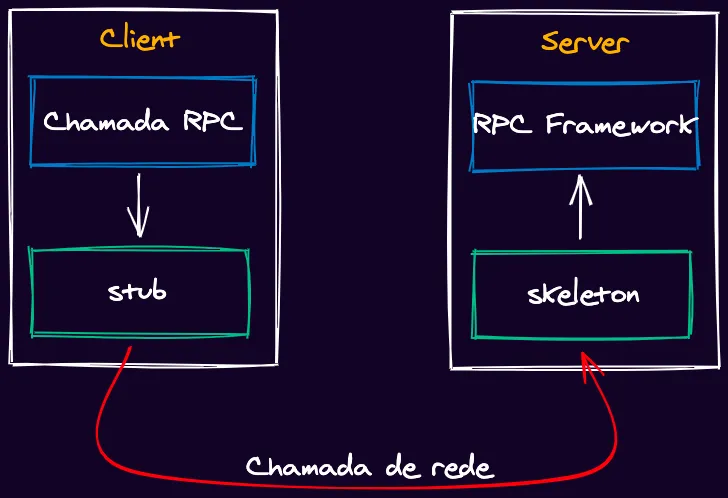
RPC architectures are very similar. The basic idea is that we always have a server and a client. On the server side we have a layer called the skeleton, which is essentially a decoder of a network call into a function call. This is responsible for calling the function on the server side.
Meanwhile, on the client side, we have a network call made by a stub, which is like a “fake” object representing the object on the server side. This object has all the methods with their signatures.
These names vary from implementation to implementation. In JRMI we had skeleton and stub, but the gRPC implementation names both sides as stubs.
This is the diagram of how a common RPC call works.
gRPC works very similarly to the diagram we just saw. The difference is that we have an extra layer which is the gRPC framework interpreting the calls encoded with protobuf’s IDL:
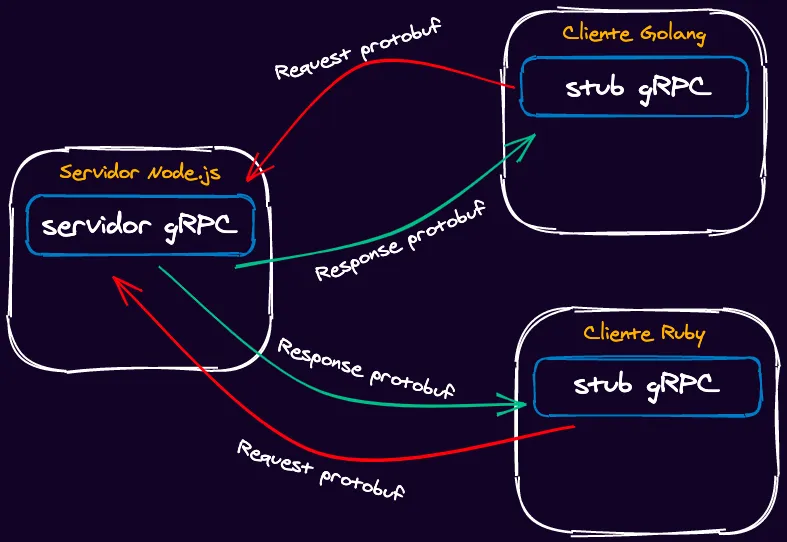
As you can see, the operation is basically the same. We have a client that converts locally made calls into binary network calls with protobuf and sends them over the network to the gRPC server, which decodes them and responds to the client.
HTTP/2#
HTTP/2 has been in use for some time and has been becoming the main form of web communication since 2015.

Among the many advantages of HTTP/2 (which was also created by Google), is the fact that it is much faster than HTTP/1.1 because of several factors we’ll understand.
Request and Response Multiplexing#
Traditionally, HTTP cannot send more than one request at a time to a server, or receive more than one response on the same connection. This makes HTTP/1.1 slower since it needs to create a new connection for each request.
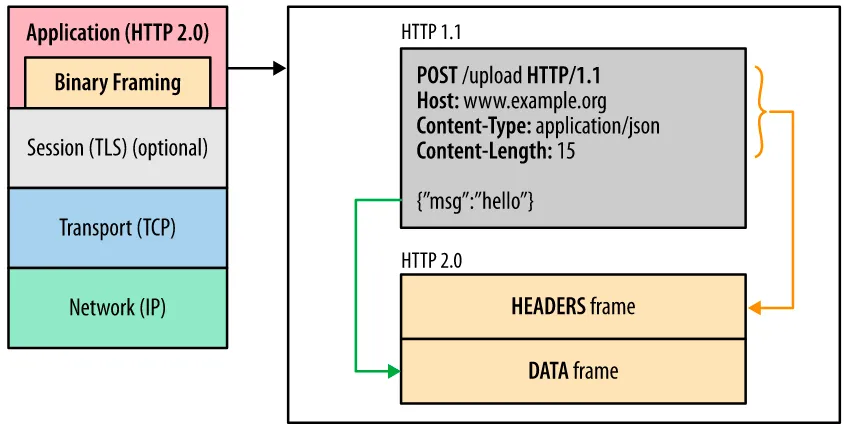
In HTTP/2 we have what’s called multiplexing, which consists of being able to receive multiple responses and send multiple calls on the same connection. This is only possible because of the creation of a new frame in the HTTP packet called Binary Framing. This frame essentially separates the two parts (headers and payload) of the message into two separate frames, but contained in the same message within a specific encoding.
Header Compression#
Another factor that makes HTTP/2 a faster protocol is header compression. In some cases the headers of an HTTP call can be larger than its payload, so HTTP/2 has a technique called HPack that does quite interesting work.
Initially everything in the call is compressed, including the headers. This helps with performance because we can transmit binary data instead of text. Furthermore, HTTP/2 maps the headers that go back and forth on each side of the call. This way it’s possible to know if the headers were changed or if they’re the same as the last call.
If the headers were changed, only the changed headers are sent, and those that weren’t changed receive an index to the previous header value, preventing headers from being sent repeatedly.
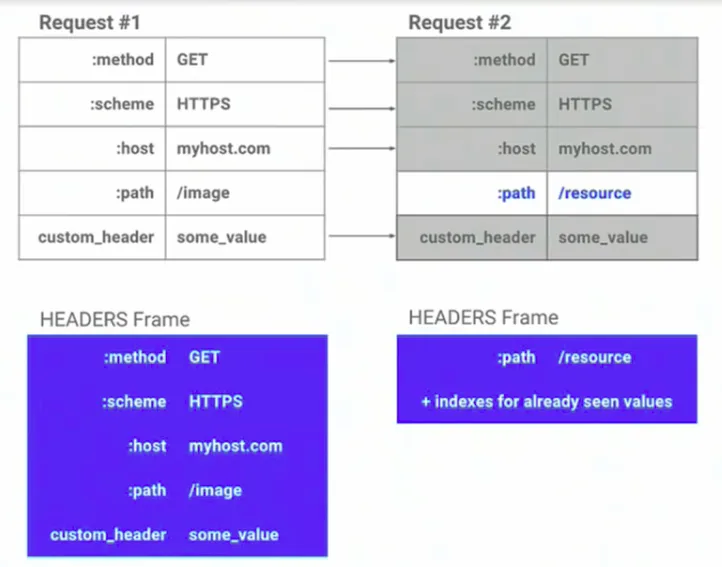
As you can see, only the path of this request changed, so only it will be sent.
Protocol Buffers#
Protocol buffers (or just protobuf) are a method of serializing and deserializing data that works through an Interface Definition Language (IDL).
It was created by Google in 2008 to facilitate communication between different microservices. The big advantage of protobuf is that it’s platform-agnostic, so you could write the specification in a neutral language (the proto language itself) and compile this contract for several other services. This way Google was able to unify the development of various microservices using a single language for contracts between its services.
Protobuf itself contains no functionality, it’s just a description of a service. A service in gRPC is a set of methods, think of it as if it were a class. So we can describe each service with its parameters, inputs and outputs.
Each method (or RPC) of a service can only receive a single input parameter and one output. So it’s important to be able to compose the messages in a way that they form a single component.
Furthermore, every message serialized with protobuf is sent in binary format, so its transmission speed to the receiver is much higher than plain text. Since binary takes up less bandwidth and, as the data is compressed by HTTP/2, CPU usage is also much lower.
Another big advantage that contributes to increasing protobuf’s speed is the separation of context and content. When we’re using formats like JSON, the context comes with the message, for example:
{ "name": "Lucas", "age": 26}When we convert this to a message in protobuf format, we’ll have the following file:
syntax = "proto3";
message Name { string name = 1; int32 age = 2;}See that we don’t have the message header with the message, just an index telling us where that field should be.
Encoding#
When we use the protobuf compiler (called protoc), we can run the following command using our previous example: echo 'name: "Lucas";age: 26' | protoc --encode=Name name.proto > name.bin.
This will create a binary file named name.bin. If we open the binary file in a hex viewer (like the one in VSCode), we’ll have the following bit string:
0A 05 4C 75 63 61 73 10 1AWe have 9 bytes represented here, against 24 for JSON, and that’s enough to understand the message. For example, what we have here is the following:
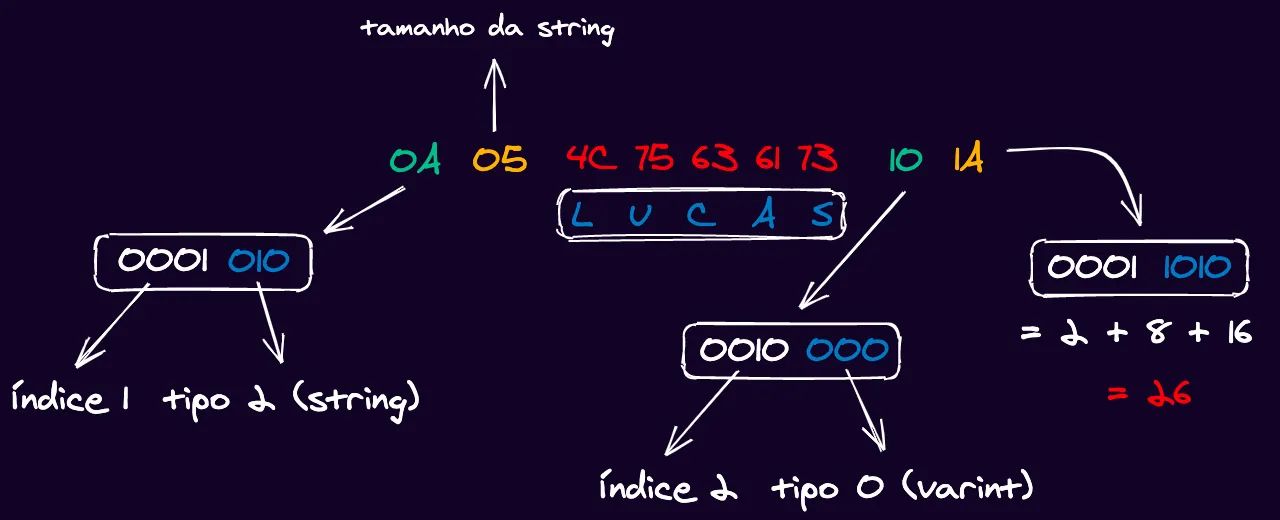
- The first byte
0Atells us the index and type of the message.0Ain decimal is 10, that is,0000 1010in binary. According to the protobuf encoding specification, the last three bits are reserved for the type and the MSB (most significant bit on the left) can be discarded. So regrouping the bits we have0001 010. Therefore our type is010, which is 2 in binary, the number that represents a string in protobuf. Now in the first byte0001we have the field index, which is 1, as we defined in our message. - The next byte
05tells us the size of this string, which is 5 bytes because “Lucas” has 5 letters. - The next 5 bytes
4C 75 63 61 73are the hexadecimal representation of the UTF-8 string “Lucas”. - The second-to-last byte
10relates to the second field. If we convert the number10to binary we get0001 0000. As we did with the first field, we group the 3 bits on the right, moving the zero on the left (4th bit from right to left) to the next group, and we remove the MSB leaving0010 000. That is, we have type0, which is varint, from the last 3 bits, and the first group gives us0010, or 2 in binary, which is the index of the second field. - The last byte is the value of this varint. The value
0x1Ain binary is0001 1010. So we can simply convert to a common decimal by adding the powers of 2:2 + 8 + 16 = 26, which is the value we put in the second field.
So essentially, our message is 125Lucas2026. See that we have 12 bytes here, but in the encoding we have only 9. This is because two bytes represent 2 values at the same time, and we use only 1 byte for the number 26 whereas we would use 2 for the string "26".
Can you use protobuf without gRPC?#
Yes, one of the coolest things about gRPC is that it’s a set of tools that work very well together. So gRPC is a combination of HTTP/2 with protobuf and a very fast remote call system.
This means we can use the protobuf compiler to generate an encoding SDK, which will allow you to encode and decode your messages using protobuf.
For example, let’s create a simple file:
syntax = "proto3";message Pessoa { uint64 id = 1; string email = 2;}Now we can run the following line in our terminal to generate a .js file that will contain a Pessoa class with setters and getters configured, as well as encoders and decoders:
mkdir -p dist && protoc --js_out=import_style=commonjs,binary:dist ./pessoa.protoThe compiler will create a pessoa_pb.js file in the dist folder using the CommonJS import model (this is mandatory if you’re going to run with Node.js), and then we can write an index.js file:
const {Pessoa} = require('./pessoa_pb')
const p = new Pessoa()p.setId(1)p.setEmail('hello@lsantos.dev')
const serialized = p.serializeBinary()console.log(serialized)
const deserialized = Pessoa.deserializeBinary(serialized)console.table(deserialized.toObject())console.log(deserialized)So we’ll need to install protobuf with npm install google-protobuf and run the code:
Uint8Array(21) [ 8, 1, 18, 17, 104, 101, 108, 108, 111, 64, 108, 115, 97, 110, 116, 111, 115, 46, 100, 101, 118]┌─────────┬─────────────────────┐│ (index) │ Values │├─────────┼─────────────────────┤│ id │ 1 ││ email │ 'hello@lsantos.dev' │└─────────┴─────────────────────┘{ wrappers_: null, messageId_: undefined, arrayIndexOffset_: -1, array: [ 1, 'hello@lsantos.dev' ], pivot_: 1.7976931348623157e+308, convertedPrimitiveFields_: {}}See that we have an encoding equal to what we analyzed before, a table of the values in objects, and the entire class.
Using protobuf as a contract layer is very useful. For example, to standardize the messages sent between messaging services and between microservices. Since these services can receive any type of input, protobuf ends up creating a way to ensure that all inputs are valid.
Advantages of gRPC#
As we could see, gRPC has several advantages over the traditional REST model:
- Lighter and faster by using binary encoding and HTTP/2
- Multi-platform with the same contract interface
- Works on many platforms with little or no overhead
- The code is self-documenting
- Relatively easy to implement after initial development
- Excellent for work between teams that won’t meet in person, especially for defining contracts for open source projects.
Challenges#
Like any technology, gRPC is not a silver bullet and doesn’t solve all problems. We have some drawbacks:
- Protobuf doesn’t have a package manager to manage dependencies between interface files
- Requires a small paradigm shift compared to the REST model
- The initial learning curve is steeper
- It’s not a specification known by many
- Because it’s not well known, documentation is sparse
- The architecture of a system using gRPC can become a bit more complex
Use Cases#
Regardless of the drawbacks and everything the technology has to offer, we have a series of well-known use cases in the open source world that use gRPC as a means of communication.
Kubernetes#
Kubernetes itself uses gRPC as a means of communication between the Kubelet and CRIs that make up the container execution platform (as we’ve already discussed in several articles, such as this, this and this).
The ease of implementing an interface using protobuf facilitates communication between teams, especially a team like Kubernetes’s, which has to support a large number of providers that aren’t even well known.
KEDA#
The KEDA project, also for Kubernetes, uses as a main feature the ability to create external scalers using a gRPC interface for communication with the main operator.
One of the CNCF projects to which I’m a contributor, the HTTP add-on for KEDA, uses this method to create an external scaler that communicates with KEDA to increase the number of pods in a cluster based on the number of HTTP requests, as you can see here.
containerd#
The main container runtime today, containerd is the project that powers Docker and Kubernetes today. It also has a gRPC interface for communication with external services.
Conclusion#
In this first part we dove a bit into how gRPC works, what it is, and its components. In the next parts of this guide we’ll build some applications and show the ecosystem of tools that exists for this amazing technology.