The complete gRPC guide part 3: Types everywhere with TypeScript!
Part 3 of 4 of the series The complete gRPC guide
In our previous guide article we saw how to integrate gRPC with JavaScript in a simple and quick way. Now it’s time to level up and add types to this application! And when we talk about types, we automatically think of TypeScript!
For this article, we’re going to convert our gRPC notes API to use TypeScript. But first, let’s understand what “converting to TypeScript” means and what we’re saying when we do this using gRPC, especially when we use gRPC with JavaScript.
What does converting mean?#
As I mentioned in the first part of this guide, gRPC, despite being an established technology, doesn’t have very good documentation or tooling for some languages. Unfortunately, JavaScript is one of those languages.
However, the tooling we have for JS works very well, despite being somewhat complicated and obscure to use. With a solid foundation, we just need to add type declarations to the files that were already generated by the compiler.
So “converting” an application to TypeScript basically means we need to add .d.ts files to all the .js files generated by the compiler. The task itself isn’t very complicated, since we have official libraries that do this kind of thing. So everything is fine, right?
Unfortunately, the problem we face comes back to the tools we have for JavaScript. For example, we have two official packages: an older one called simply grpc, which was the first gRPC implementation package for JavaScript, but this package is gradually being replaced by the @grpc/grpc-js package, which doesn’t have the .proto file loader, making the package lighter and with fewer dependencies, since it outsources this functionality to a specific package called @grpc/proto-loader.
We used both packages in the previous article of this series
The differences between these packages go beyond just being variations of each other or having fewer things together. The reality is that the grpc package is better implemented because it’s been around for much longer, while, for example, the @grpc/grpc-js package doesn’t have some implementations, like grpc.Server.bind().
Working with the differences#
We already know these packages have differences, but is it possible to work with them? Yes, it’s totally possible, but we need to be careful about some details that aren’t very well documented and are, in large part, the reason I’m creating this guide. Our JavaScript ecosystem for gRPC is extremely scattered and sparse at various levels, which makes implementation in the language very complicated for beginners.
Since we had one package, grpc, for most of the time gRPC has existed, we started having libraries created for it, like Protobuf.js, an official tool that basically creates files to encapsulate the message generation classes in gRPC. That is, we can generate classes for our messages and use them like this:
const pbjs = require('protobuf.js')pbjs.load('notes.proto', (err, root) => { if (err) throw err
const NoteFindRequest = root.lookupType('NoteFindRequest') const payload = { id: 1 }
const isValid = NoteFindRequest.verify(payload) if (!isValid) throw new Error(isValid)
const message = NoteFindRequest.create(payload) const buffer = NoteFindRequest.encode(message).finish()})As you can see, we have a reflection model, meaning we need to do a lookup inside our .proto file. But it’s also possible to generate files statically, so we’ll have ready-made classes for it. Additionally, protobuf.js also includes the concept of verify, so we can verify messages to see if they’re correct, following a flow like this:

And beyond all that, it also generates definitions for TypeScript, since grpc and @grpc/grpc-js have static typing bundled with their packages. So we can basically do the same functionality but with our types defined.
Can you see the problem we have here? Although very good, this library doesn’t have a good and simple way to generate self-contained TypeScript code, that is, that we can instantiate as an instance of a service without relying on dynamic loading of a .proto file. That is, we have to use .load in our definition file and trust that it will be complete and valid, and in a statically typed superset like TypeScript, anything dynamic is a problem.
So, although protobuf.js generates valid types, it’s much better when we’re making a client than when we’re creating a server, since it provides much more tooling for messages than for inference of the server’s internal types. But it can also be used as a runtime type generator with decorators.
What we want#
Let’s think about it a bit. We have a complete definition file like this:
syntax = "proto3";
service Notes { rpc List (Void) returns (NoteListResponse); rpc Find (NoteFindRequest) returns (NoteFindResponse);}
// Entitiesmessage Note { int32 id = 1; string title = 2; string description = 3;}
message Void {}
// Requestsmessage NoteFindRequest { int32 id = 1;}
// Responsesmessage NoteFindResponse { Note note = 1;}
message NoteListResponse { repeated Note notes = 1;}With this we already know basically everything we need to create our server. A gRPC server has two main interfaces: the first is the base interface that contains all the methods that can be created, and the second is the server implementation. So ideally we could do something like this:
class NotesServer implements NotesServerInterface { find (call: ServerUnaryCall<NoteFindRequest, NoteFindResponse>, callback: sendUnaryData<NoteFindResponse>) { /* implementation */ }
list (_: ServerUnaryCall<Void, NoteListResponse>, callback: sendUnaryData<NoteListResponse>) { /* implementation */ }}
const server = new grpc.Server()server.addService(NotesService, new NotesServer())The important part is, beyond the class types, the types we’re going to pass to the server. So our server.addService call has a signature like this:
abstract class Server { function addService (service: ServiceDefinition, implementation: UntypedServiceImplementation): void}And the types ServiceDefinition and UntypedServiceImplementation have, respectively, the following definitions:
type ServiceDefinition<ImplementationType = UntypedServiceImplementation> = { readonly [index in keyof ImplementationType]: MethodDefinition<any, any>}See that it’s not complex. What we have here is a generic, a service definition takes a type parameter with which methods are implemented. If we don’t pass anything to it, we’ll have an UntypedServiceImplementation, which means “I have no idea what’s here”:
export declare type UntypedHandleCall = HandleCall<any, any>export interface UntypedServiceImplementation { [name: string]: UntypedHandleCall}Both types are index signatures that define just an object with a string format key.
Summing all this up, what we have is an object that needs to have the same keys as its implementation. So NotesService needs to have the same keys as NotesServer, and the two types that these keys refer to need to be method implementations, that is, functions with the following signature:
export type MethodImplementation = (call: ServerUnaryCall<RequestInput, RequestOutput>, callback: sendUnaryData<RequestOutput>): voidWe could even make it prettier by doing everything with generics:
export type MethodImplementation<In, Out> = (call: ServerUnaryCall<In, Out>, callback: sendUnaryData<Out>): voidAnd all this is just to show you that the types we need for gRPC are absolutely nothing special, just objects that need to have the same keys as other objects and need to implement functions with a specific signature.
Streams and other data types#
A small extension of what we’re talking about, but not directly related to the content of this guide. If our call type isn’t a Unary call, that is, if we have data streaming from one of the sides, like in this .proto:
service Notes { rpc List (Void) returns (stream NoteListResponse); rpc Find (NoteFindRequest) returns (stream NoteFindResponse);}Then our responses would no longer be ServerUnaryCall and nor sendUnaryData because we’re not sending a single type as a return anymore, but rather opening a data stream. Our call would be a ReadableStream and our callback would be a WritableStream or essentially anything that implements Readable and Writable respectively.
We’ll learn more about streaming with gRPC in the next parts of this guide.
Let’s get to it#
Now that we understand the details of TS types and how they’re actually just indices of a large object, let’s move to our implementation.
To convert our API to TypeScript, we’re going to use another library more specialized in grpc-js, since protobuf.js doesn’t meet our needs for this task. The example repository is available on my GitHub if you want to check out the final code and overall structure.
The first thing we’re going to do is make a small change to our .proto file. The changes are minimal. We’re just going to change the name of our rpc implementation to Notes.
syntax = "proto3";
service Notes { rpc List (Void) returns (NoteListResponse); rpc Find (NoteFindRequest) returns (NoteFindResponse);}
// Entitiesmessage Note { int32 id = 1; string title = 2; string description = 3;}
message Void {}
// Requestsmessage NoteFindRequest { int32 id = 1;}
// Responsesmessage NoteFindResponse { Note note = 1;}
message NoteListResponse { repeated Note notes = 1;}This is just because if we call it NoteService, we’ll have a weird name in our type like NoteServiceServer (yes, I have OCD with variable names).
Let’s create a new folder for our project. Inside it, we’ll create a proto folder and put the notes.proto file with the content we just saw. Then we run npm init -y to create a new Node.js project and install the following packages:
$ npm i -D @types/long @types/node grpc_tools_node_protoc_ts grpc-tools typescriptAs you can see, we’re going to use the grpc-tools library, which is basically a wrapper of protoc with some interesting modifications, including the generation of .d.ts files. And we’re going to use a plugin for this library called grpc_tools_node_protoc_ts, which does the work of generating types in a more structured way so we can create our services from just a single interface.
These are our development dependencies. For runtime dependencies, we’ll only have one: grpc-js. So let’s run npm i @grpc/grpc-js. This is because we’re generating static files that won’t need to be read from a .proto file, so we don’t need anything other than the server.
If you want to generate files dynamically, then you’ll need the protobuf loader and unfortunately, the generated types may not be ideal for you.
Let’s now initialize our TypeScript project with npx tsc --init. When creating it, we’ll modify the tsconfig.json variables to be as strict as possible:
{ "compilerOptions": { "target": "es5", "module": "commonjs", "declaration": true, "declarationMap": true, "sourceMap": true, "outDir": "./dist", "rootDir": "./src", "strict": true, "noUnusedLocals": true, "noUnusedParameters": true, "noImplicitReturns": true, "noFallthroughCasesInSwitch": true, "noUncheckedIndexedAccess": true, "noPropertyAccessFromIndexSignature": true, "esModuleInterop": true, "experimentalDecorators": true, "emitDecoratorMetadata": true, "skipLibCheck": true, "forceConsistentCasingInFileNames": true }}Now let’s edit our package.json file to create our build script. We’ll create a script called compile that will be basically the compilation of our .proto file:
grpc_tools_node_protoc \ --js_out=import_style=commonjs,binary:./proto \ --grpc_out=grpc_js:./proto \ -I ./proto ./proto/*.proto && \ grpc_tools_node_protoc \ --plugin=protoc-gen-ts=./node_modules/.bin/protoc-gen-ts \ --ts_out=grpc_js:./proto \ -I ./proto ./proto/*.protoThis script will first generate the static files in JavaScript, both the type files for the messages (described by js_out) and the file that contains the pre-built server (described by grpc_out), all inside our ./proto folder using files that end with *.proto.
Then, we’ll read the .js files generated in this folder and activate the protoc-gen-ts plugin to generate their types and save them in the same folder.
Important: See that we have a key
ts_out=grpc_jsin the second part of the command. This is because this library is prepared to generate types for bothgrpcand@grpc/grpc-js.
The last two scripts we’ll create are the scripts to start the server and client, compiling from TS to JS beforehand. At the end, we’ll have a scripts key like this in our package.json:
{ // ... content omitted "scripts": { "compile": "grpc_tools_node_protoc --js_out=import_style=commonjs,binary:./proto --grpc_out=grpc_js:./proto -I ./proto ./proto/*.proto && grpc_tools_node_protoc --plugin=protoc-gen-ts=./node_modules/.bin/protoc-gen-ts --ts_out=grpc_js:./proto -I ./proto ./proto/*.proto", "start:server": "tsc && node dist/server.js", "client": "tsc && node dist/client.js" }, // ... content omitted}Run the npm run compile script and see that we’ll have 4 new files in the proto folder:
proto├── notes.proto # protobuf definition file├── notes_grpc_pb.d.ts # gRPC server types├── notes_grpc_pb.js # gRPC server├── notes_pb.d.ts # message types└── notes_pb.js # definition messagesWhere it all comes together#
If you open the notes_grpc_pb.js file, you’ll see at the end that it has a variable called NotesService:
var NotesService = exports.NotesService = { list: { path: '/Notes/List', requestStream: false, responseStream: false, requestType: notes_pb.Void, responseType: notes_pb.NoteListResponse, requestSerialize: serialize_Void, requestDeserialize: deserialize_Void, responseSerialize: serialize_NoteListResponse, responseDeserialize: deserialize_NoteListResponse, }, find: { path: '/Notes/Find', requestStream: false, responseStream: false, requestType: notes_pb.NoteFindRequest, responseType: notes_pb.NoteFindResponse, requestSerialize: serialize_NoteFindRequest, requestDeserialize: deserialize_NoteFindRequest, responseSerialize: serialize_NoteFindResponse, responseDeserialize: deserialize_NoteFindResponse, },};Compare this variable with the ServiceDefinition type we have in grpc-js. They’re the same, that is, we can create a server directly from this constructor. Right below we have a call to grpc.makeGenericClientConstructor, which is a method that generates a generic client for gRPC calls that we can use without needing an instance of our .proto file. We’ll talk more about it in the next editions.
Creating the server#
Let’s move on to the interesting part, where we create our server. Create a src folder and a server.ts file inside this folder.
Let’s start by creating our “database”. Remember that it’s an array of notes, but notes are no longer simple objects. Now we have types that define not just notes as objects but also notes as a message class. That’s why the type we need for this database is Notes.AsObject[], that is, an array of objects that are valid Notes messages:
import { Note } from '../proto/notes_pb'
const notes: Note.AsObject[] = [ { id: 1, title: 'Note 1', description: 'Content 1' }, { id: 2, title: 'Note 2', description: 'Content 2' }]Now let’s implement our server. There are two ways to do this. The first is implementation via object, like we did before, with an object of type:
const server = { find (call, cb) { ... }, list (call, cb) { ... }}And the second is implementation in the class model which, in the end, becomes an object when compiled, but it’s prettier and easier to understand when we’re reading the code. So that’s the one we’ll use. Let’s start with a NotesServer class that implements an INotesServer interface generated by our .proto compiler:
import { Note } from '../proto/notes_pb'import { INotesServer } from '../proto/notes_grpc_pb'
const notes: Note.AsObject[] = [ { id: 1, title: 'Note 1', description: 'Content 1' }, { id: 2, title: 'Note 2', description: 'Content 2' }]
class NotesServer implements INotesServer {
}Tip: If you’re using VSCode, when you create a new class that implements an interface, a small blue lightbulb will appear next to it. Click on it and there will be an option to implement all objects automatically:
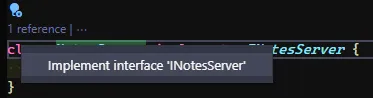
When you click, you’ll have the interfaces implemented with the necessary types. Just replace it with the actual implementation:
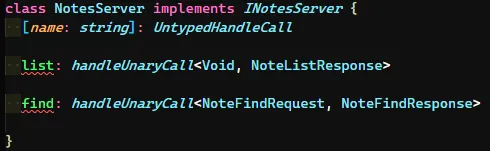
See that we have, besides our methods, a TypeScript index signature at the beginning. This is one of the problems I mentioned when I said that libraries aren’t prepared to work with TypeScript initially. This bug is documented in the library and, unfortunately, it’s a limitation of TypeScript for unknown types of indices. Since the type says we can have N strings as keys and their values, we need to make it clear that this class implements and allows this kind of thing as well.
With implementation using only the
grpclib, this doesn’t happen because the types don’t require a dynamic index signature like this.
Let’s implement our functions, starting with the list function, which is the simplest. We’ll just add a signature as the type requires:
import { sendUnaryData, ServerUnaryCall, UntypedHandleCall } from '@grpc/grpc-js'import { Note } from '../proto/notes_pb'import { INotesServer } from '../proto/notes_grpc_pb'import { Note, NoteListResponse, Void } from '../proto/notes_pb'
const notes: Note.AsObject[] = [ { id: 1, title: 'Note 1', description: 'Content 1' }, { id: 2, title: 'Note 2', description: 'Content 2' }]
class NotesServer implements INotesServer {
list (_: ServerUnaryCall<Void, NoteListResponse>, callback: sendUnaryData<NoteListResponse>): void { const response = new NoteListResponse() notes.forEach((note) => { response.addNotes( (new Note).setId(note.id) .setTitle(note.title) .setDescription(note.description) ) }) callback(null, response) }
[name: string]: UntypedHandleCall
}Notice that now, instead of just returning the array, we have to convert each item in the array to a Note and add it to the response type. While this is very good because we have type safety, it’s worse because we have to write more and there’s no way to convert the entire array at once natively from the compiler (you can, however, write a function to do exactly that).
About imports#
Another important detail to note: here we receive the Void type that we created inside our .proto file. If we want a more “correct” implementation, we can use the well-known type called Empty, which comes bundled with the protobuf standard library when you download it from the official protoc repository. You need to move this folder to /usr/includes or any other folder that’s in your PATH.
So we can import this type inside our .proto file:
syntax = "proto3";package notes;
import "google/protobuf/empty.proto";
service Notes { rpc List (google.protobuf.Empty) returns (NoteListResponse); rpc Find (NoteFindRequest) returns (NoteFindResponse);}
// Entitiesmessage Note { int32 id = 1; string title = 2; string description = 3;}
message Void {}
// Requestsmessage NoteFindRequest { int32 id = 1;}
// Responsesmessage NoteFindResponse { Note note = 1;}
message NoteListResponse { repeated Note notes = 1;}We need to add a package declaration to tell the compiler that our file is in another namespace. This is mandatory to avoid confusion in the compiler.
Then, in our server, we would install the google-protobuf package with npm i google-protobuf and import the Empty type naturally:
import { sendUnaryData, ServerUnaryCall, UntypedHandleCall } from '@grpc/grpc-js'import { Note } from '../proto/notes_pb'import { INotesServer } from '../proto/notes_grpc_pb'import { Note, NoteListResponse } from '../proto/notes_pb'import { Empty } from 'google-protobuf/empty_pb'
const notes: Note.AsObject[] = [ { id: 1, title: 'Note 1', description: 'Content 1' }, { id: 2, title: 'Note 2', description: 'Content 2' }]
class NotesServer implements INotesServer {
list (_: ServerUnaryCall<Empty, NoteListResponse>, callback: sendUnaryData<NoteListResponse>): void { const response = new NoteListResponse() notes.forEach((note) => { response.addNotes( (new Note).setId(note.id) .setTitle(note.title) .setDescription(note.description) ) }) callback(null, response) }
[name: string]: UntypedHandleCall
}This was a small detour in the article to show that it’s possible to keep things more separated and use external type libraries in our server. Although we won’t be using this library here, it’s interesting content to keep in mind.
Back on track#
Let’s implement the find method. It follows the exact same idea. We’ll just add the basic type implementation and return a Note object:
import { sendUnaryData, ServerUnaryCall, UntypedHandleCall } from '@grpc/grpc-js'import { Note } from '../proto/notes_pb'import { INotesServer } from '../proto/notes_grpc_pb'import { Note, NoteFindRequest, NoteFindResponse, NoteListResponse, Void } from '../proto/notes_pb'
const notes: Note.AsObject[] = [ { id: 1, title: 'Note 1', description: 'Content 1' }, { id: 2, title: 'Note 2', description: 'Content 2' }]
class NotesServer implements INotesServer {
list (_: ServerUnaryCall<Void, NoteListResponse>, callback: sendUnaryData<NoteListResponse>): void { const response = new NoteListResponse() notes.forEach((note) => { response.addNotes( (new Note).setId(note.id) .setTitle(note.title) .setDescription(note.description) ) }) callback(null, response) }
find (call: ServerUnaryCall<NoteFindRequest, NoteFindResponse>, callback: sendUnaryData<NoteFindResponse>) { const id = call.request.getId() const foundNote = notes.find((note) => note.id === id) if (!foundNote) return callback(new Error('Note not found'), null)
const response = new NoteFindResponse() response.setNote( (new Note()).setTitle(foundNote.title) .setId(foundNote.id) .setDescription(foundNote.description) ) return callback(null, response) }
[name: string]: UntypedHandleCall
}While it’s more verbose, the method becomes much easier to read and understand, in addition to maintaining consistency and mandatory types.
To finish, let’s start our server. We have two ways to do this. The first one is via callback:
import { INotesServer, NotesService } from '../proto/notes_grpc_pb'import { Note, NoteFindRequest, NoteFindResponse, NoteListResponse, Void } from '../proto/notes_pb'import { sendUnaryData, Server, ServerCredentials, ServerUnaryCall, UntypedHandleCall } from '@grpc/grpc-js'
const notes: Note.AsObject[] = [ { id: 1, title: 'Note 1', description: 'Content 1' }, { id: 2, title: 'Note 2', description: 'Content 2' }]
class NotesServer implements INotesServer { /* Our implementation */}
const server = new Server()server.addService(NotesService, new NotesServer())
server.bindAsync('0.0.0.0:50052', ServerCredentials.createInsecure(), (err, port) => { if (err) throw err console.log(`listening on ${port}`) server.start()})This is a problem stemming from TypeScript. Since it’s possible to use bindAsync as a Promise in JavaScript, this happens because the server type doesn’t have a definition for a promise. But we can always find a workaround and use promisify:
import { promisify } from 'util'import { INotesServer, NotesService } from '../proto/notes_grpc_pb'import { Note, NoteFindRequest, NoteFindResponse, NoteListResponse, Void } from '../proto/notes_pb'import { sendUnaryData, Server, ServerCredentials, ServerUnaryCall, UntypedHandleCall } from '@grpc/grpc-js'
const notes: Note.AsObject[] = [ { id: 1, title: 'Note 1', description: 'Content 1' }, { id: 2, title: 'Note 2', description: 'Content 2' }]
class NotesServer implements INotesServer { /* Our implementation */}
const server = new Server()server.addService(NotesService, new NotesServer())
const bindPromise = promisify(server.bindAsync).bind(server)
bindPromise('0.0.0.0:50052', ServerCredentials.createInsecure()) .then((port) => { console.log(`listening on ${port}`) server.start() }) .catch(console.error)Much better, right? Note that we need to use .bind(server) because the start() method has a check to know if the server has already been initialized by calling this.started.
Now, if we run npm run start:server, we’ll have our server running on port 50052. We still need to create the client, but notice that the workflow and code understanding became much better than before.
Creating the client#
Creating the client is almost completely automatic because we already have our genericClientConstructor called with the server type we need in NotesService. Create a new file in src called client.ts and it’s pretty straightforward:
import { ChannelCredentials } from '@grpc/grpc-js'import { NotesClient } from '../proto/notes_grpc_pb'import { NoteFindRequest, Void } from '../proto/notes_pb'
const client = new NotesClient('0.0.0.0:50052', ChannelCredentials.createInsecure())client.list(new Void(), (err, notes) => { if (err) return console.log(err) console.log(notes.toObject())})
client.find((new NoteFindRequest).setId(1), (err, note) => { if (err) return console.log(err) console.log(note.toObject())})
client.find((new NoteFindRequest).setId(3), (err, note) => { if (err) return console.log(err.message) console.log(note.toObject())})The client is already pretty much instantiated with all the methods, but remember that all return types and sending types need to be a valid type for gRPC in the eyes of TypeScript. That’s why we’re creating a new empty class with new Void(), which seems counterproductive, but it helps a lot in maintaining the consistency of everything we do.
Run npm run client and see the magic happen!
Conclusion#
As we’ve seen, we have great ease in transforming everything to TypeScript, but we first need to understand what we want and understand the limitations of the tools, which can turn out to be a big problem since they don’t talk to each other much.
Although gRPC with TypeScript is incredible, we still have some steps to take to turn this modality into a more useful form so we can all use it. I’m trying to do that with some libraries like protots to generate interfaces and not just types. This way we can abstract a bit more from the functionalities so we don’t need a complete implementation of gRPC to have functional types.
In the next parts of the series, we’ll cover a lot, like buf and streams. So like and share this post with your friends so we can spread the word about gRPC and show that it’s not that difficult to create an API that can be used in a unified way by everyone!
Footnotes#
-
All the types we’re using in the previous call, like
ServerUnaryCallandsendUnaryData, are sourced from@grpc/grpc-jsnatively, since the library is written in TypeScript. See more of the types in the official repository. ↩