Understanding container runtimes
We discussed in the previous post on the topic how container runtimes work, and we also talked about what OCI is, what CRI is, and even created a container using ContainerD directly through application integration.
However, ContainerD is not the only runtime that exists. Let’s understand what ContainerD is, its advantages and disadvantages compared to its counterpart CRI-O, and how Docker fits into all of this.
Docker#
As I mentioned in my article on Docker’s history, before version 1.11, Docker was considered a single monolith. Everything a container runtime could do was being done by Docker in one place, image downloads, networking, lifecycle management and everything else in a single process running as root.
However, like any system that grows over time, Docker could not remain monolithic forever. This would start to impact the architecture and was beginning to make integration with operating systems like Linux more difficult. Until someone had the idea of splitting Docker into separate pieces.
In a release note for version 1.11, the company said it would break up the Docker daemon and start using runC along with containerd. This meant a lot for the ecosystem, because now Docker would actually be using the same runtime they had donated in 2015 to the CNCF, creating the OCI. This way not only would we have a standardized container model, but also one that could evolve over the years independently.
Having a tool divided into more specialized sections causes other people to specialize in maintaining those sections, so the application as a whole becomes better by being better developed. In the same note they showed the new Docker operating model:
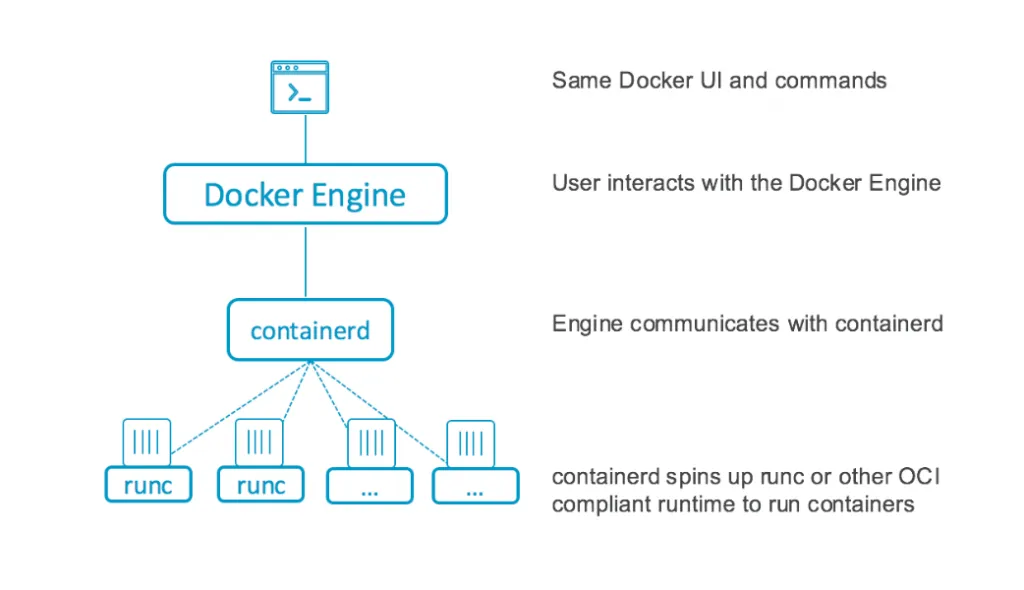
We can see that Docker’s main engine (dockerd) was separated from the runtime, and now it focused solely on receiving user inputs and communicating them to containerd, which in turn would start the runC runtimes or any other runtime compatible with the OCI.
In short, naming all the parts:
- Docker Engine (or Docker Daemon,
dockerd): It is responsible for receiving user commands from the CLI and passing those requests to containerd. - containerd: An interface compatible with the OCI capable of executing, downloading, and extracting any image that is also OCI compatible and running runC processes.
- runC: Handles all management and creation of containers according to the OCI specification.
This opened up opportunities for other people and companies to create their own container runtimes, and now let’s understand the difference between the two main ones.
containerd#

As we discussed in the mentioned articles, containerd is a daemon that executes and controls instances of runC. Managing its lifecycle, as well as the image transfer and extraction, storage, networking, and so on. This is what we call a container engine.
Containerd is the main tool that abstracts much of the functionality that Docker accumulated as a whole. If we were to simplify, we could say that containerd is the set of minimal functions a container runtime needs to execute any container.
Containerd helps abstract kernel calls (syscalls) so that containers can run the same way on any operating system, regardless of what is happening underneath. This is called supervision and is a very common pattern when running VMs.
Whenever we run an OS inside another one, the guest OS doesn’t know it’s running inside a VM, so it keeps calling the syscalls needed to communicate with the hardware, and that’s where the hypervisor comes in, which abstracts these system calls so the guest OS doesn’t need to implement each individual kernel if it’s running inside, for example, a Linux machine.
Containerd is this implementation, so that other tools can also build their runtime implementations on top of it without worrying about which operating system they are running on, since containerd abstracts all this functionality.
containerd advantages#
- You have complete control of images, being able to download and push images to registries
- Allows usage via API within your own programming language
- When inside Kubernetes, it can be used as a CRI
- Fully configurable
- Allows managing container lifecycles through an API
- Storage and snapshot management
- Extensible
- Completely abstracts the running OS
CRI-O#

Besides containerd, another famous runtime is CRI-O. CRI stands for Container Runtime Interface, which is a plugin that exposes an interface allowing a Kubelet (an agent that runs inside each node within a Kubernetes cluster) to use different runtime types compatible with the OCI specification without needing recompilation or reboot. RunC is the most famous runtime, but we have others like crun, railcar, and kata.
We won’t go into details about why Kubernetes needs a CRI, as we already covered all of that in the previous post
Given all that, CRI-O was created specifically to allow Kubernetes to run containers without much code or external tools. This is because CRI-O is built on several different libraries, see some of its components:
- Container Runtime compatible with the OCI, by default it’s runC but it can be any one
containers/storage: Module responsible for handling storage layers and filesystemscontainers/image: Module responsible for downloading images from registriesnetworking: Used to create the networking layer of pods, there are several plugins called CNI that can be usedconmon: A utility called “container monitoring” that serves to monitor what is happening inside containers
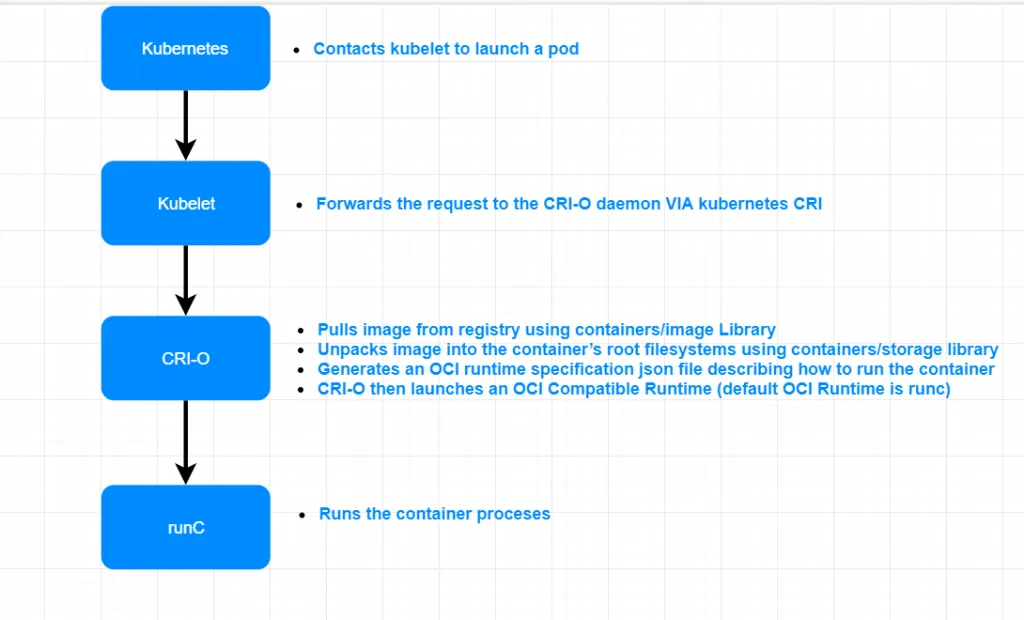
The image below illustrates the entire lifecycle of CRI-O within a Kubernetes cluster:
Conclusion#
Although we are used to Docker, there are still many other tools and ideas hovering around our heads when it comes to containers. I used this article as the basis for writing this content, and I strongly advise you to check out the other related articles.
See you later!