Getting Started with the Node.js Test Runner
I’ve been talking a lot about the Test Runner in a bunch of places (including here on the blog), and I recently took part in a really cool podcast with Ryan talking more about this tool that showed up not long ago and has already won everyone’s heart.
You can watch the video right below:
So what now? How do we start writing a test using the Node.js Test Runner (NTR) and TypeScript? This is going to be a really quick and really simple article about getting everything set up for your first test!
Setting up the environment#
Unlike most test runners such as Jest, you don’t need to install any kind of dependency to use the NTR, you just need Node.js version 20 or higher installed on your machine and you’re good to go.
To find out whether everything is in place, run the command node --test in an empty folder. Since node won’t find any files, your output should look like this:
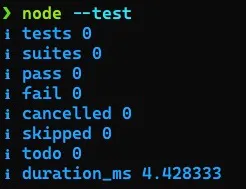
If you have this text in your terminal, congratulations, you have the Node.js Test Runner ready to use! Now, if you don’t have that command, install the latest version of Node, there are several ways to do that:
- Through the official Node website
- Using a version manager like asdf or NVM
- Using a package manager like Homebrew, apt, or any other
For this article I’m using Node version 22.2.0.
Create a folder where we’ll put our test, use npm init -y to initialize a package.json, and inside scripts create a test command if there isn’t one already, ending up like this:
{ "name": "test", "version": "0.0.1", "main": "index.js", "scripts": { "test": "node --test ./tests/**/*.test.*" }, "keywords": [], "author": "Lucas Santos <hello@lsantos.dev> (https://lsantos.dev/)", "license": "GPL-3.0", "description": ""}If you run npm t in your terminal, you’ll see the same output as before. Now we can create our first file
The first test#
To create our first test we’ll start with a simple function. Create a file called sum.mjs at the root of the project, we’re going to use this function:
export function sum (...n) { return n.reduce((acc, cur) => acc+cur)}It’s a simple sum function that takes a variadic parameter N, so sum(1,2) should always return 3. Let’s test that.
In a new file sum.test.mjs inside the tests folder we can start by importing the essentials: our tester and our native assertion tool.
import { test } from 'node:test'import assert from 'node:assert'Unlike most testers, the Node.js Test Runner doesn’t come with a native test assertion tool, but it accepts any tool that has what we call throwing assertions, meaning that if everything goes well, nothing happens, and if it doesn’t, we get a throw on an error.
Coincidentally (or not) Node already has an assertion library, node:assert, it isn’t the best one out there, but it’s usable and has been quite stable for years.
If you prefer another syntax, like Chai for example, you can use that library without any problems
Now let’s import our function from the sum.mjs module and create our first test:
import { test } from 'node:test'import assert from 'node:assert'import { sum } from '../sum.mjs'
test('sum', () => { assert.deepStrictEqual(sum(1,2), 3)})It’s that simple… Now we can run the npm t command and you’ll see an output like this:
❯ npm t
> test@0.0.1 test> node --test ./tests/**/*.test.*
✔ sum (0.759667ms)ℹ tests 1ℹ suites 0ℹ pass 1ℹ fail 0ℹ cancelled 0ℹ skipped 0ℹ todo 0ℹ duration_ms 45.971875But we want to test other things, and we don’t want to create more top-level tests… For example, I want to have a sum category but inside it I want several tests running, like we have with describe and it in Jest.
Well, it’s our lucky day.
Describe and it#
The Node.js test runner has the same describe and it methods, so we can do this:
import { describe, it } from 'node:test'import assert from 'node:assert'import { sum } from '../sum.mjs'
describe('sum', () => { it('deve somar dois números', () => { assert.deepStrictEqual(sum(1,2), 3) })})And now our test output will be:
▶ sum ✔ deve somar dois números (0.495625ms)▶ sum (0.994416ms)ℹ tests 1ℹ suites 1ℹ pass 1ℹ fail 0ℹ cancelled 0ℹ skipped 0ℹ todo 0ℹ duration_ms 45.708083And we can add a new test, let’s say we want an error if any of the elements of N isn’t a number:
export function sum (...n) { if (!n.every((num) => typeof num === 'number')) throw new Error('Não é um número') return n.reduce((acc, cur) => acc + cur)}Testing it is as simple as adding a new it:
import { describe, it } from 'node:test'import assert from 'node:assert'import { sum } from '../sum.mjs'
describe('sum', () => { it('deve somar dois números', () => { assert.deepStrictEqual(sum(1,2), 3) })
it('deve dar um erro se não tiver um número', () => { assert.throws(() => sum(1, 'b'), Error) })})And now our test result will be:
▶ sum ✔ deve somar dois números (0.521541ms) ✔ deve dar um erro se não tiver um número (0.174958ms)▶ sum (1.283333ms)ℹ tests 2ℹ suites 1ℹ pass 2ℹ fail 0ℹ cancelled 0ℹ skipped 0ℹ todo 0ℹ duration_ms 46.597292Coverage#
Besides having the tests, we also have an experimental tool that collects code coverage from our tests, and for that we can simply enable an option called --experimental-test-coverage (in the future this option won’t be --experimental anymore), our command in package.json will look like this:
{ "name": "test", "version": "0.0.1", "main": "index.js", "scripts": { "test": "node --test --experimental-test-coverage ./tests/**/*.test.*" }, "keywords": [], "author": "Lucas Santos <hello@lsantos.dev> (https://lsantos.dev/)", "license": "GPL-3.0", "description": ""}Now we can run the same npm t command as before and the result will be a bit different:
▶ sum ✔ deve somar dois números (0.673708ms) ✔ deve dar um erro se não tiver um número (0.211542ms)▶ sum (1.552791ms)ℹ tests 2ℹ suites 1ℹ pass 2ℹ fail 0ℹ cancelled 0ℹ skipped 0ℹ todo 0ℹ duration_ms 58.830042ℹ start of coverage reportℹ -------------------------------------------------------------------ℹ file | line % | branch % | funcs % | uncovered linesℹ -------------------------------------------------------------------ℹ sum.mjs | 100.00 | 100.00 | 100.00 |ℹ tests/sum.test.mjs | 100.00 | 100.00 | 100.00 |ℹ -------------------------------------------------------------------ℹ all files | 100.00 | 100.00 | 100.00 |ℹ -------------------------------------------------------------------ℹ end of coverage reportThe Node.js Test Runner supports several coverage reporting tools, the main one being TAP, a protocol that makes integration with other systems very simple. But beyond that we have lcov, dot, etc… To switch between them just pass the --test-reporter property, try running a test with --test-reporter=dot.
TypeScript#
One of the coolest things about the Node.js Test Runner is the direct integration with TypeScript through loaders (now called importers), like TSX (which I’ve also written about here).
To get the TS integration going, let’s set it up in the project, first we install the two dependencies:
npm i -D tsx typescript @types/nodeNow we run npx tsc --init and we should have a tsconfig.json file in our project. We’re not going to touch anything in it for now.
Let’s change our command in package.json to this:
{ "name": "test", "version": "0.0.1", "main": "index.js", "scripts": { "test": "node --import=tsx --test --experimental-test-coverage ./tests/**/*.test.*" }, "keywords": [], "author": "Lucas Santos <hello@lsantos.dev> (https://lsantos.dev/)", "license": "GPL-3.0", "description": "", "devDependencies": { "@types/node": "^20.12.13", "tsx": "^4.11.0", "typescript": "^5.4.5" }}If you run the command now, nothing will change, because our mjs file is still the same and TSX can run that file without any trouble. Now let’s change the extensions to .mts and run the test again with npm t. Your output will be something like this:
▶ sum ✔ deve somar dois números (0.57075ms) ✔ deve dar um erro se não tiver um número (0.209459ms)▶ sum (1.26725ms)ℹ Warning: Could not report code coverage. TypeError: Cannot read properties of undefined (reading 'line')ℹ tests 2ℹ suites 1ℹ pass 2ℹ fail 0ℹ cancelled 0ℹ skipped 0ℹ todo 0ℹ duration_ms 133.706375Conclusion#
The Node.js Test Runner is currently the fastest and simplest test runner in the JavaScript/TypeScript ecosystem, and also one of the simplest to configure.
In this article we only covered the most basic of basics, but I’ll be back with more stuff about how to create mocks, how to mock timers, and how I implemented features in the Node.js core, specifically in this module!