External types and declaration packages - #TypeScript Week day 2
Part 2 of 5 of the series TS Week
Today we’ll discuss type declaration files, the famous .d.ts files you’ve probably seen around if you’ve done any kind of project with TypeScript. I’ll also show some best practices for publishing your type library to NPM (or another package manager).
So let’s go! And don’t forget to leave your feedback about #TypeScriptWeek!
Declaration files#
The .d.ts files are known as type declaration files, they have a slightly different syntax and are rarely seen in applications as code displayed to users or other devs. And that’s the point.
Declaration files are used to tell TypeScript what the type of a given module, file, or function is. For example, one of the most common uses of declaration files is to type NPM modules that don’t have any type. This way you can use that package while enjoying the type system that TS offers you as if the package itself was written with TypeScript.
You can see an example of a declaration file for an NPM package called keychain that I did recently.
Let’s get our hands dirty and code a bit, create a folder anywhere on your computer and put the following content in a package.json file:
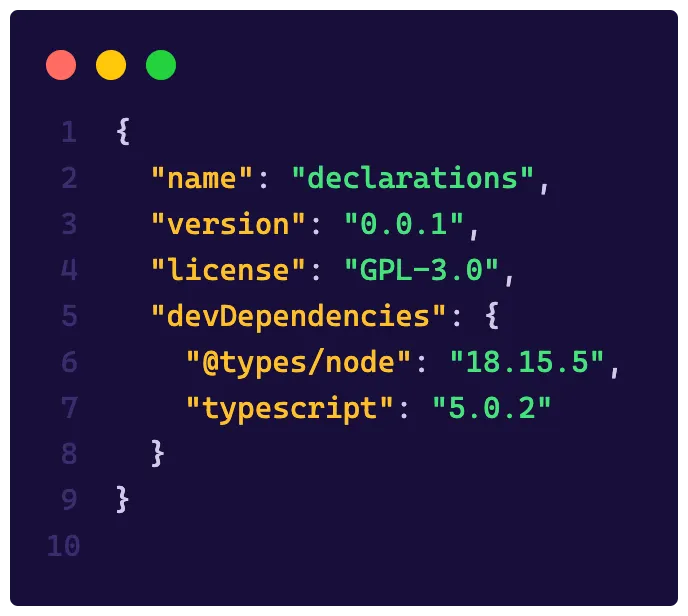
Run npx tsc --init at the root of this folder to create our tsconfig file and then run the npm i command to install all dependencies. Finally, inside the folder, create another folder called minhaLib and place an index.js file (yes .js) with this content:
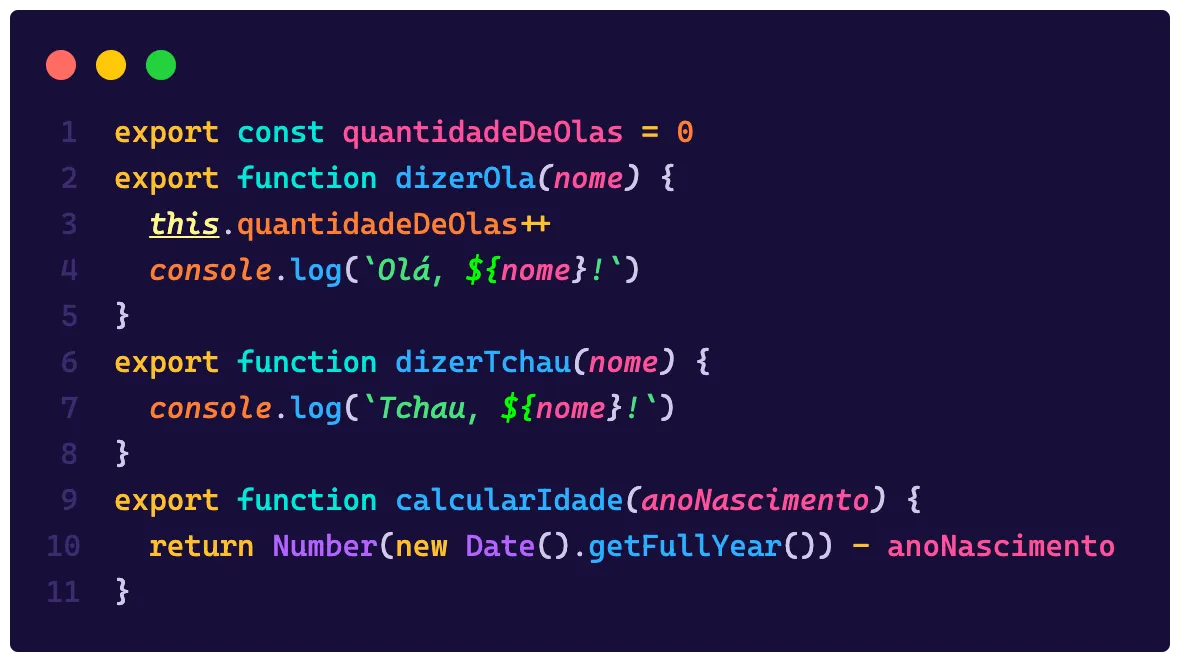
At the root of the folder, create an index.ts file and import your index.js file the traditional way with import lib from './minhaLib' and now let’s see the magic happen.
I’m assuming you already have Node installed on your machine to run the commands, if not, install it to have the
npmandnpxcommands available.
If you followed the steps, you should have encountered an error that says the following:
Could not find a declaration file for module ’./minhalib’. ‘caminho/para/minhalib/index.js’ implicitly has an ‘any’ type.
This is because TypeScript, under the hood, will always try to find a type for the file you’re importing. If the file is of type .ts then it will use the types already present there, if the file is a .js file, it will try to find a .d.ts file that has the necessary definitions for it to understand what’s happening.
It’s at this moment that projects like DefinitelyTyped come into play, they are type repositories. If you look at our package.json file we have a dependency called @types/node, this @types is the organization of this project. And it’s so important that it became part of the TypeScript pipeline.
By default, TypeScript will first look in your library’s folder, but if it doesn’t find anything, it will go to
node_modules/@types/<lib-name>/index.d.tswhich is the DefinitelyTyped directory to find these types, and if these types don’t exist, then you receive that error we got above.
Creating types where there were none before#
This kind of problem is not uncommon, you’ll find many libraries out there that aren’t typed, the Keychain example I gave is just one among millions of other packages.
A different use for declaration files is when you can extend or modify a library, this is called module augmentation, but we won’t talk about that here
The first thing we need to do when dealing with a package without types is identify what type of file it is. For example, is it a module? A function? A class? And this can be done by seeing how the file behaves.
There are two ways to notice this, the first is through usage and the second is through code. In the case of usage specifically, look at things like:
- How do you get the library overall? Via NPM, via CDN? Another way?
- How do you import this lib in your code? Does it have a global object? Does it use
requireorimport/export?
Usually libs that are modular will have one of two types of calls, either with const lib = require('lib') or import x from 'lib'. In our case we can see that our library is a module, and more than that, it’s a module that uses ESModules because of exports using export.
This identification is super important because it will tell us how we’ll define the types. But first, we need to define these types somewhere. The best practice is to create an index.d.ts file inside a folder that has the same name as the library, in our case we just need to create an index.d.ts file alongside the index.js.
There are other cases where, for example, you’ll download an NPM package without types, and because of that you won’t be able to add types directly inside node_modules, because you won’t submit that folder to your version control. In these cases, the best practice is to create a folder called @types at the root of your project, inside it another folder with the same name as your lib and, inside that, the index.d.ts file, that is, you’ll be mimicking the DefinitelyTyped structure.
In our index.d.ts file we’ll add all the type declarations that our lib exports like this:
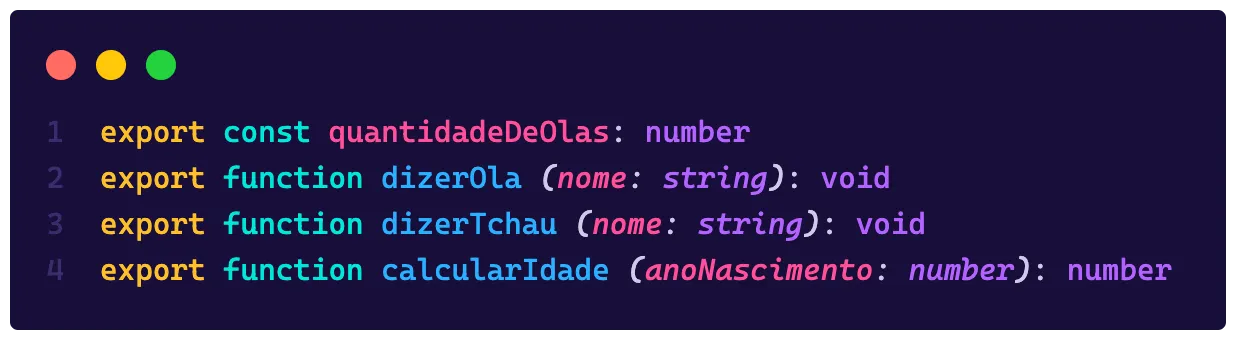
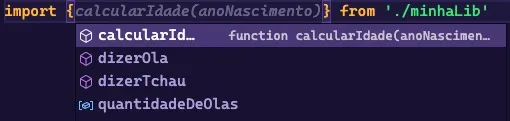
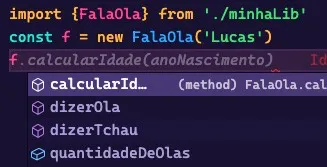
Notice that we don’t have an implementation of the function, we’re just declaring its signature, which is what TypeScript needs to know the type and guide us. When you go back to our index.ts file you’ll see that besides the error being gone, you’ve now gained intellisense for your lib:
Global objects and namespaces#
Libraries can be classes, for example, if instead of our lib exporting functions directly, it was a class, like this:
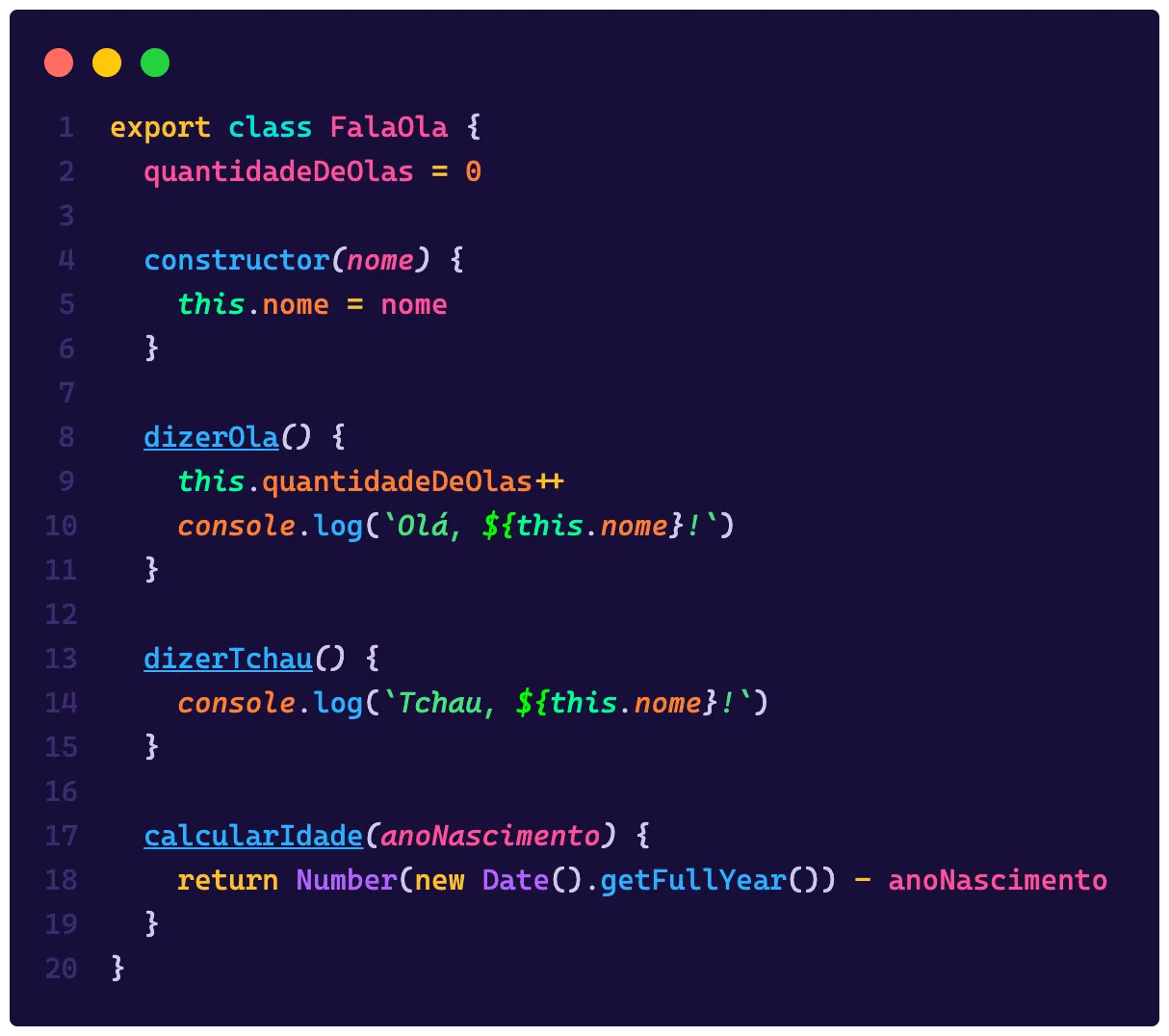
Now our declaration has changed, because we’re no longer receiving the functions directly, in this case we need to change our index.d.ts file to export a class, which will basically follow the same model as the original file:
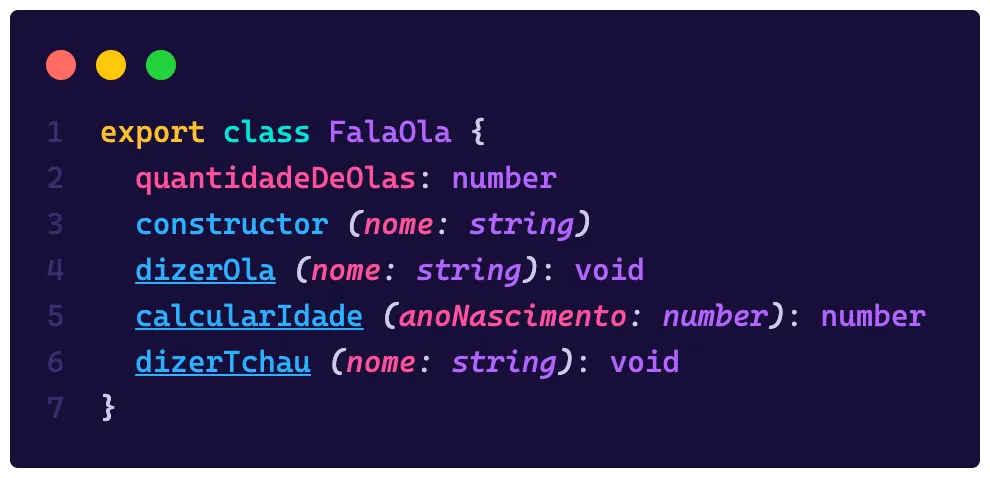
And thus we also have the same typing for our class:
But what if our package doesn’t use ESM? What if it exports everything as a module in an object? Then we have the concept of namespaces, let’s say our lib is like this:
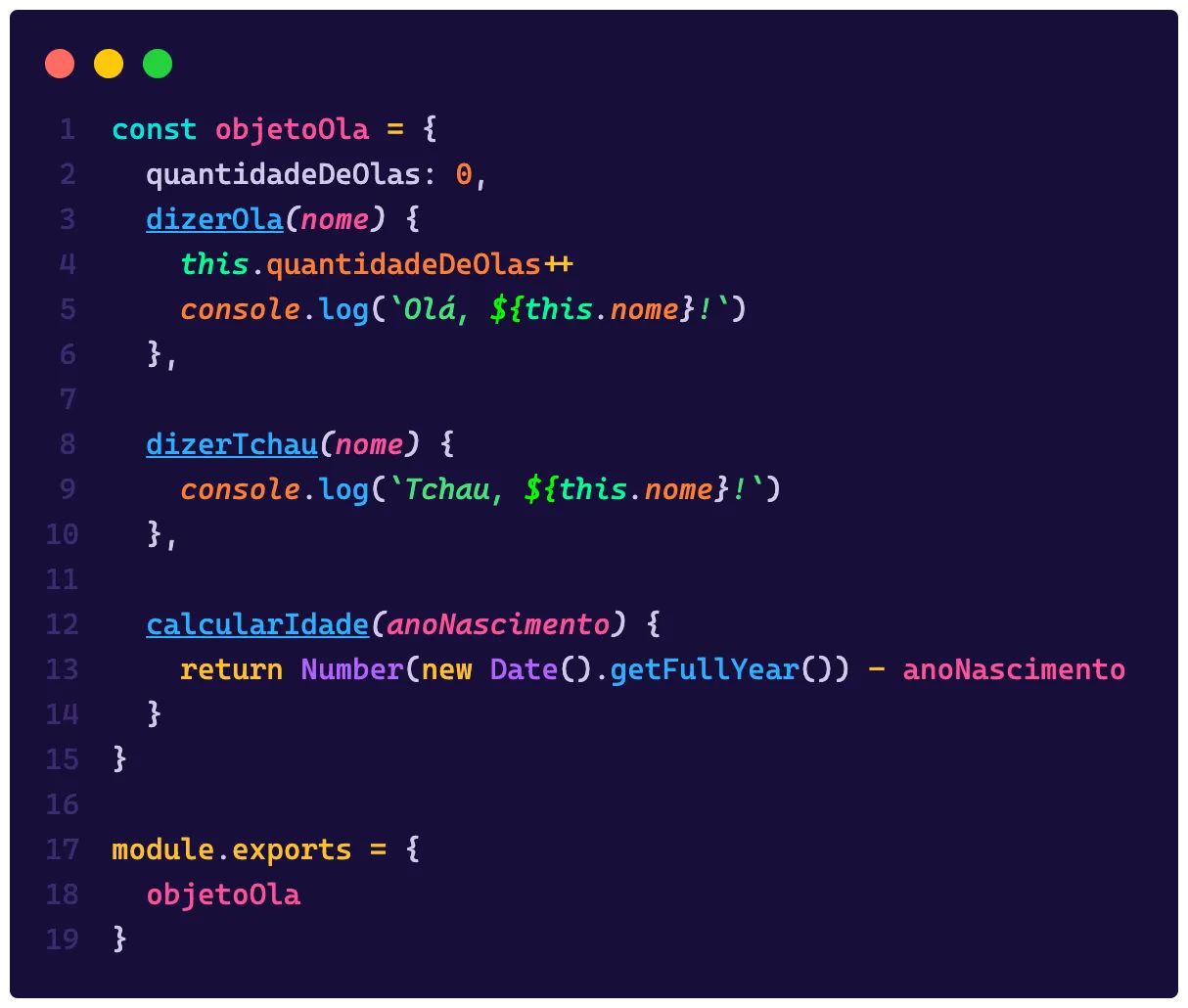
To be able to use this lib, we’ll have to import it as a destructuring like const { objetoOla } = require('./minhaLib'), our declaration file will then have to contain an object that will be the container for all functions, this is what we call namespaces, and we can declare one like this:
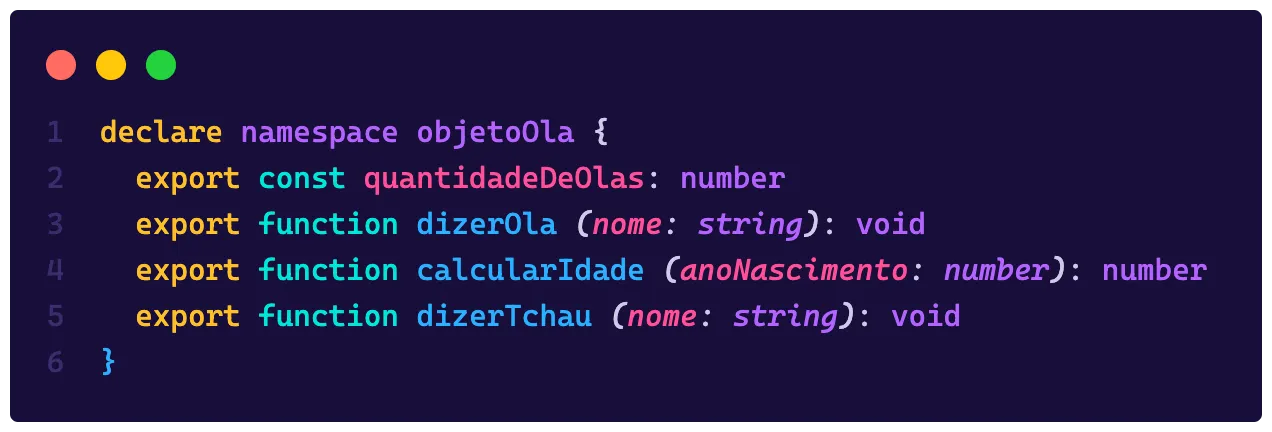
Think of the namespace as an object, a box that will contain all the functions we have, and namespaces can have other namespaces and so on
See that we have a new keyword there, declare, think of it as being a kind of let or const for declaration files, it’s saying we’re creating a new object. All declarations that appear at the top level of a .d.ts file need to start with either declare or export.
Next we need to say that our lib is a module, otherwise we’ll get an error saying “File <your-path> is not a module”. We can do this in two ways, the first is to be explicit and declare the module exporting the namespace by default, like this:
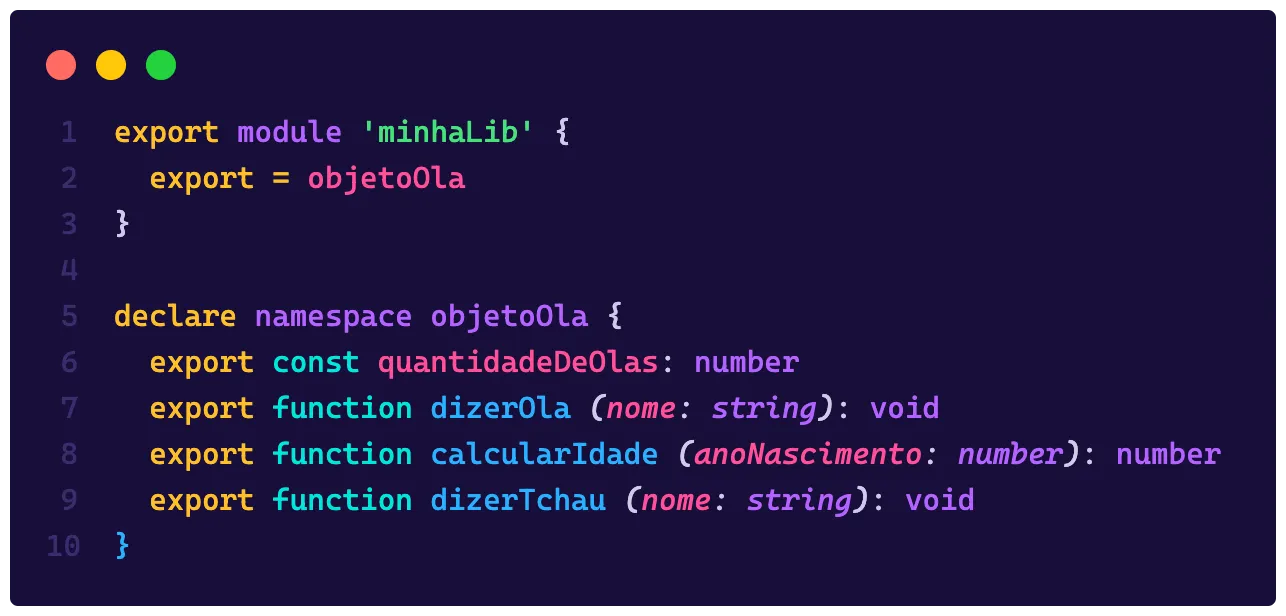
Or we can do it in a more concise way and omit the export, which leaves it implicit that everything declared in the file will be exported by default:
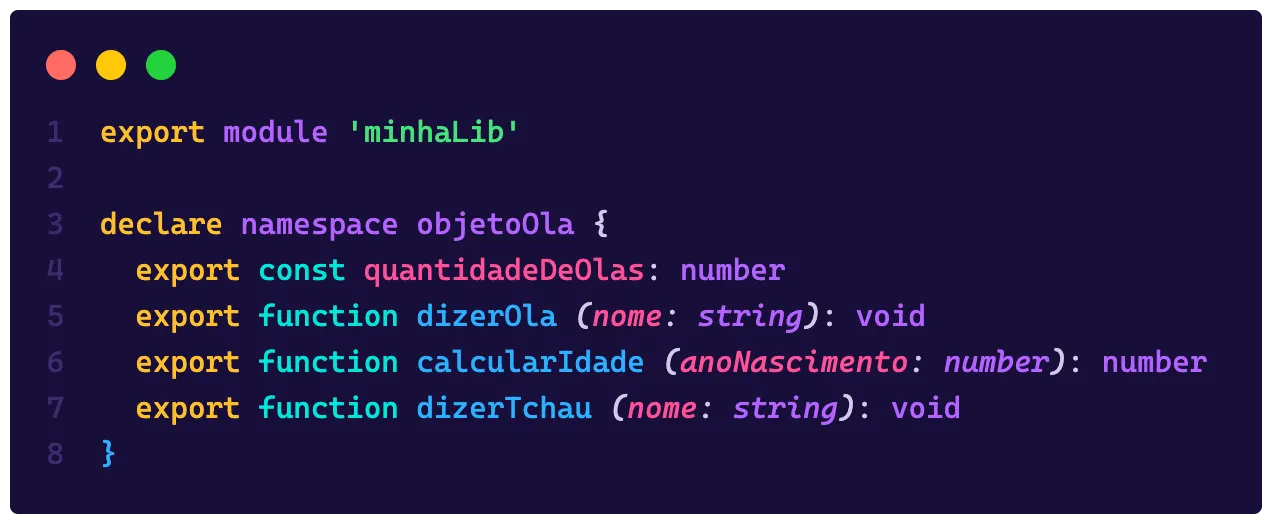
The end result is the same and we have intellisense again:

Default exports and extra types#
In this case I want to analyze the PR I opened for the Keychain package on DefinitelyTyped. This package, besides being super old, is a CommonJS package (just like what we did above) but exports a default object instead of a namespace, so using it is something like this:
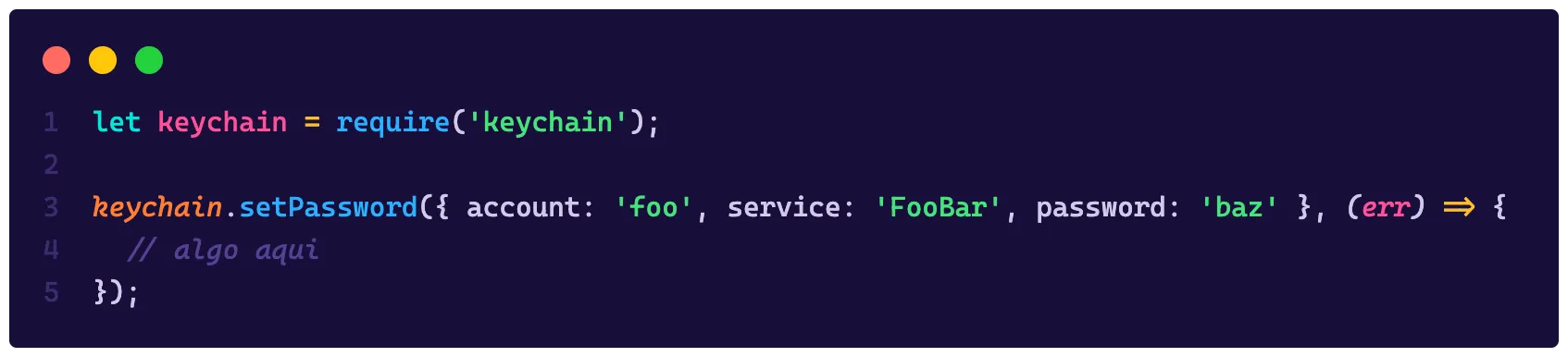
To create a type and publish that type on DefinitelyTyped we first have to create our type locally, so, to start I did exactly what we did here, a folder. But instead of creating a folder with the name of my library, I followed the structure <root>/@types/keychain/index.d.ts, this way we can organize all the types there.
Since we’re dealing with an old module, and we need to support all possibilities, we’ll have to export this functionality not as a module, but as a default export, but first, let’s create the typing for all functions.
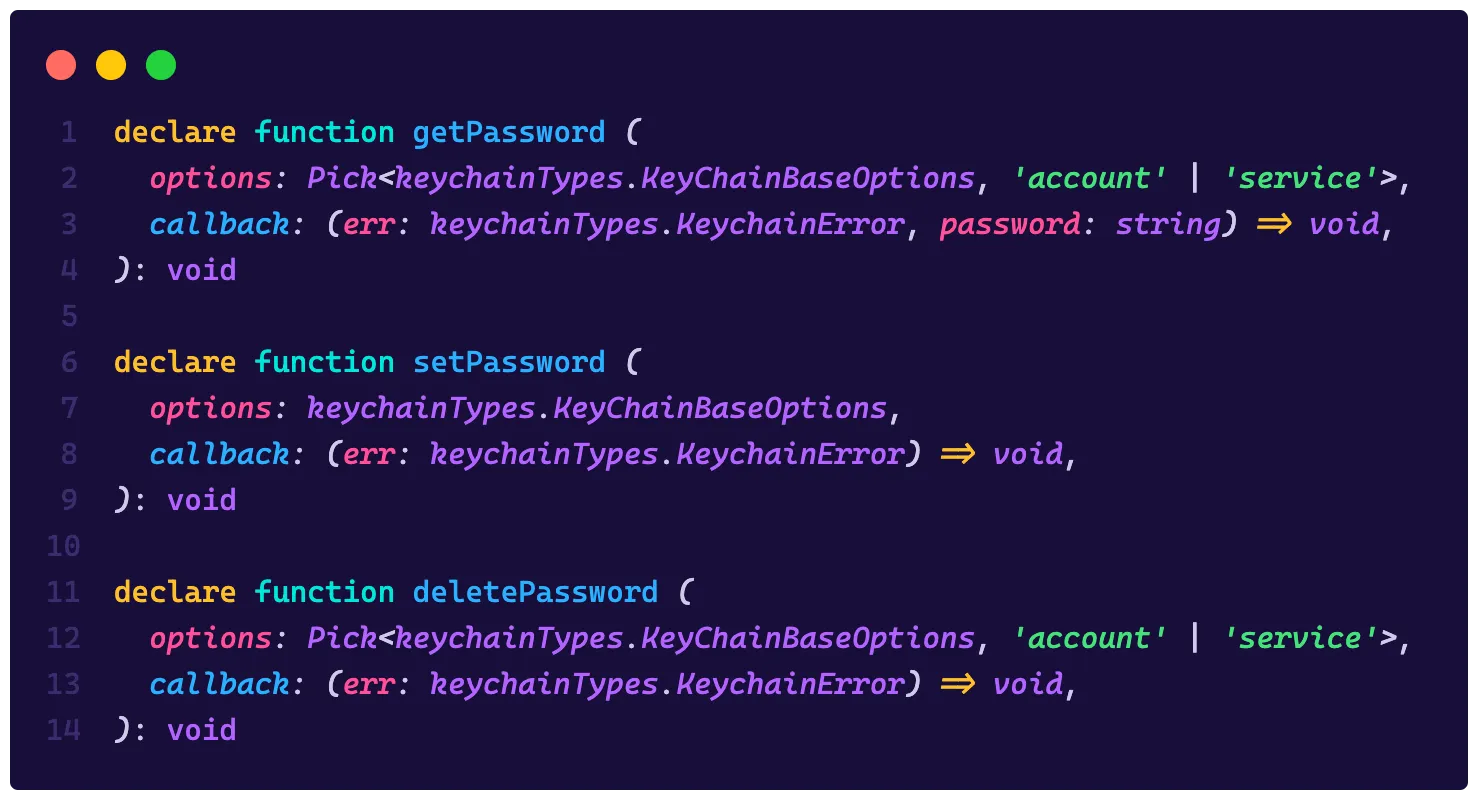
See that I’m using the Pick function that gets keys from a base object, and that base object is inside a namespace called keychainTypes, this is because I identified that we can type the library even more, so we can add extra types and leave it even more typed, but when we’re talking about exports with CommonJS, these declarations need to be inside a namespace. So we can create our namespace like this:
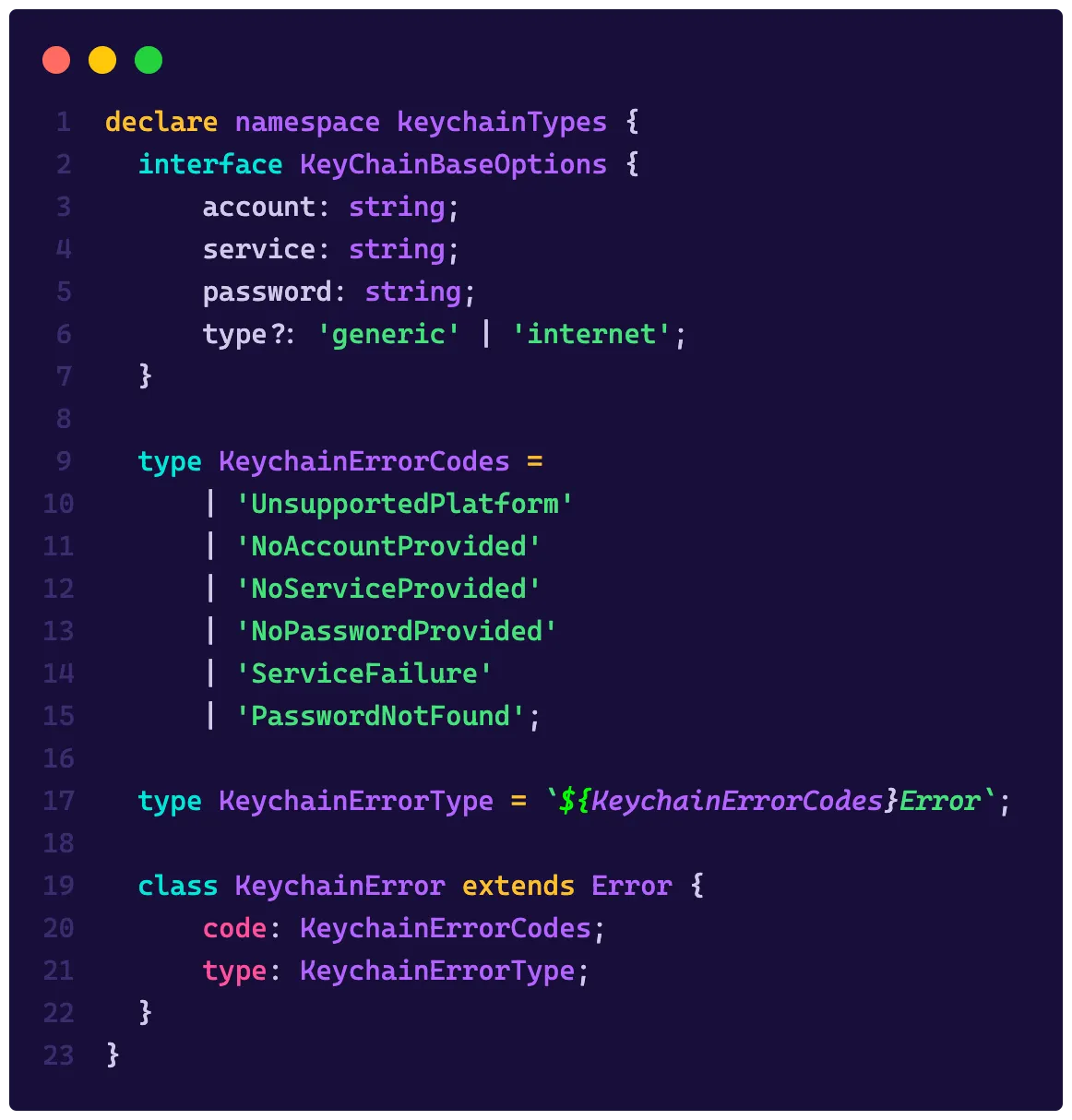
By default, everything inside the namespace will be exported, this means I’m exporting more types than the lib itself has, but can we do that!?
Not only can we, but it’s a best practice, because if we export types that identify, for example, errors and enumerators, people who will use our typing can improve the assertion of their types!
A good exercise and a good way to understand how libs work is to create types for them, because then you not only understand the way the library is, but also how it works internally.
In the end, what we need to do is create a constant that will be the default object (our default export) that is exported by the lib:
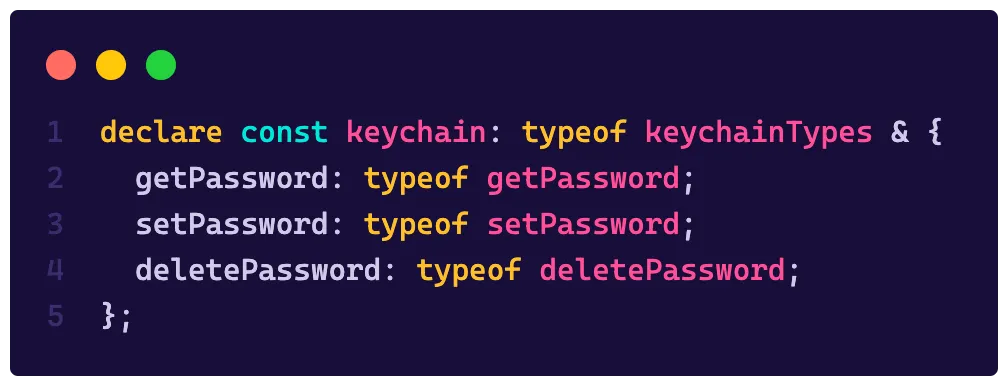
Let’s go step by step:
- I’m declaring a constant called
keychain, the name doesn’t matter since our package is a default export - I assigned to that constant the type of our namespace, the
typeofkeyword will fetch all members of an object and return their types - I used the
&operator which is the intersection of types, in TS, when we’re intersecting two objects that don’t have common keys, the result is an object with all keys from both
Now we just need to export everything with an export = keychain as it is in the PR. However, to test locally we’ll have to create a module so that TS can identify our file and import this module locally, so we’ll make a small modification, and the complete file looks like this:
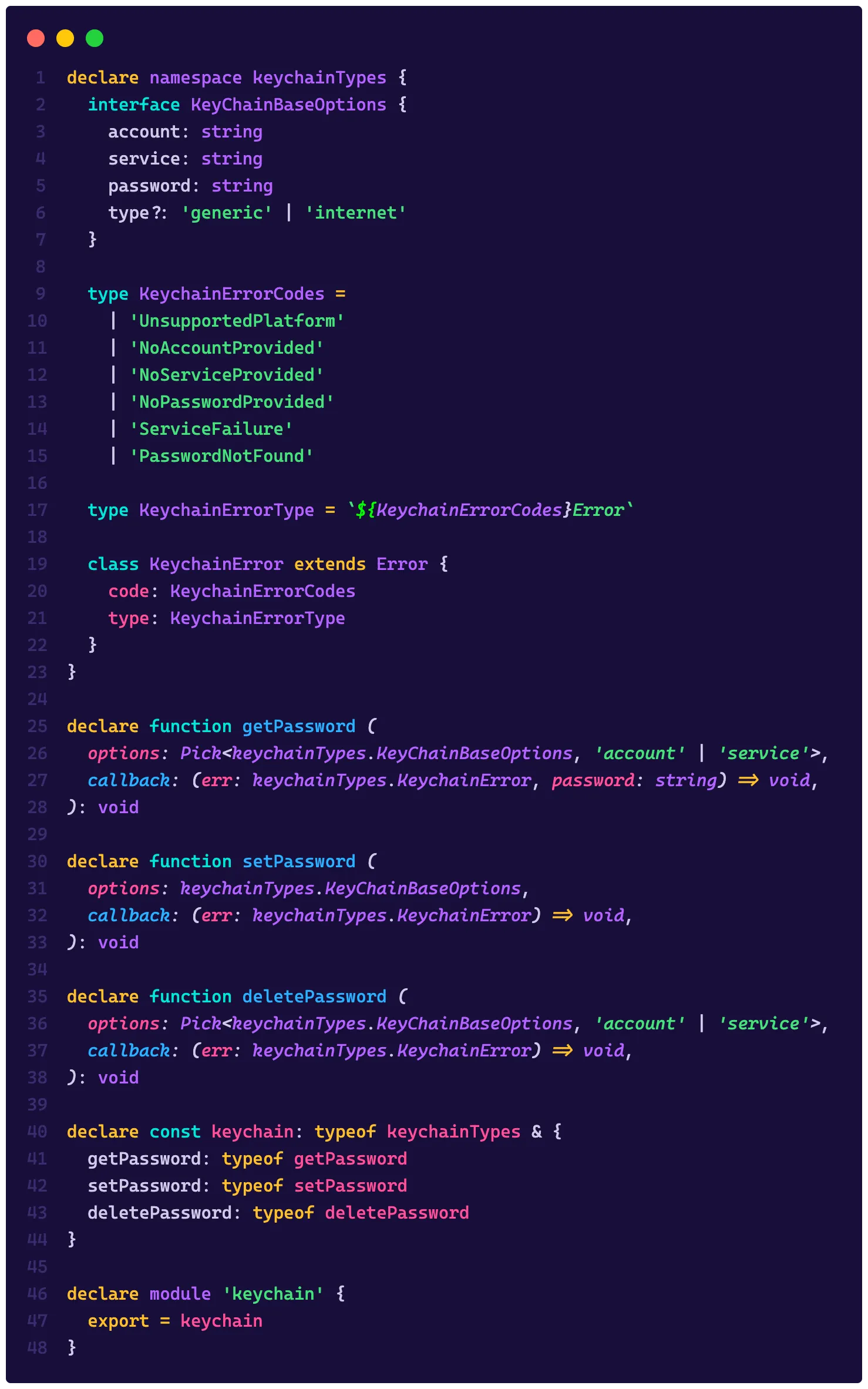
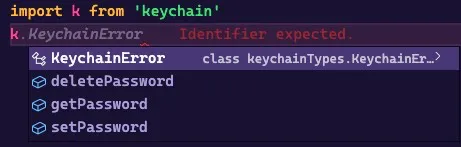
We just typed our first external module:
Type tests#
Just like it’s important to test our code, our types also need tests, but type tests are a bit different. Let’s take a look at the test file for the types we created (which is on DefinitelyTyped):
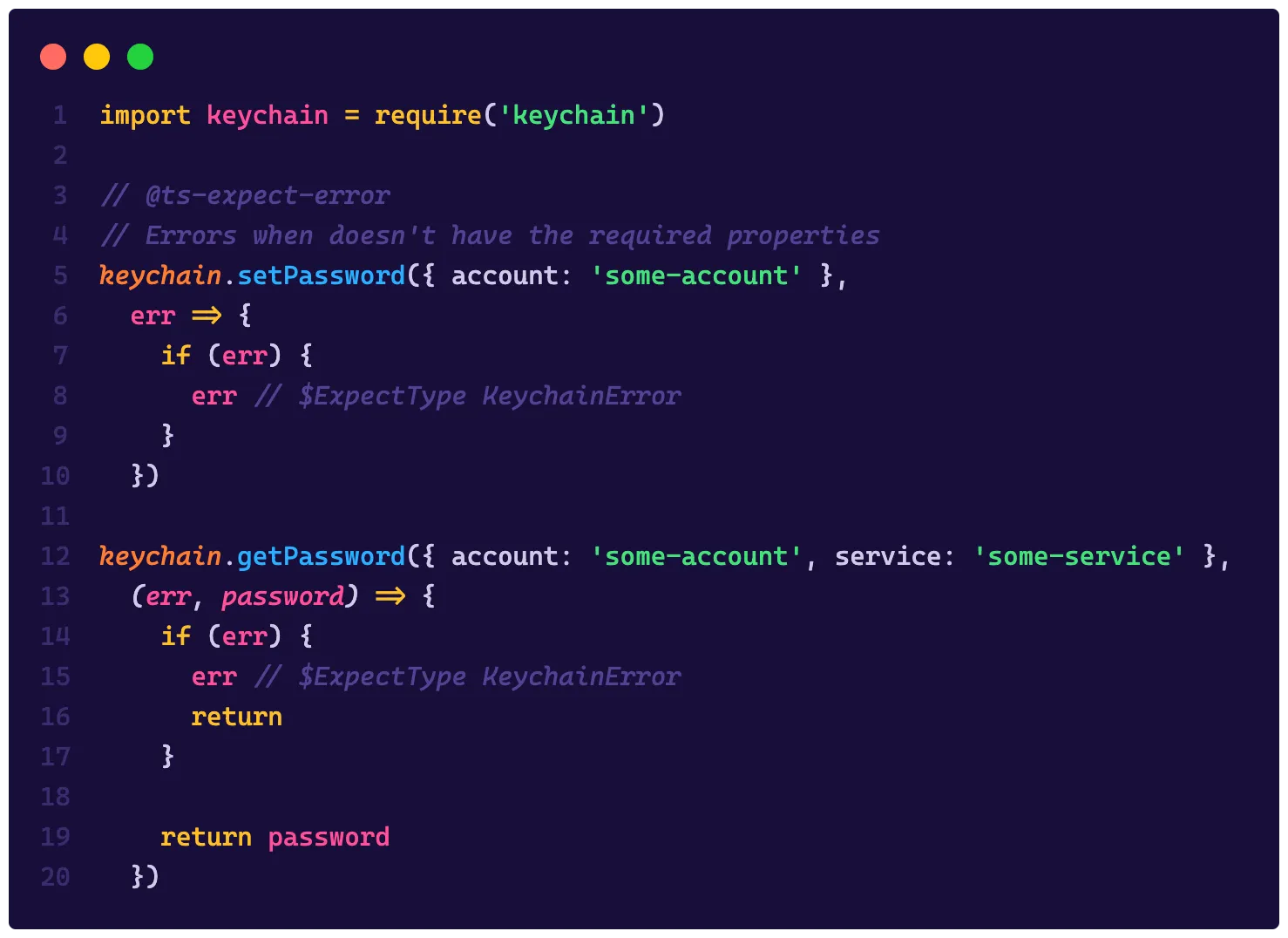
The idea of a type test is simply to call our functions passing the correct parameters, since the file will never be, in fact, executed, we’ll just pass the TS compiler to see if this code compiles as expected.
We’ll abuse directives like @ts-expect-error to say that the next line should give a compilation error, and that’s how we manage to test not only the code but also our types.
Publishing a library with TS#
Publishing a module with TypeScript is not much different from publishing a native JavaScript module to NPM, but we’re dealing with another important situation here: We also need to send the types, that is, the .d.ts files need to be present in the package that NPM will use.
To publish your first lib to NPM, what you need to do is make sure that the following options are set in your tsconfig.json file (which you create with tsc --init):
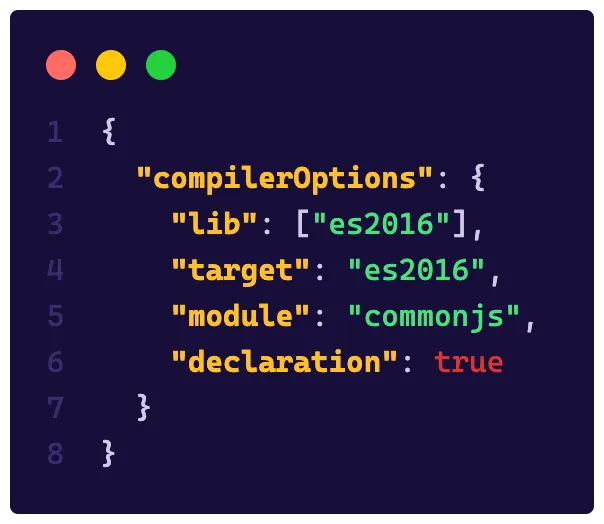
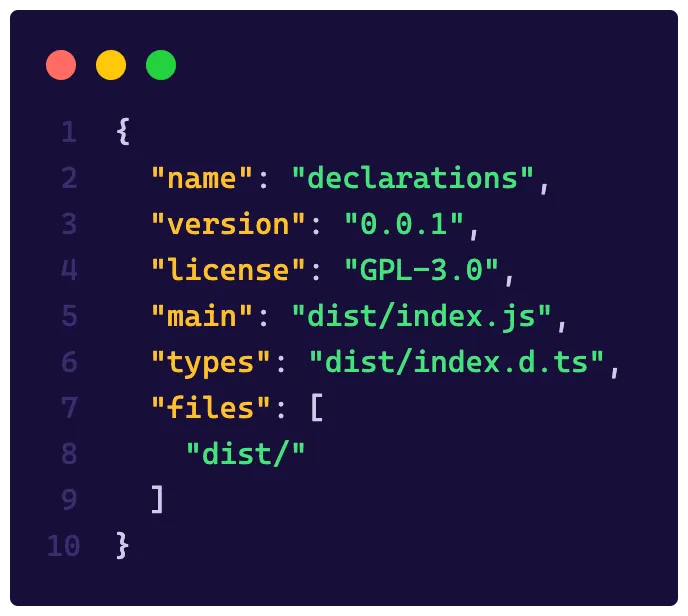
The most important part here is having declaration: true, because this will tell TS to generate its types according to what you write. Then, in package.json you can also specify a field called types and tell where to find the types of your libraries, like this:
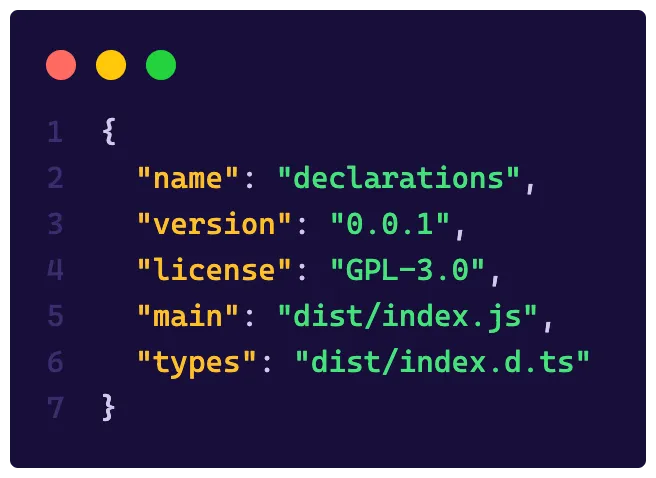
I’m assuming here that the value of outDir in your tsconfig.json is dist so your output folder would be dist and your declaration files will live alongside your JavaScript files.
In addition, it’s important to ignore the dist folder in your .gitignore but not in your NPM, because we want that folder there, so you can override the default functionality by adding the files key in your package.json, this will tell NPM which files it needs to fetch to include in the package, let’s put the dist folder in there:
Now it’s just a matter of implementing your library and publishing your package with npm publish!
For you to practice#
First, let’s start by solving the last challenges!
Hello World#
To solve this challenge, just define the type as a string:
type HelloWorld = stringIf#
To implement a feature like if within the TS type system we’ll make use of generics, which we’ll discuss in the coming days! The idea is that If<true, 'a', 'b'> should return a, so we’ll implement a type that receives a condition and if it’s true, we return the first value:
type If<Condicao, Verdadeiro, Falso> = Condicao extends true ? Verdadeiro : Falso👉 The next challenge will be just one! Try to type that library in a .d.ts file and we’ll correct it tomorrow!
Don’t forget to leave your feedback about #TypeScriptWeek here in this form!