My journey with Vim. Six months in, what changed?
Part 9 of 11 of the series Backlog Newsletter
About 6 months ago I decided it was time to drop the fussiness, leave behind my long-time editor (VSCode) and start using this famous Vim everyone talks about. When I finished configuring it and was happy with my initial progress, I wrote this article. In it, I documented most of my journey through the installation and my first impressions of Vim, but I didn’t want to go too deep into actually using it because I hadn’t used the editor long enough to have opinions (or statistics) about it.
Now it’s different. After 6 months using only Neovim as my main editor (in reality, as my only editor) I want to break down everything I learned, what I gained, what I lost, what I liked the most and what I found strange in this new experience.
Let’s go!
Why did I start using Vim?#
I’ve been using VSCode since probably its launch, I remember using the beta version and thinking “my God this is horrible” and going straight back to my Sublime Text. But a few years later VSCode became probably the best and most powerful code editor of all, and today I see few reasons for you to start out with an editor other than it.
But then… Why did I start using Vim?
Ever since I started in development I already knew about vi and other editors like nano for when I needed to SSH into a machine, or configure some server, but I never cared about learning for real how Vi/Vim worked until around 2016 at a PHPExperience in São Paulo.
That day Augusto Pascutti gave a talk called “Why Vim?”, showing the various interesting points of using the editor. Macros, movements, open configuration and much more. From that day on I kept Vim on my radar (with absurd curiosity) but every time I tried to start, the learning curve was too steep and I gave up because it took too long.
The years went by, I got more and more stuck in VSCode, I loved being there, my whole environment was customized, I managed to make the editor feel truly like home. But unfortunately I still needed to have the editor installed on the computer… And VSCode isn’t necessarily very light to run everywhere, even with improvements like separating the server from the interface and so on…
But the final push that made me switch to Vim was realizing how much time I wasted stopping my typing or taking my hand off the keyboard to grab the mouse and move things around… If you’ve never thought about this, stop for a bit, record yourself using the computer in timelapse and look at how many times your hand makes that sideways movement to grab the mouse and then come back… That was bothering me a lot - To the point where I was working on a special keyboard with a built-in mouse.
I HATE mice in general, if I have the option to do everything in a terminal I will… Maybe that’s a leftover from my sysadmin days with AKS. But I love TUIs and anything without a graphical interface simply because it’s much more responsive.
So when I installed my dual boot with Arch Linux, I decided to install a window manager called Sway, which makes the mouse unnecessary for most things, so I thought: “Why not start ditching the mouse for good?” and that’s when I decided to leave VSCode completely and use only Vim.
Unfortunately GUI usage is still very common and most of them don’t have great keyboard support, with shortcuts or movements, so unfortunately we won’t be able to abandon the mouse once and for all…
I also tried using the Vim extension for VSCode, but it’s an editor built to be used with a mouse, so the movement wasn’t that fluid in the interface, which was a problem.
Initial adaptation#
I’m going to skip the configuration part and all that because I already covered it in the first article
The main thing at the beginning was forcing myself to build the habit of using Vim. Because I was so used to VSCode that, by default, I would just open the editor straight away.
To force myself to use Vim, I removed VSCode from my desktop, removed the file bindings that would open in VSCode and forced myself to only open the terminal when I started the machine. A few days doing this were enough to pick up the habit. Another thing that helped a lot was that I liked the look and feel of Nvim, so it was nice having it open, and it’s very responsive so things happen really fast and you end up feeling like a hacker.
Once the first obstacle was over, the second one was the worst of all: remembering the keys…
The first problem#
This is, without a doubt, the hardest part of everything I had to do to use Vim. The main keys everyone knows (hjkl) are pretty simple, most of the basic commands like switching modes (with i, v), replacing (c, C, r and R) and line modifications with O, dd, D, etc are also quite intuitive.
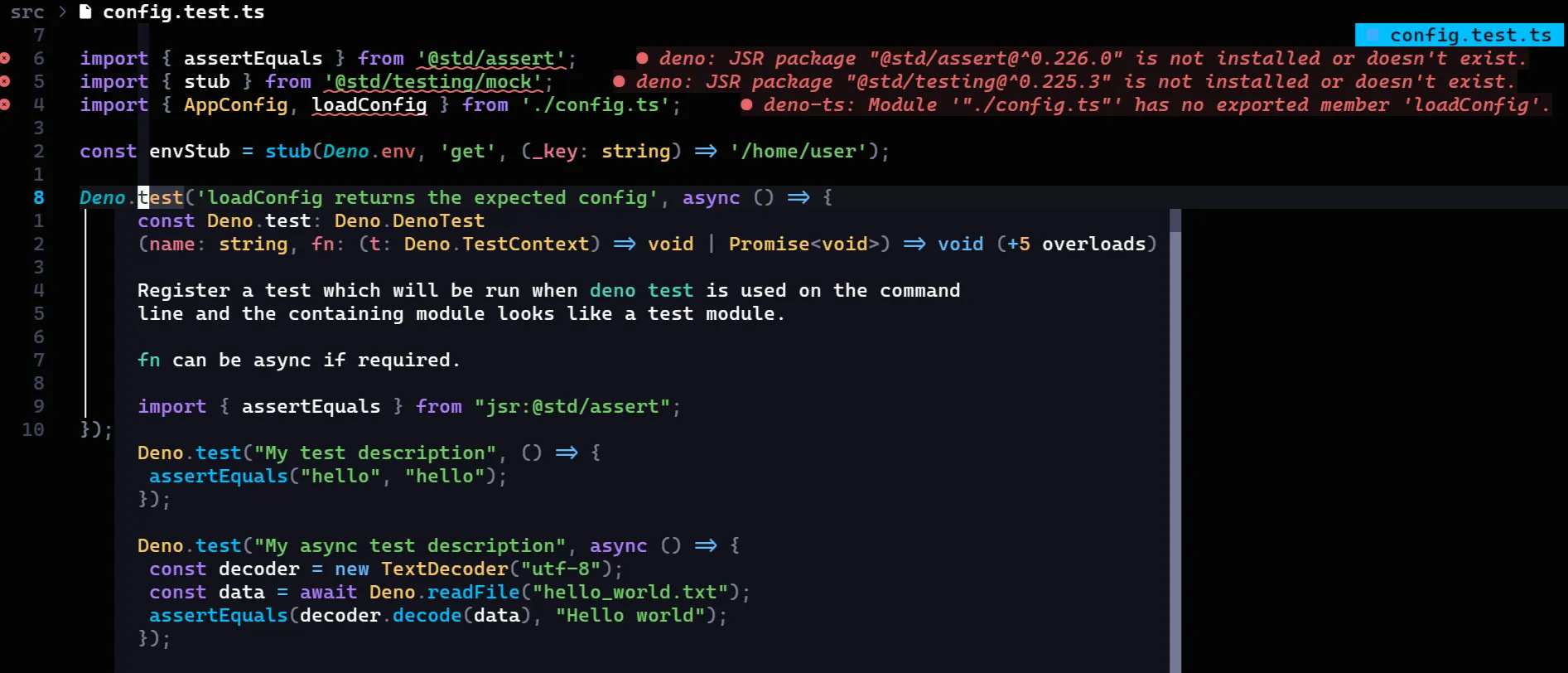
The problem is when you have to interact with everything that isn’t text, for example, the file list, opening the Git manager (with LazyGit) and interacting with popups that show up on screen, like intellisense completions and the quick peeks showing type hints in TypeScript. Not because they’re bad, but because in each new panel, the keys change.
For example, Telescope (the equivalent of VSCode’s ctrl+p) has a search field, so the default movement keys don’t work (because they’re typing into the text input), instead the combination is ctrl-p to go up and ctrl+n to go down (for previous and next). On top of that it has a small preview on the right side that you can move around not with ctrl+hjkl, but with ctrl+dfku…
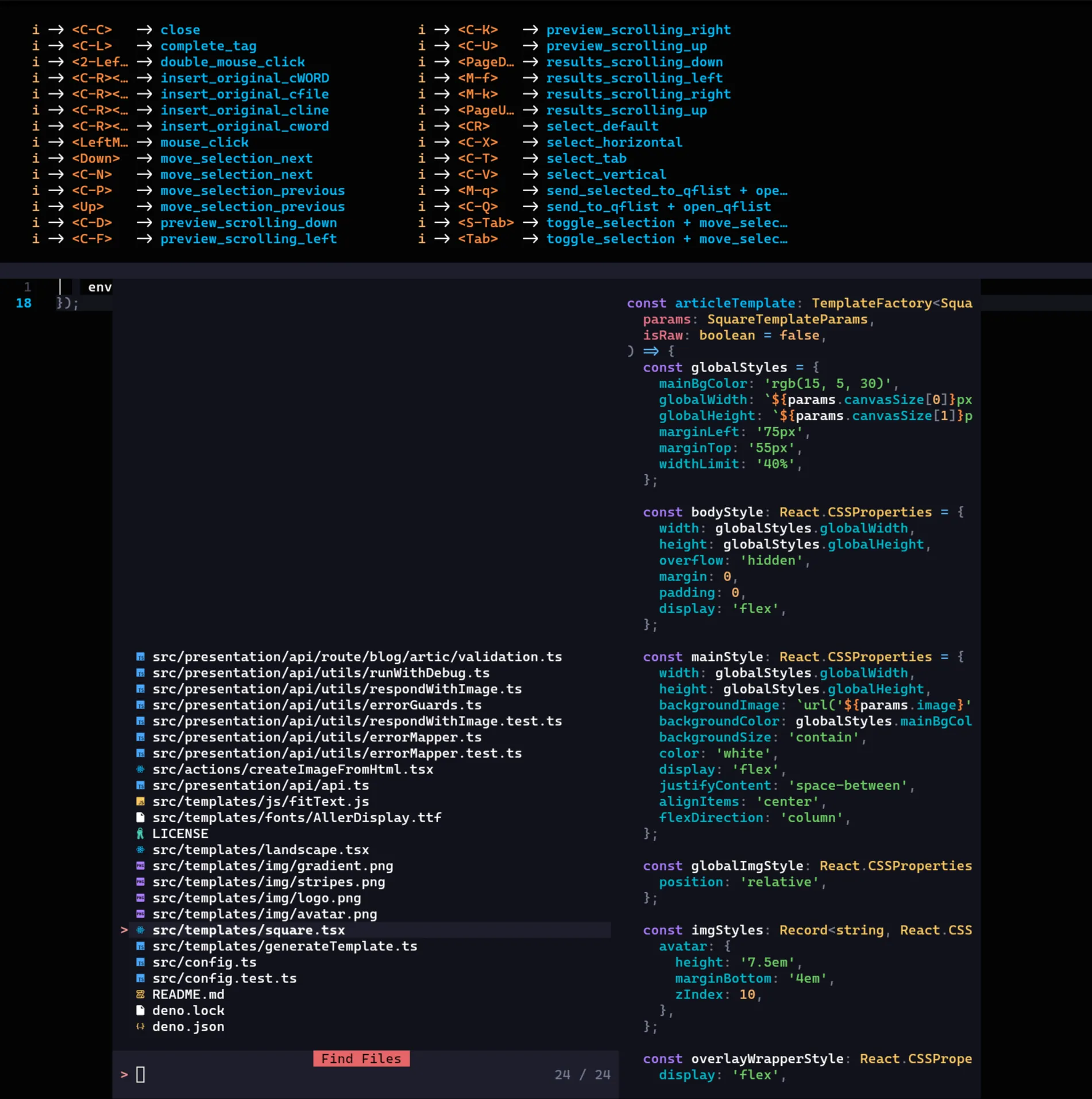
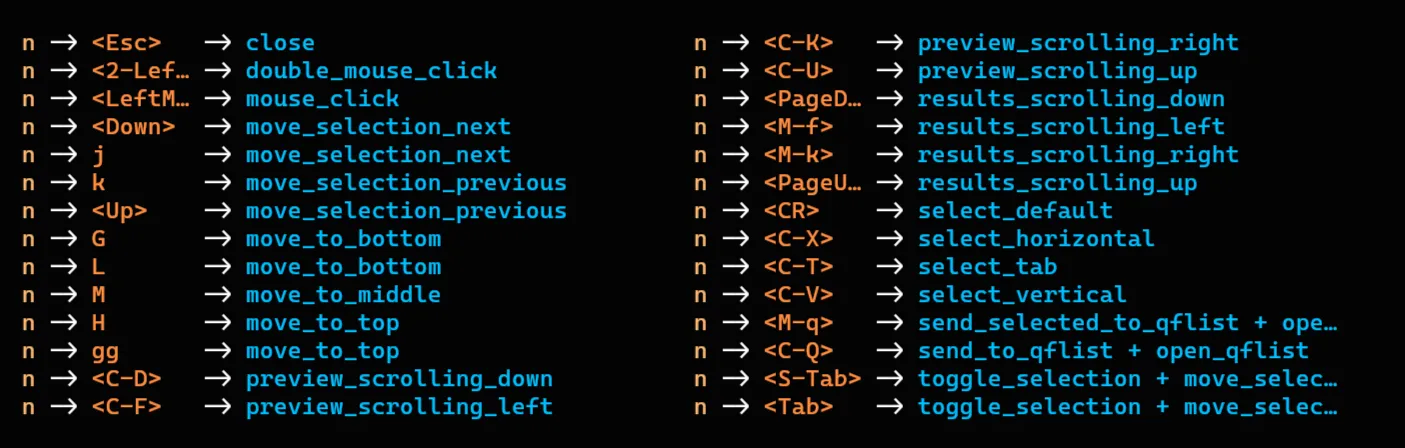
But that’s only in insert mode, when we switch to normal mode, the movement keys go back to the default, but the preview ones don’t…
Besides that, the equivalent of VSCode’s “Find All” is a mix of ripgrep with fzf that searches across all files via regex and is one of the most powerful tools in Nvim, but it has no mode selection… So to move through the results without using the arrow keys (which are further away on the keyboard), we have to use what? What would be intuitive: ctrl+hjkl…
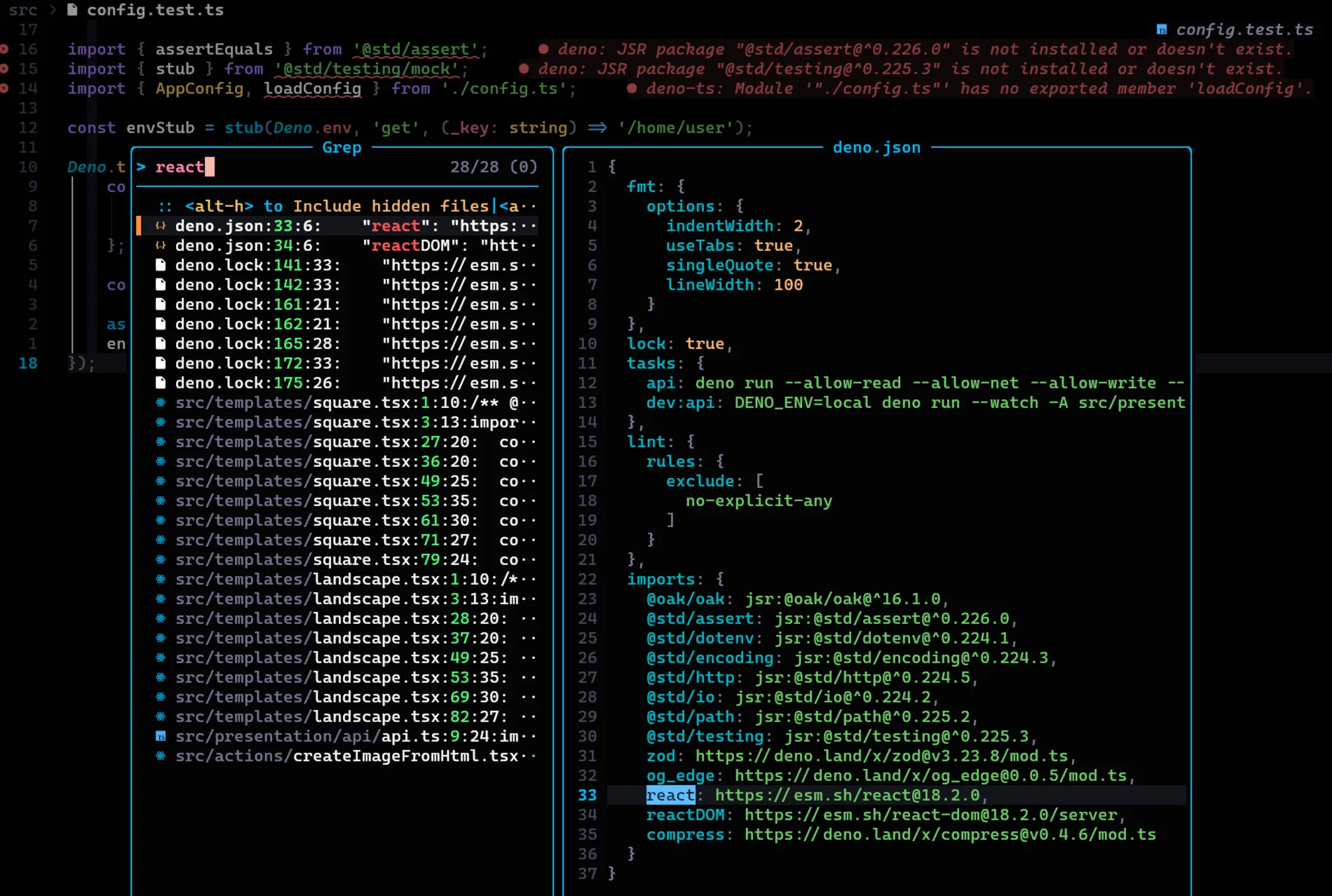
But, as incredible as it sounds, you use these tools so much (especially telescope) that these combinations kind of get burned into your head. By the end of the first month I was already 100% comfortable with Vim’s UI, including moving the cursor across windows and all that.
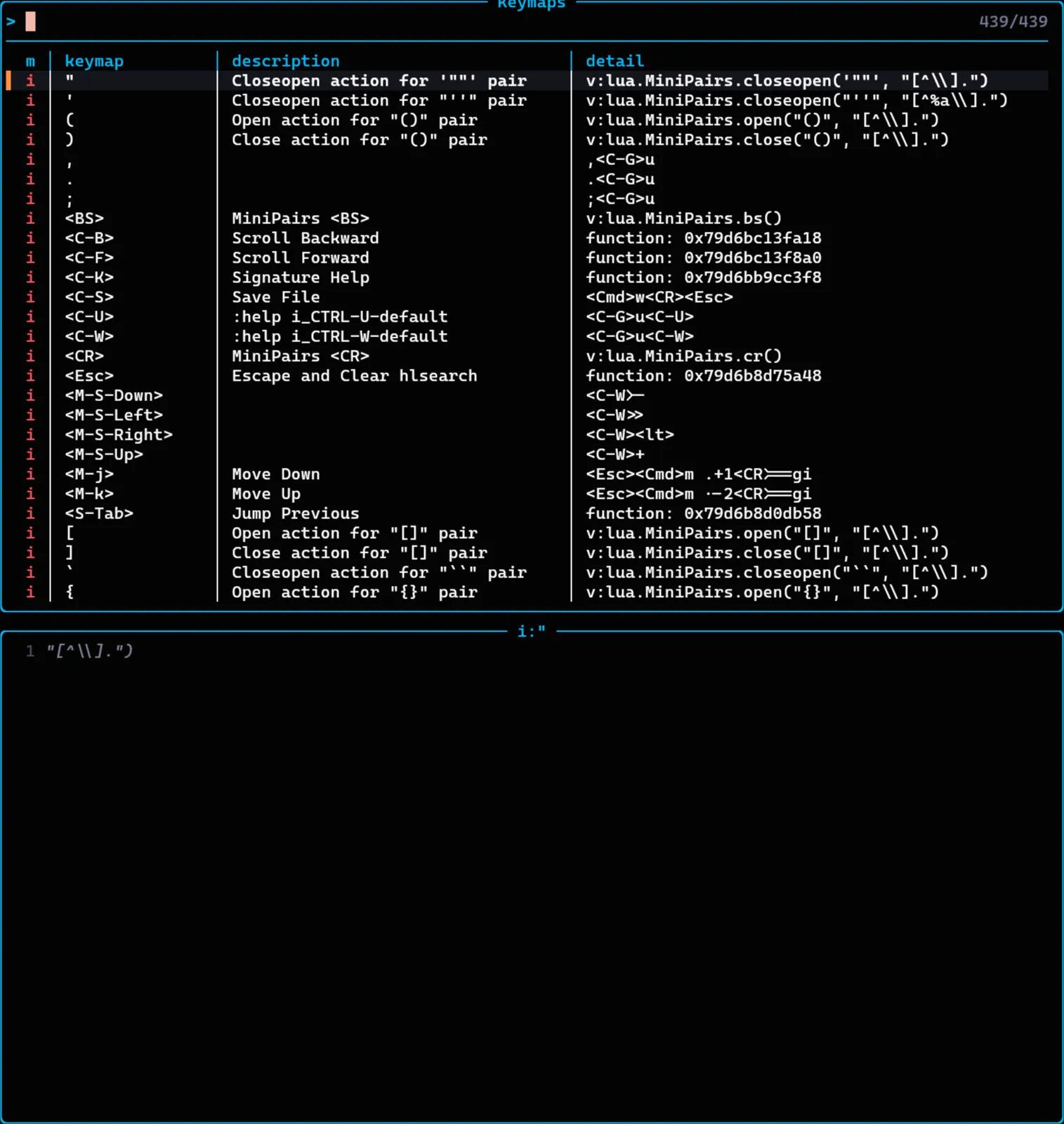
In the end, the keys aren’t that much of a problem because LazyVim itself has a command to search all the keys, <leader>sk:
Besides that the whichkey package shows every possible combination for a pressed key:
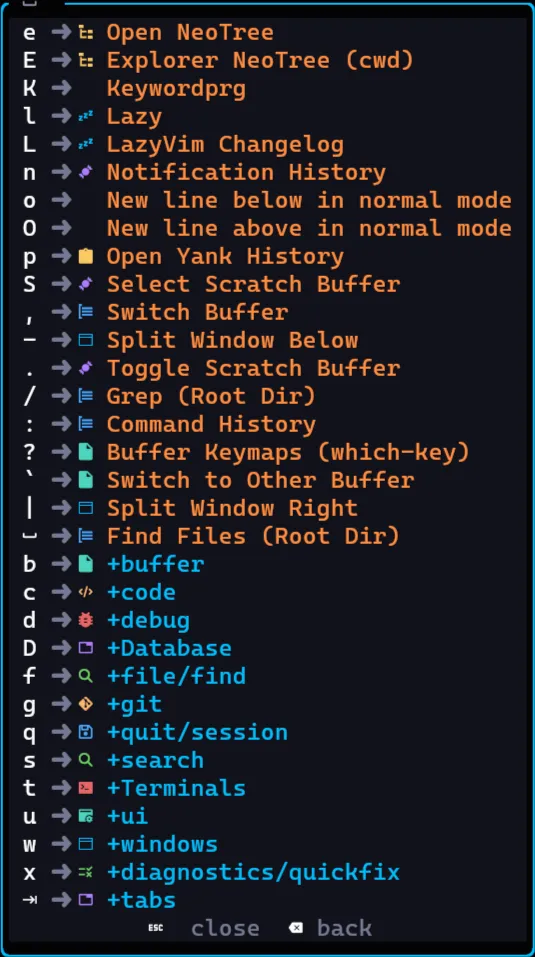
This makes the whole experience very good and not far behind VSCode, if you want to explore the editor, just go through the keys.
The best and the worst at the same time#
Another thing worth pointing out is that, during the first month (and to this day, actually) I’m always making small tweaks here and there in my LazyVim configuration, especially when it updates and changes defaults. That’s relatively annoying, it’s probably the thing I hate the most about Nvim so far, but it’s also one of the things I like the most: the configuration.
While the configuration is extremely permissive and you can virtually do anything, it’s also extremely complex to understand. The documentation is basically nonexistent, the Lua LSP does its best to extract the functions and show what you can use, but most Vim functions aren’t known, autocompletion is pretty bad and in general you find yourself searching for things on the Internet more than anything else.
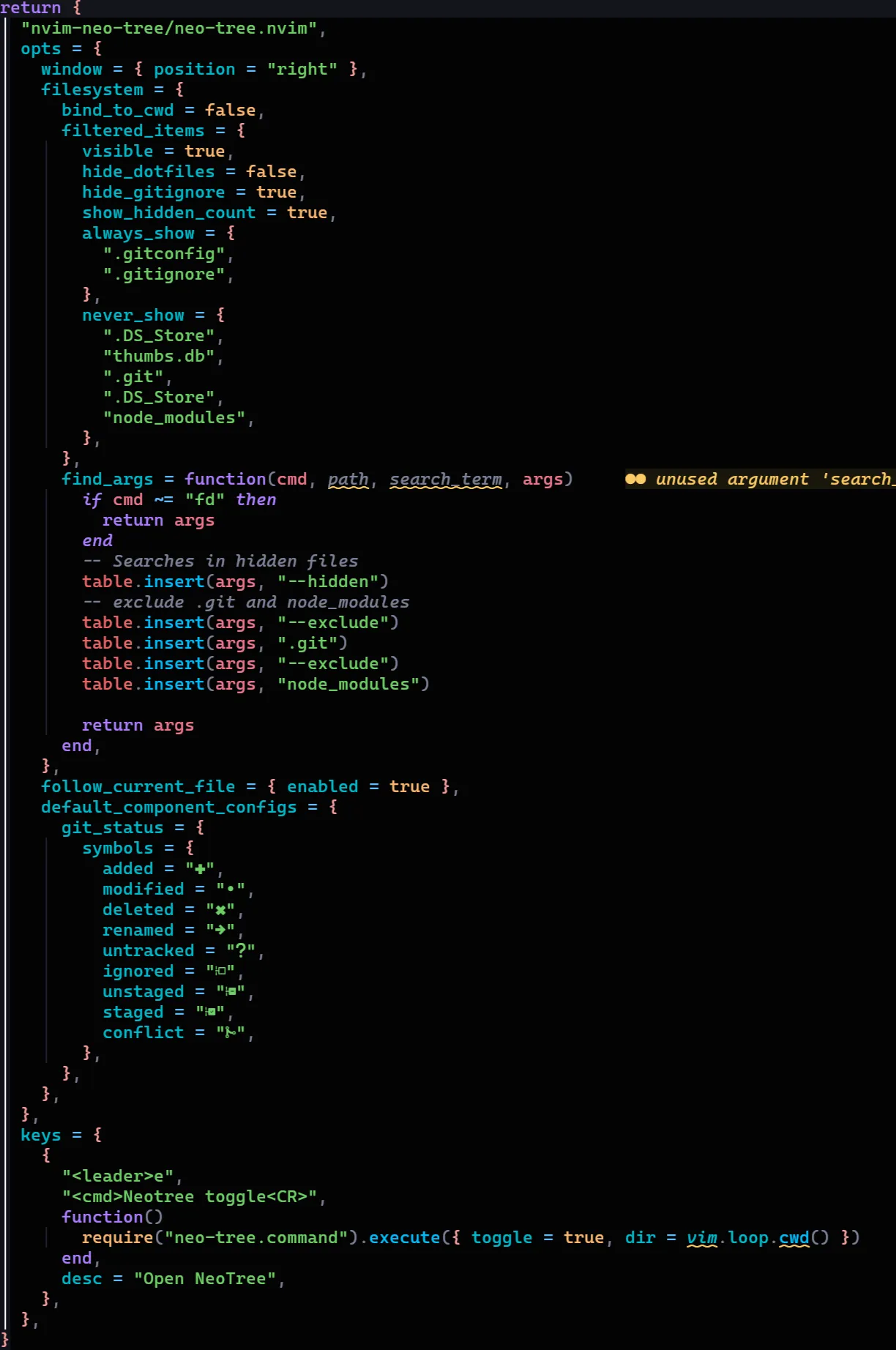
The configuration is hierarchical, so the initial settings will be overwritten by a later configuration, so the order in which plugins and configurations are loaded matters. And that sucks because there’s no nice autocompletion for what you can put in there, it’s always a game of trial and error.
Some Lua programming is almost always needed, and often mandatory. In other cases the base configuration is enough, in general, LazyVim’s own documentation is very good and helps A LOT, it’s well defined and explained, but you’ll eventually run into problems.
LSPs#
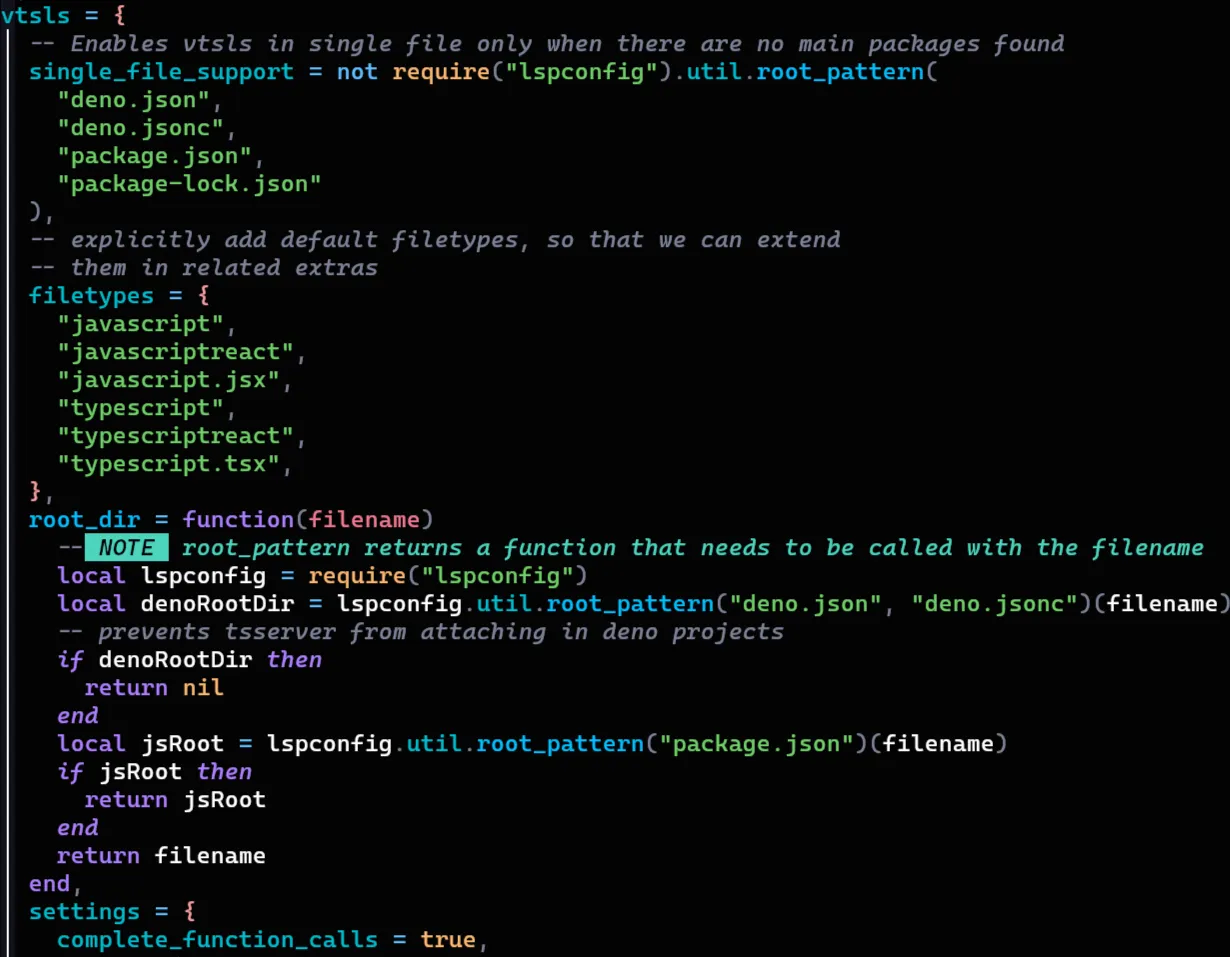
The biggest problem I had was configuring the LSPs. The default settings for most of the languages I use are fine, but I had a conflict with Node and Deno. Since both use the same language but have different key files, I had to write a function to check whether the repository was a Deno or Node repository and prevent having both the Node LSP and the Deno LSP on the same file.
LSPs are Language Server Protocols, a protocol created by Microsoft to let an editor connect to a service that holds the language intelligence separately, independent of the editor, to provide things like completions, intellisense and so on in a distributed way.
So far I’ve only said bad things, or things I liked less than the rest, is Vim really that good?
The turning point#
After about 2 months using Vim daily I was thinking nothing would change, I wasn’t feeling any “faster” or like I had “super powers”, until the day I needed to modify a really large file.
Since I was in a bit of a hurry and had to change a bunch of things in the file with Regex, I tried using VSCode right away, but it didn’t open the file… So I tried opening it with Vim and it didn’t even flinch, while VSCode was using more than 2gb of memory just to open the file, my Nvim had the file open and working using a mere 120mb. That’s when I noticed the gains beyond development itself.
I was so focused on using the editor that I hadn’t noticed the real super powers I was gaining. First of all, I was using around 45% fewer resources on my computer, an absurd saving for a code editor. On top of that the editor is very responsive, almost everything you do happens practically instantly, all of it without taking your hands off the keyboard. I consider that a super power.
Inside the code, I started noticing I had developed muscle memory for some things, for example:
- Hitting
:wqor:walmost everywhere - Hitting
escafter typing a line (including while writing this article) - Trying to move anything with
jhkl - Trying to navigate with
wandbbetween lines and{in the code - Searching for anything by hitting
/ - Trying to use
<leader>(which in my case is the space bar) to start commands - Copying things with
yand pasting withp
This is so automatic for me that it became natural, when I can’t do one of these commands I feel weird. On top of that I started noticing I was increasingly using other Vim commands I didn’t use before, I was learning!
Progressive improvements#
One of my checkpoints was starting to make extensive use of vim words, which are sets of keys that let you do several actions at once, for example, if I want to delete a single character I can hit x, so if I want to delete a whole word I can just keep hitting x until the end. But I can also tell Vim to delete everything inside that word with diw, or delete in word without deleting the spaces, or delete everything around it with daw, where the “a” is around.
These are the well known Vim words, which I already knew existed but had never used extensively. And you can combine aw and iw with basically anything, for example, LazyVim has a plugin called surround that lets you wrap anything with anything else, for example:
function foo () { const codigo = '1'}If I want to add a try/catch around this code, I can enter line selection mode with V, type gsa? and put try { in the first prompt and } catch {} in the second:

And the result will be what you’d expect:
function foo () { try {const codigo = '1'} catch {}}Other more advanced commands like block editing ctrl+V are also super useful, and much more powerful than VSCode’s multi cursor editing, because you can edit multiple columns at the same time.
When that isn’t enough, you can use the famous sed style replace, which was an essential tool for me to get a drastic improvement in my efficiency, for example, if I wanted to replace a long sequence of calls:
controller.run(new URN<'application'>(args.params.applicationId))controller.run(new URN<'application'>(args.params.applicationId))controller.run(new URN<'application'>(args.params.applicationId))controller.run(new URN<'application'>(args.params.applicationId))controller.run(new URN<'application'>(args.params.applicationId))controller.run(new URN<'application'>(args.params.applicationId))controller.run(new URN<'application'>(args.params.applicationId))controller.run(new URN<'application'>(args.params.applicationId))controller.run(new URN<'application'>(args.params.applicationId))controller.run(new URN<'application'>(args.params.applicationId))controller.run(new URN<'application'>(args.params.applicationId))controller.run(new URN<'application'>(args.params.applicationId))controller.run(new URN<'application'>(args.params.applicationId))controller.run(new URN<'application'>(args.params.applicationId))controller.run(new URN<'application'>(args.params.applicationId))controller.run(new URN<'application'>(args.params.applicationId))controller.run(new URN<'application'>(args.params.applicationId))controller.run(new URN<'application'>(args.params.applicationId))controller.run(new URN<'application'>(args.params.applicationId))controller.run(new URN<'application'>(args.params.applicationId))controller.run(new URN<'application'>(args.params.applicationId))controller.run(new URN<'application'>(args.params.applicationId))controller.run(new URN<'application'>(args.params.applicationId))controller.run(new URN<'application'>(args.params.applicationId))controller.run(new URN<'application'>(args.params.applicationId))controller.run(new URN<'application'>(args.params.applicationId))controller.run(new URN<'application'>(args.params.applicationId))controller.run(new URN<'application'>(args.params.applicationId))controller.run(new URN<'application'>(args.params.applicationId))controller.run(new URN<'application'>(args.params.applicationId))controller.run(new URN<'application'>(args.params.applicationId))controller.run(new URN<'application'>(args.params.applicationId))controller.run(new URN<'application'>(args.params.applicationId))I want to remove all the new URN... and leave only the call to args.params.application, I can use the substitution %s/(new URN<'application'>\(([a-zA-Z\.]*)\))/\1 to swap everything at once:
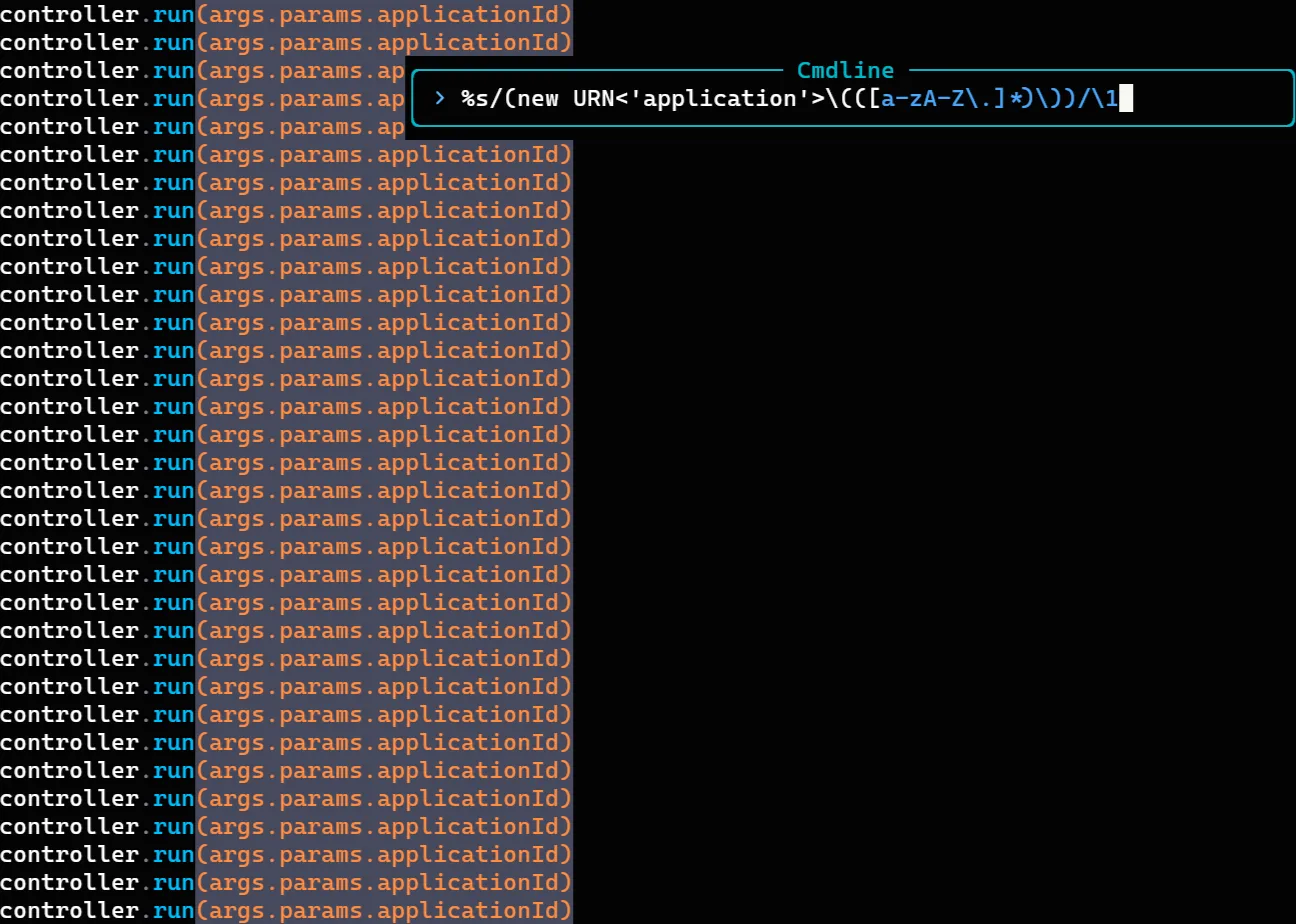
The command itself looks pretty complex, but let’s break it apart to make it easier. Here I’m:
- Taking everything that is
(new URN<'application'>( - Creating a group containing
[a-zA-Z\.]*, meaning all the letters and the dot - Taking the trailing
)) - Replacing everything with
\1which denotes the first group we created in step 2
This is something I would never do this “simply” anywhere else.
Other things I noticed#
Besides these small demonstrations, I also noticed some things about Vim that are worth commenting on:
- Macros are very good, but they’re not for every situation
- Learning to deal with buffers and windows is essential, knowing what a buffer is, what a window is, what a pane is and all that
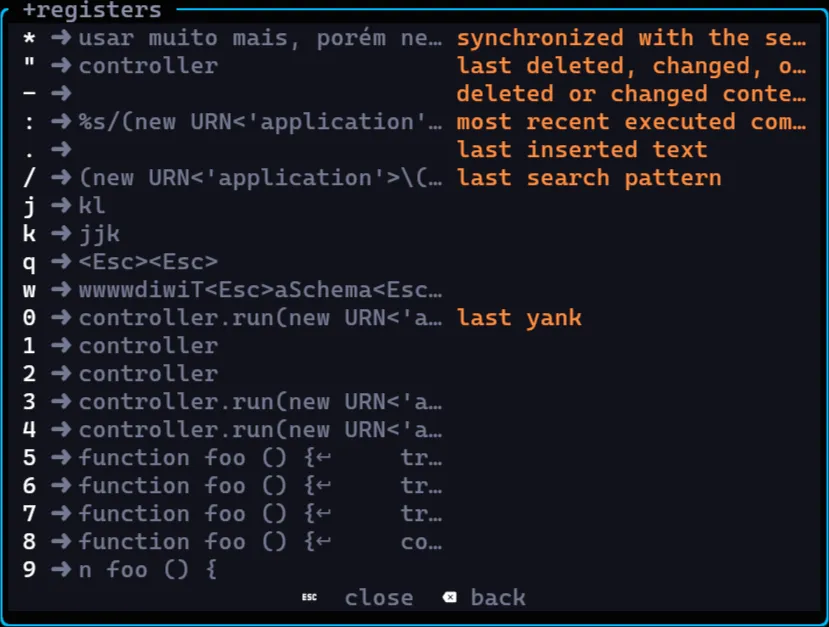
- Vim has a set of registers you can access with
"in Lazy or with:reg, these registers are powerful because they let you, for example, copy multiple texts at once with"<register number>yand paste from several as well with"<number>p, lazy has a pretty nice list of registers
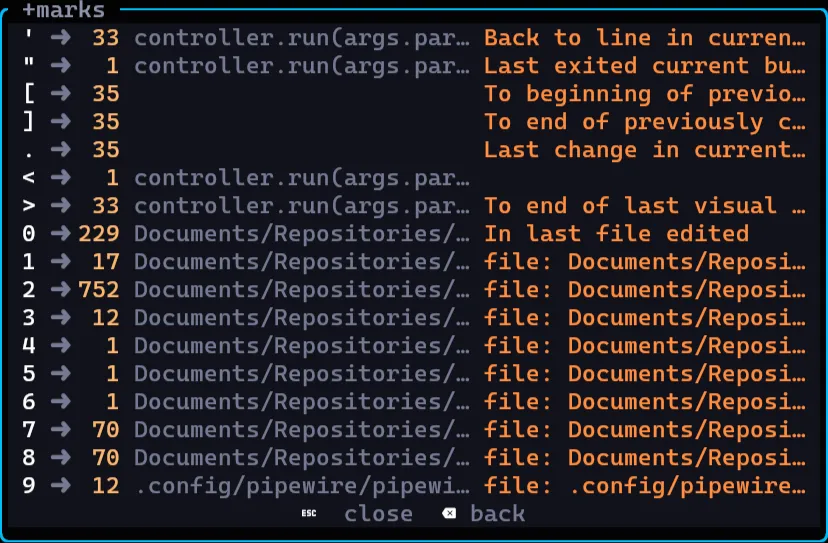
- Besides registers Lazy keeps a list of bookmarks (or just
marks) that let you save a spot in the code and go back there instantly, in any buffer, this is very useful to move between two locations quickly with'', but you can create a mark withm<letter>and then go to it with'<letter>
- Vim has an integrated terminal with
:termbut Lazy has a terminal in a tab at the bottom just like VSCode which lets you use Vim commands normally, but I found it a bit easier to use another tab of the same terminal mainly because this can cause lag in the editor.
Verdict, was it worth it?#
After 6 months using it nonstop, I can say this was the best choice I’ve ever made. How fast and instant Vim is is incredible, using the keyboard instead of the mouse for movement and for actions inside the editor is orders of magnitude faster and more efficient than using a traditional mouse (even though neovim supports the mouse).
The integration between the editor and what you’re doing and the “flow” state you get into being on a black screen with no distractions is simply incredible. Plus everything gets much faster and much more efficient as you pick up more tips and learn more things about Vim.
I think the main thing for me is that I can see I’m improving, it’s easy to see an improvement, it’s easy to understand what’s happening, the editor is intuitive once you learn the basic concepts it operates under. And realizing there’s constant improvement and constantly discovering new things, new keys, new combinations, new workflows is simply incredible, even for an editor that’s over 40 years old.
If you’ve already tried using Vim, leave your comment on my socials! I really want to know how your experience with Vim was!
See you around!