Node.js 20 is out! Learn about the new features
Another year, another Node version is available! And as usual, I’ll share all the coolest new features here in this post so you don’t miss anything!
Node v20 is a very important version because, being an even-numbered release, it will become the next LTS eventually!
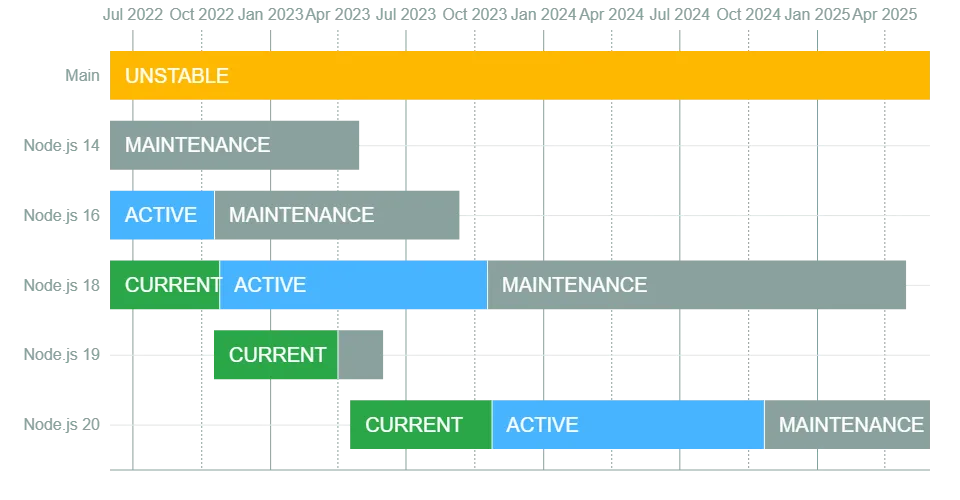
Currently, we have version 18 as the active version until October 2023, then we have version 19 which acts as an intermediate testing version that remains available until the release of the new version 20, which will replace version 18 as the active version in October.
Permission System#
Node is following Deno‘s lead again. To give some context, Deno has a permissions system for files, where each executable has specific permissions to perform tasks like reading files, network access, environment variables, and so on.
So, for example, if we want to run a program that reads a file, we need to execute it with a flag called --allow-read. Similarly, Node has just implemented an experimental permissions system for running programs.
Initially, the implemented permissions are:
- File system access with the
--allow-fs-readand--allow-fs-writeflags - Restrict access to spawning child processes with
--allow-child-process - The same applies to worker threads with
--allow-worker
You need to start Node with the --experimental-permission flag along with the desired permissions when starting your program. So for example, a program that can read and write to the entire file system would look like this:
$ node --experimental-permission --allow-fs-read=* --allow-fs-write=* index.jsLike Deno, you can specify which folder and file this program can read:
$ node --experimental-permission --allow-fs-write=/tmp/ --allow-fs-read=/home/index.js index.jsAnd just like Deno, you can check permissions programmatically. If you enable the --experimental-permission flag, you’ll have access to the permission object in process. With it, you can check whether permissions exist and have been granted. For example:
process.permission.has('fs.write'); // trueprocess.permission.has('fs.write', '/home/nodejs/protected-folder'); // trueAdding this permissions system is really important because it shifts the runtime toward a security-focused vision, which is one of Node’s major weaknesses today.
Test runner is stable#
Finally we have a stable test runner in Node.js! And we won’t need other libraries like Jest, Ava, Mocha, and so on. Version 20 includes changes that made the runner stable, making it possible to run your tests in production!
I wrote an article about Node’s test runner a while back, where I talk about what the runner had, but now we have more features like watch mode, mocking, and the ability for node --test to run files in parallel.
Here’s an example from Node’s site showing all its new features:
import { test, mock } from 'node:test';import assert from 'node:assert';import fs from 'node:fs';
mock.method(fs, 'readFile', async () => "Hello World");test('synchronous passing test', async (t) => { // Test passes because no exception is thrown assert.strictEqual(await fs.readFile('a.txt'), "Hello World");});Performance#
As a general trend, Node is getting faster. With the upgrade of Ada, a C++ URL parsing library, the cost of parsing a URL and performing other basic operations has dropped significantly. For example, the cost of initializing an EventTarget object was cut in half, which means all libraries and code using it will get faster.
Similarly, other APIs are being optimized and modified to become even faster so that the runtime as a whole is improved.
Single Executable Applications (SEA)#
Following deno compile, Node is also bringing initial support for files compiled as a single executable, containing all the tools needed to run the runtime and your code even if Node isn’t installed on the machine.
This is amazing because it allows Node applications to be installed much faster and much safer, since you can, for example, start a container from scratch with just your application running inside. This drastically reduces the attack surface.
The problem is that we still can’t send more than a single file to be executed as a SEA, but we have initial support that requires a prepared blob and an initial configuration file like this:
{ "main": "hello.js", "output": "sea-prep.blob"}And then the execution looks like:
$ node --experimental-sea-config sea-config.jsonUsing a configuration file is both good and bad because, while we need to pass an entire file to Node, we can still open new use cases where multiple resources can coexist in the same binary.
Other features#
- Official ARM64 support for Windows
- The Web Crypto API implementation now validates arguments according to the WebIDL specification
- WASM interface support in Node is growing