Why You Should Reconsider Using Date.now
Measuring time is something we do routinely, whether walking down the street or waiting for an important meeting, and since time is an important part of our lives, it’s natural to expect that when we’re coding something, it should be too.
The idea for this article came when I noticed some inconsistencies in measuring time using our beloved Date.now, the most standard way to measure time in a JavaScript application.
While I was looking for some alternatives for measuring time using Node.js, I came across this excellent article by Deepal about how this method can be quite problematic. Although you probably won’t see some of these cases many times in your life, it’s worth understanding what’s happening behind something as simple as measuring time.
Measuring time#
Historically, the standard method for measuring time in electronic systems is counting seconds from January 1st, 1970, the so-called Unix timestamp.
While today the Unix Epoch, as it’s called, is widely used by most programming languages and operating systems around the world, there are at least 12 other ways to count time that are far from small enough to ignore, but I’m not going to tell that whole story here (at least not in this article).
The thing is that the representation by counting seconds requires some kind of synchronization because there are small irregularities in time counting within processors.
Common computers don’t have a dedicated processor for counting time, so the same core that’s processing your Netflix series is being used to count time on your machine, this is known as time sharing. Originally designed to share CPU time among different users of a system, but later implemented directly within operating systems under the name of context switching.
The whole idea is that your processor is dividing processing time with all the processes running on your system, so it can’t give full attention to just your clock, and thus we always have a problem called clock drifting.
Clock Drifting#
Time drift is an old problem that happens in any system that needs a certain level of precision to run, this ranges from clocks to pendulums.
In computers and clocks specifically, time drift is caused by the lack of precision of equipment like watches, wall clocks and so on, how many times have you had to adjust your wall clock because it was different from your phone’s clock?
And this even applies to computers not only because of CPU time differences, but also because computers use quartz clocks to measure time locally. And a quartz clock has a time drift of approximately 1 second every few days.
In fact, time drift in computers is widely used to create random number generators, because the drift of the clock itself is naturally random.
So where does programming fit into all this? Imagine we have common code like this:
const inicio = Date.now()// alguma operação aquiconst fim = Date.now()console.log(fim - inicio)The idea is that it works normally, I’ve used this type of code a lot and also others like console.time, for example:
console.time('contador')// Fazemos alguma coisaconsole.time('contador')// mais alguma coisaconsole.timeEnd('contador')The problem is exactly time drift within computers, if you need to synchronize some kind of time with another computer somewhere else in the world or with another clock that’s outside your own machine, you may get an unusual result.
In an example, let’s imagine we have a clock that experienced time drift:
const { setTimeout } = require('timers/promises')
const inicio = Date.now()
adiantarTempo() // Adiantando o relógio 1 minuto para a frenteawait setTimeout(2000) // Simulando uma operação de 2s
const fim = Date.now()console.log(`Duração ${fim - inicio}ms`)If you run this code, you’ll get an output similar to: Duração 7244758ms, that is, 7 seconds, for an operation that should have taken 2…
I’ll put the code for this complete test (with the code to advance the clock) at the end of the article, so you can also replicate the experiment.
If we reverse the order:
import { setTimeout } from 'node:timers/promises'
adiantarTempo() // Adiantando o relógio 1 minuto para a frente
const inicio = Date.now()await setTimeout(2000) // Simulando uma operação de 2sconst fim = Date.now()console.log(`Duração ${fim - inicio}ms`)We’ll get the expected output of Duração 2002ms. So here we learned that Date.now gets the time as it is right now in the system.
Now you might ask: “But when would this happen without me forcing it?”. And the answer is: All the time.
NTP - Network Time Protocol#
To fix the time drift problem in computers, there’s NTP, which is a universal time transmission protocol. Basically it’s a server that listens for requests and responds to those requests with the current time, adjusted through an atomic clock, which is much more precise.
The problem is that we don’t have control over NTP, it’s implemented by the OS to synchronize the local clock with a central clock whenever there’s apparent time drift, in other words, the OS will correct the clock automatically several times during the day without you noticing.
So now let’s do the reverse example:
import { setTimeout } from 'node:timers/promises'
adiantarTempo() // Adiantando o relógio 1 minuto para a frenteconst inicio = Date.now()setImmediate(() => corrigeNTP()) // Corrige o tempo pelo NTPawait setTimeout(2000) // Simulando uma operação de 2sconst fim = Date.now()console.log(`Duração ${fim - inicio}ms`)And now we have a NEGATIVE result without us having to do anything. See where the problem can happen?
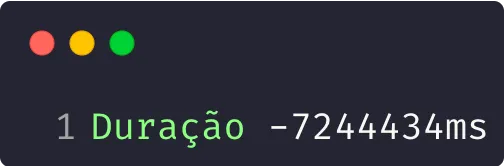
If we’re measuring time while the computer makes an NTP correction, we’ll have a big problem precisely because our measurements will be completely incongruous.
An interesting observation is that the time we see in the output is exactly the time of the NTP correction
Monotonic Clocks#
The solution to this problem is a monotonic clock, which is simply a counter that starts at some point in time (in the past) and moves toward the future at the same speed as the system clock. In other words, a counter.
Since it’s just a counter, obviously we have no use for this type of functionality other than counting the difference between two intervals, but the important part is that, precisely because it has no use as a time measure, it’s not affected by NTP. Therefore, any difference between two points of a monotonic clock will always be a positive integer.
Most languages have functions to handle regular clocks and counters like these, Node.js is no different, we can use require('perf_hooks').performance.now() and process.hrtime.bigint() (or process.hrtime() in older versions).
Let’s use the same code, but instead of using Date.now, we’ll modify it to use the perf_hooks counter:
import { setTimeout } from 'node:timers/promises'import { performance } from 'node:perf_hooks'
adiantarTempo() // Adiantando o relógio 1 minuto para a frenteconst inicio = performance.now()setImmediate(() => corrigeNTP()) // Corrige o tempo pelo NTPawait setTimeout(2000) // Simulando uma operação de 2sconst fim = performance.now()console.log(`Duração ${fim - inicio}ms`)And we’ll have the output we expect, 2000 milliseconds:
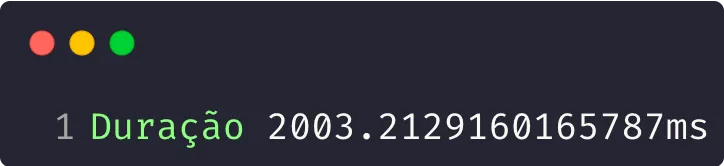
Remember that setTimeout and setImmediate themselves are subject to some small delays because of what happens in the Node.js Event Loop, that’s why the difference.
Conclusion#
Now, knowing that we can have problems using Date.now, you already know there’s another solution to count durations between scripts! Use perf_hooks to avoid NTP problems and all the others I mentioned here.
Remember that in Deepal’s article there’s also a third experiment that’s super fun to do where we can compare the results of the other two experiments together, it’s worth taking a look!
Another great resource is this talk by Dr. Martin Kleppmann about time drift in distributed systems that’s definitely worth watching.
I’m wrapping up here, if you want to know more about the code I used to generate these examples and replicate what I did here on your machine, continue to the article’s appendix!
See you!
Appendices#
Before sharing the code, there are some notes:
- This code only works on macOS, but you can freely modify it to run on Linux
- You’ll probably need to use
sudo - You need to have a Node version compatible with ESModules (>=12)
- This is a more updated version of the code in the article I mentioned
import { execSync } from 'node:child_process'import { setTimeout } from 'node:timers/promises'import { performance } from 'node:perf_hooks'
function adiantarTempo () { const toTwoDigits = (num) => num.toString().padStart(2, "0") const now = new Date() const month = toTwoDigits(now.getMonth() + 1) const date = toTwoDigits(now.getDate()) const hours = toTwoDigits(now.getHours()) const fakeMinutes = toTwoDigits(now.getMinutes() + 1) const year = now.getFullYear().toString().substring(2, 4)
// executa o comando do OS execSync(`date -u ${month}${date}${hours}${fakeMinutes}${year}`)}
function correcaoNTP () { const output = execSync(`sntp -sS time.apple.com`) console.log(`Tempo corrigido: ${output}`)}
const esperar2Segundos = () => setTimeout(2000)
// ------- Experimento 1: Relógios normais{ adiantarTempo() const timeNow = Date.now()
setImmediate(() => correcaoNTP())
await esperar2Segundos()
const endTime = Date.now() const duration = endTime - timeNow console.log(`Duração\t: ${duration}ms`)}
// ------- Experimento 2: Relógios monotonicos{ adiantarTempo() const timeNow = performance.now()
setImmediate(() => correcaoNTP())
await esperar2Segundos()
const endTime = performance.now() const duration = endTime - timeNow console.log(`Duração\t: ${duration}ms`)}