"What's New in Node.js 18!"
As I always do here, let’s talk about another sensational Node.js release. Version 18 was announced in April 2022! And you must be wondering: So what?
Whether you’re a JavaScript dev or not, this Node.js version brought a series of very interesting changes to the runtime itself, and some of these changes are so important that they can inspire other runtimes to do the same, so let’s take a look at everything we have here!
But first, as I always do in articles like this, let me explain a bit more about this Node.js release process.
The Node.js release process#
Like many other large projects that rely heavily on community, Node.js has an extremely well-organized calendar and structure for new versions and releases.
All even versions are considered “production-ready” versions, while odd versions are test and development versions. In other words, odd versions are like a staging environment, with more structured tests, before moving to a stable version. Generally new features are tested with the community in these versions and, after some time, they are promoted to a stable version.
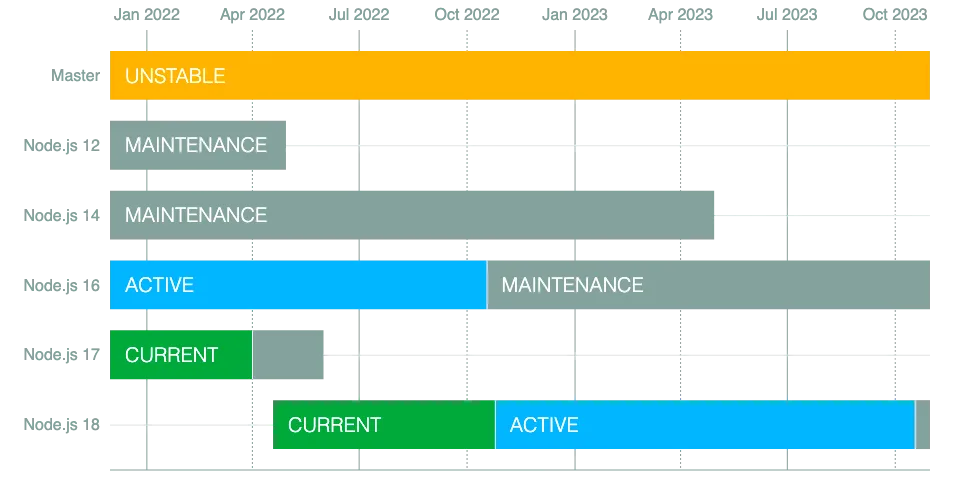
Even versions are released in April and are designated as Current until October, when they become the active version, moving the previous even version to the state of maintenance.
The difference between an Active and Current version is that active versions are considered LTS or Long Term Support, which receive security updates and maintenance for 3 years. There are always 3 versions in maintenance state and one LTS version, all versions older than 3 years are deprecated, which is what happened with version 10 now that version 18 was released.
You can see all the dates and timelines for the previous and upcoming versions on the official releases website.
Here is the current state:
- Node v12: reached end of life in April 2022
- Node v14: remains in maintenance until April 2023, then it will be abandoned
- Node v16: is currently the LTS version until October 2022, then enters maintenance until April 2024, when it will be abandoned
- Node v18: is the Current version until October 2022 when it becomes the next LTS until April 2025
Global Fetch available by default#
In Node version 17, it was announced that the fetch API, already present in most JavaScript browsers, would also arrive in Node. This means we would no longer need external packages like the famous axios and got to make HTTP requests more easily, without needing Node’s native HTTP client, which is, let’s say, a bit complex.
This client is implemented using one of the most interesting libraries ever made for Node, undici, an HTTP/1.1 client written from scratch, completely in JavaScript for Node.js.
This implementation was originally added through an experimental flag in Node that enabled the feature, but now we have fetch enabled by default.
See how we can use this new client:
const res = await fetch('https://nodejs.org/api/documentation.json');if (res.ok) { const data = await res.json(); console.log(data);}In addition to fetch, other global variables were added: Headers, Request, Response and FormData
Be careful not to confuse native
RequestandResponsetypes with those from Express when using TypeScript
Other Global APIs#
- An experimental version of the WebStreams API was added, allowing the use of streams natively in the Web without the need for local integrations
- A new experimental
Buffertype,Blob, was also added to the global APIs - With additions to
worker_threads,BroadcastChannelis now also exposed as a global API
Native Test Runner#
One of the features I’ve been most excited about for years is native test support. That’s right, no more mocha, jest, ava and others.
Now you can run all the software tests you already have natively through the test module, which requires the node: prefix to be loaded:
import test from 'node:test'import assert from 'node:assert'
test('top level test', async (t) => { await t.test('subtest 1', (t) => { assert.strictEqual(1, 1); });
await t.test('subtest 2', (t) => { assert.strictEqual(2, 2); });});The API is fully documented, of course it will take some time for it to reach the level of other libraries like jest, if it ever does.
I say that because the main purpose of this library is to reduce the barrier to entry for creating automated tests using Node.js, not to replace the main libraries we already use. This way more systems can have automated tests and will be much safer.
However, there are some implementation considerations to keep in mind:
- Node will execute all test files when you initialize the runtime with the
--testflag, each test will be run in its own isolated process. - Tests can be synchronous or asynchronous. Synchronous tests are considered valid if they don’t throw any exception. Asynchronous ones, as expected, are valid if they don’t reject a Promise
- Subtests created with the
tcontext, which we’re passing in the example, will be executed the same way as the parent test - If you want to skip a test, just pass an options object with the
{ skip: 'mensagem' }flag to the test object like in this example:
test('pulado', { skip: 'Esse teste foi pulado' }, (t) => { // nunca executado})Currently the options object accepts three types of keys:
concurrency: Defines how many tests run in parallelskip: Can be a boolean or a string. If it’s a booleantrue, the test will be skipped without any message, otherwise the message will be displayedtodo: Same as the previous one, accepts a boolean or a string. If it’s converted totrue, the test will be marked as To-Do.
The test runner is still experimental and requires flags, but that should change in upcoming versions.
The node: prefix#
Let me explain a feature that didn’t necessarily come with Node 18 itself, but is an important change that sets a precedent for future modules.
In the test runner example above, you can see that we’re importing the assert and test modules with a node: prefix. This marks the beginning of what’s called prefix-only core modules.
This already existed before, but it wasn’t mandatory. Until now, all native modules like fs, assert and others worked the same way whether imported with the node: prefix or not. Today that is no longer the case.
node:test is the first native module that requires the node: prefix to import. If you don’t use the prefix, the runtime will try to load a community module called test, a userland module.
This is an amazing change because with the node: prefix being introduced in new modules (and probably as a breaking change in some future version for older modules), we’ll have the ability to have two modules with the same name, one in userland and another in Node’s core.
As a result, since core modules take precedence over user modules, contributors to Node can now create modules without worrying about name conflicts on NPM.
On the other hand, this creates two issues. First, there’s a clear inconsistency between existing modules like fs and http and new modules that require the prefix. Solving this would require mandating the prefix for all modules, not just new ones.
Additionally, a security issue emerges: typosquatting, when someone creates a module on NPM with the same name or a very similar name to an original package, such as naming express as expres on NPM, so that unaware developers can download the malicious package instead of the original. These problems aren’t the responsibility of the Node team, especially since NPM already has some security measures against this, but in any case, it’s worth noting.
Userland Snapshots#
An interesting feature that emerged in version 18 is the use of snapshots during Node runtime build time. This is particularly useful for teams that need to synchronize and improve startup performance across their products.
Starting from this new version, it will be possible to compile a Node.js binary with a customized initialization snapshot using the --node-snapshot-main flag. For example:
$ cd /path/to/node/source$ ./configure --node-snapshot-main=marked.js# Build do binário$ make nodeBuilding the Node binary with an entrypoint like marked.js, a Markdown parser, will initialize the module and load it in globalThis, so you can use it natively like:
const html = globalThis.marked(process.argv[1]);console.log(html);And execute the compiled binary with:
$ out/Release/node render.js test.mdOf course, this is for very specific use cases where you need to recompile the entire Node runtime to include one or more module entrypoints directly in the binary to improve startup time.
As a follow-up, the team is working on PRs #42617 and #38905, which respectively:
- Allow the module to be loaded without an initialization script, which will transform the entire binary into the user’s application. Your final binary would be executed like
$ out/Release/markedNode test.md, a step closer to complete Node binaries like Go does - Allow adding entrypoints without needing to recompile the entire runtime
V8 Updates and More#
Version 10 of V8 brings some new features:
- Support for the new
findLastandfindLastIndexmethods on arrays, which work the same asfindbut find the last value instead of the first - Improvements to the
Intl.LocaleAPI - Performance improvements for class property initialization and private methods so they’re as fast as normal properties
- JSON module import was officially removed from experimental status