What's New About JavaScript Signals
In 2023, a TC39 member named Rob Eisenberg mentioned that he wanted to create a common standard for signals and it really turned into a proposal at TC39!
But before anything else, what are signals? What do they do? What’s the main idea? Let’s understand all of this now!
What are signals#
Signals are a kind of state machine. Anyone who has written React code should be quite familiar with something like this:
const [state, setState] = useState()The idea of a state is that we have a place where it’s originally set. Many places where this setup is called, meaning many places that contribute to the state’s final value (these are called sources), and that value affects the state of multiple subcomponents (called sinks).
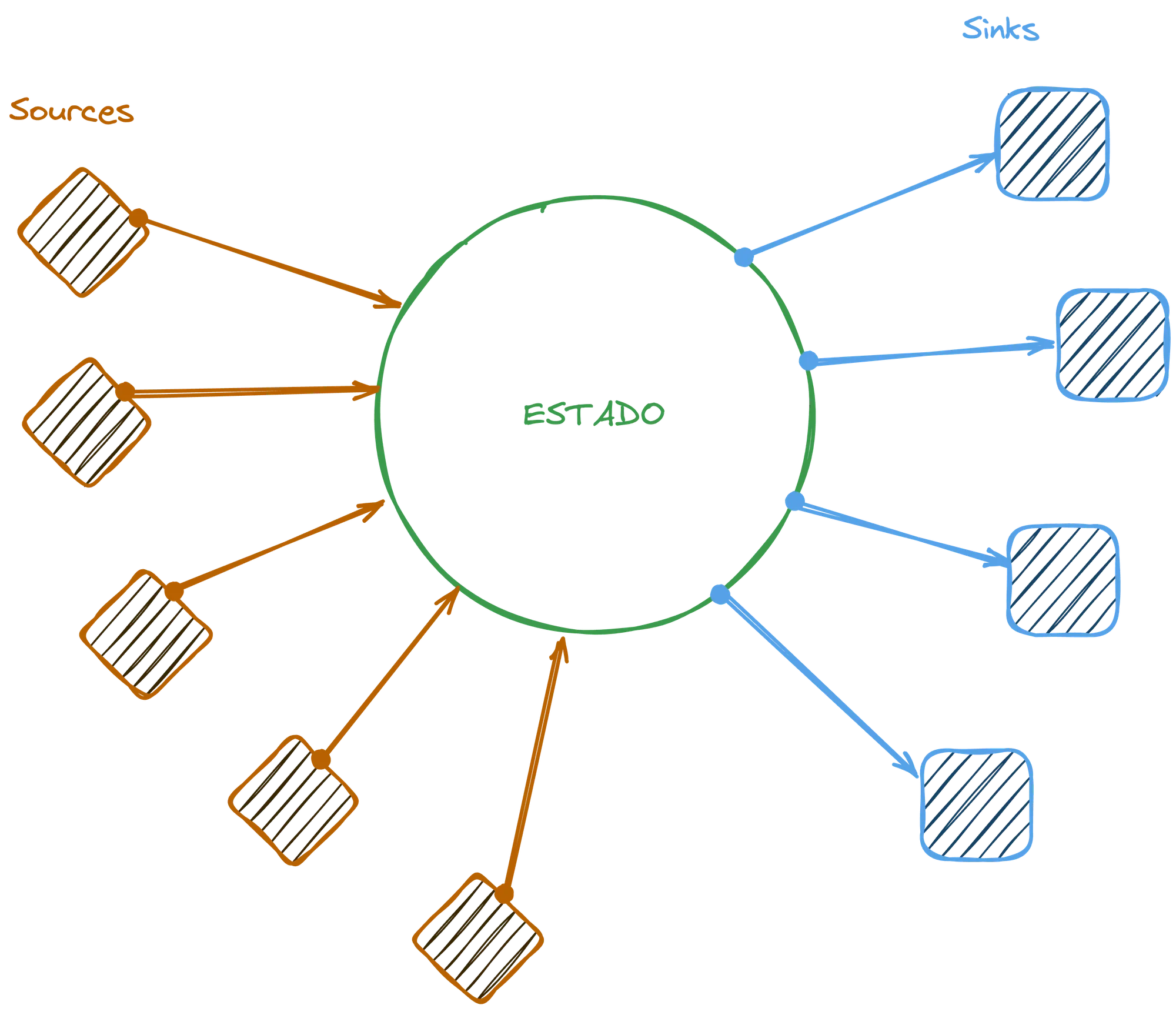
A sink can also be a source for another state or even for another sink, so overall it becomes a directed acyclic graph that directs the data flow in a single direction:
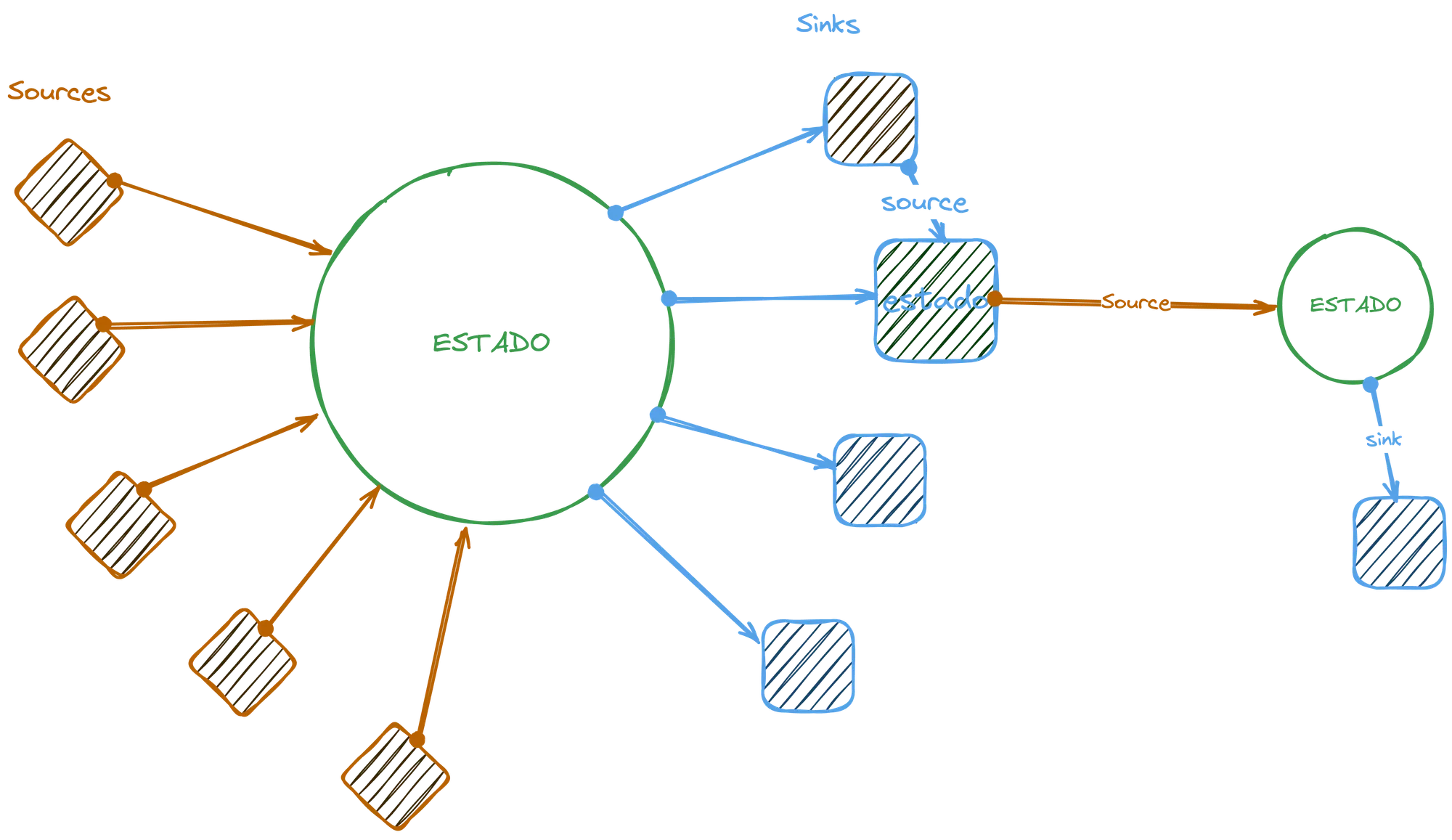
If we convert this to code, it’s as if we have an initial state that can be modified by multiple sources and that can also affect multiple sinks. For example, in the proposed syntax itself we would have this:
const counter = new Signal.State(0) // useState(0)The counter would be our state. Unlike what React does with an array of options, one with the variable and the modification function, the counter has a get() method to fetch the current value and a set() method to update:
counter.get() // 0counter.set(1)counter.get() // 1Besides this type of state, we can have a sink, that is, a value that depends on that original state, so the counter is acting as a source. A classic example is having computed states, to know whether the value inside the counter is even, for example.
In React we would have to create some kind of memoization:
const [counter, setCounter] = useState(0)const isEven = useMemo(() => counter % 2 === 0, [counter])In the case of signals we could use the computed property:
const counter = new Signal.State(0)const isEven = new Signal.Computed(() => counter.get() % 2 === 0)
counter.get() // 0isEven.get() // truecounter.set(1) // 1isEven.get() // falseHere our data flow goes in only one direction:

If we want to add another signal to compute the result, we can do it like this:
const counter = new Signal.State(0)const isEven = new Signal.Computed(() => counter.get() % 2 === 0)const parity = new Signal.Computed(() => isEven.get() ? "even" : "odd")
counter.get() // 0isEven.get() // truecounter.set(1) // 1isEven.get() // falseNow isEven is at the same time a source and a sink.

This means that if we change the original source, the counter, we will automatically change both sinks. Basically that’s the whole idea of signals.
Clean/Dirty states#
It’s quite common in applications that use forms, for example, to have a state called clean and another state dirty. Clean means the form hasn’t been changed, dirty means the user has already made some modification to that form.
Angular.js had another concept also called pristine which was the definition when the component had just been created. Once the user modified it, it became dirty, but if the field was cleared, it would become clean, that is, pristine could only be reached on the initial load.
Even though we could do everything we did before with function composition (and not have this graph), we would have to recalculate all states constantly. For example, when I changed the counter from 0 to 1, we would automatically recalculate the entire state.
With this graph model, what we can do is send a signal to the sinks saying “my value has changed”, and the sink marks that its source has changed, sending an equal signal to its sinks and so on.
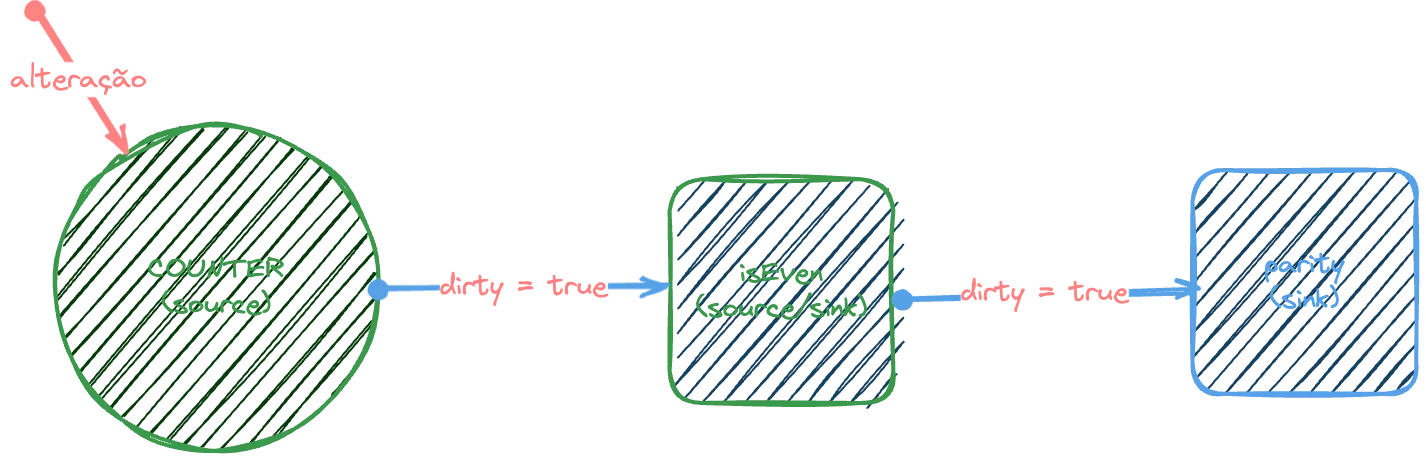
If we have other states with other sinks, we don’t need to recalculate them because they wouldn’t be affected. And we also don’t need to constantly check for changes from the sinks to the sources. What happens is that once the value of, for example, isEven is accessed with isEven.get(), we check if it’s dirty and execute the computed function and return the value, otherwise we don’t need to recalculate anything.
Here’s some possible code for what we want to do:
let dirty = truelet val
function Computed(fn) { if (dirty) { val = fn() dirty = false } return val}Other uses of signals#
Besides using them with basic APIs like these, Rob also proposes some use cases in his article about Signals, and the first one is using Signals to create a self-updating class:
export class Counter { #value = new Signal.State(0);
get value() { return this.#value.get(); }
increment() { this.#value.set(this.#value.get() + 1); }
decrement() { if (this.#value.get() > 0) { this.#value.set(this.#value.get() - 1); } }}
const c = new Counter();c.increment();console.log(c.value);In this case I see little value, because we could simply write it the same way using:
export class Counter { #value = 0
get value() { return this.#value }
increment() { this.#value = this.#value + 1; }
decrement() { if (this.#value > 0) { this.#value = this.#value - 1; } }}
const c = new Counter();c.increment();console.log(c.value);We would have exactly the same result. But of course, this is a simple example. When we have complex computations inside a class, it makes sense not to have to run them every time.
He also proposes using decorators, creating a decorator called signal:
export function signal(target) { const { get } = target;
return { get() { return get.call(this).get(); },
set(value) { get.call(this).set(value); },
init(value) { return new Signal.State(value); }, };}And then using it on the class property:
export class Counter { @signal accessor #value = 0;
get value() { return this.#value; }
increment() { this.#value++; }
decrement() { if (this.#value > 0) { this.#value--; } }}Conclusion#
While the proposal is still at stage 1, I think it can make some progress by the end of next year (as I mentioned in my predictions), if that happens, React’s entire state model could become obsolete, as well as the state models of all frontend frameworks, because JavaScript would implement this natively.
I’m particularly excited about this possibility. What about you? Let me know on my socials!