"What is NPM package provenance?"
When we’re talking about web development, one of the biggest problems we face is security. Especially when we’re talking about Node.js development with packages distributed through NPM.
One of the biggest sources of attacks on enterprise systems comes through external packages that are installed without proper care. This has been tested a few times and continues to be a problem.
The problem isn’t even downloading the package, but rather not being able to be sure that the package came from where you expect it to come from or was published by who you expect. But that’s about to change.
NPM Package Provenance#
Recently NPM announced a new feature, package provenance. This will be the way you can verify that a package was made by whoever created it, and that it was also published from a trusted source.
The goal of provenance is not just to sign the code, but to create a link from the package to where it came from and what the original artifact was that generated it. One way would be to anchor the package to whoever created it through a private key, so whoever made the package can sign it with the private key and distribute a public key for verification.
However, this approach is a problem, because the point of failure is precisely the key. If it leaks, then all the security falls apart. That’s why they thought of a quite clever way to validate package ownership: anchor the identity to the server where it came from.
This creates a much stronger security point, since you need to replicate an entire infrastructure to replicate the package’s signature, which is not as trivial as stealing a key.
What’s the Secret?#
For this, they are using some solutions from Sigstore, especially one that accepts tokens in OpenID Connect format to create certificates that have a very short lifespan and are used only to sign provenance requests.
And that’s the big insight, because for each package publication, a key pair is generated that is used to sign the certificate, these keys are thrown away and replaced by a validity certificate. No one can sign the code anymore, but anyone who has the public certificate can validate that it was generated by a trusted source, that is, nobody has a key.
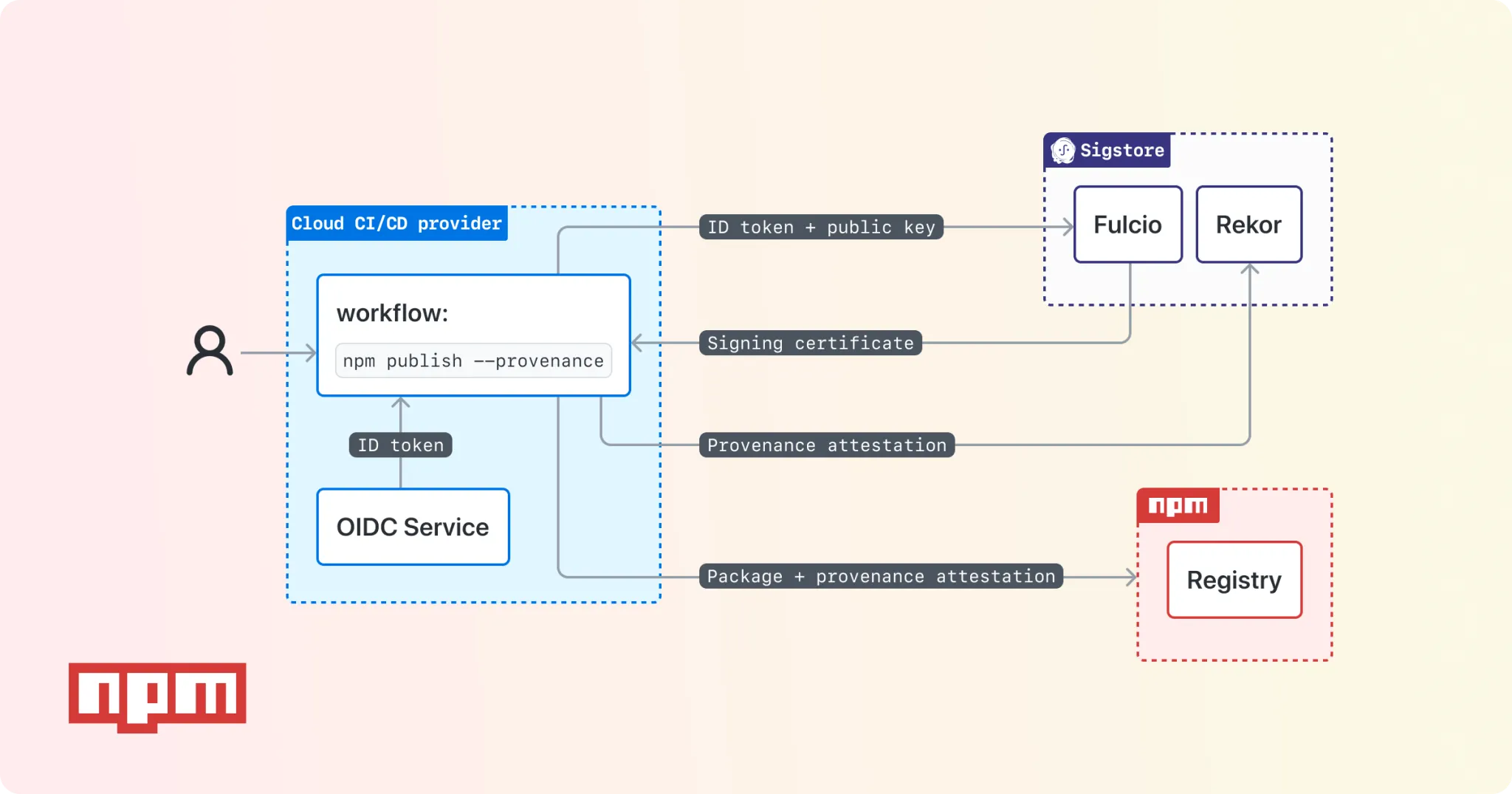
The second part of this process is verification, which is done in a service called Rekor, which is a public transaction log, basically all provenances end up there and are completely public for everyone to see. So you can download the log that contains the entire signed CI/CD environment and verify if it’s genuine with the command:
npm audit signaturesThe Importance of CI/CD#
For all this to work, the CI/CD metadata needs to be trustworthy, especially because the information we’re trying to sign is precisely where the package was built.
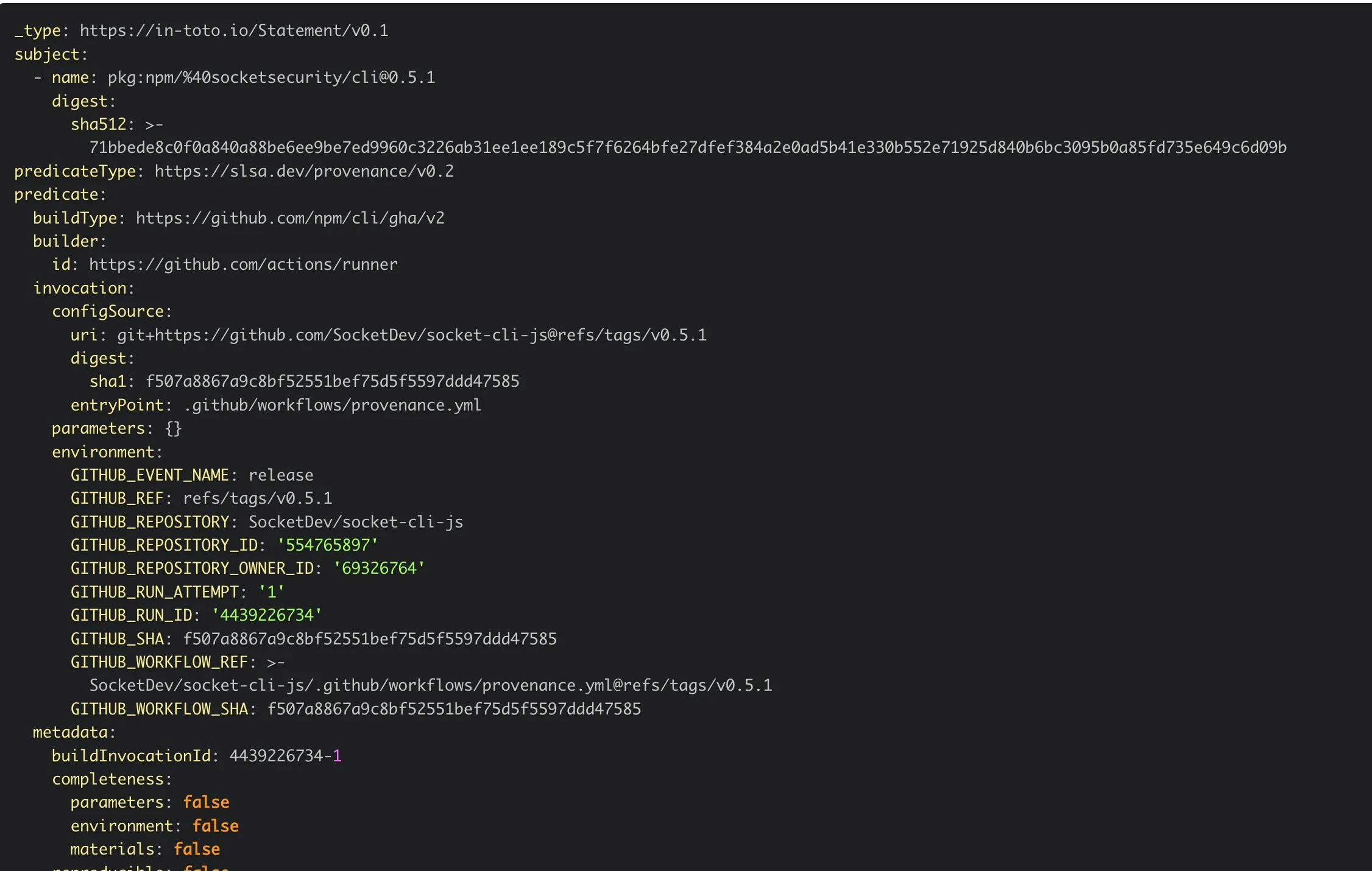
The information I’m talking about includes unique container data where the CI process was started, such as hostnames, environment variables, and so on. In the case of Github Actions, this is the provenance document that is signed:
_type: https://in-toto.io/Statement/v0.1subject:- name: pkg:npm/sigstore@1.2.0 digest: sha512: 16bf7e5b59e40522190a425047b8c39ffcc8d145cdb15a69fbb9834240a764e2311bda7ac8d5c1c7dc67b47b1f532607139e570e4915577fab61bae4cc079eb0predicateType: https://slsa.dev/provenance/v0.2predicate: buildType: https://github.com/npm/cli/gha/v2 builder: id: https://github.com/actions/runner invocation: configSource: uri: git+https://github.com/sigstore/sigstore-js@refs/heads/main digest: sha1: 5b8c0801d1f5d105351a403f58c38269de93f680 entryPoint: ".github/workflows/release.yml" environment: GITHUB_EVENT_NAME: push GITHUB_REF: refs/heads/main GITHUB_REPOSITORY: sigstore/sigstore-js GITHUB_REPOSITORY_ID: '495574555' GITHUB_REPOSITORY_OWNER_ID: '71096353' GITHUB_RUN_ATTEMPT: '1' GITHUB_RUN_ID: '4503589496' GITHUB_SHA: 5b8c0801d1f5d105351a403f58c38269de93f680 GITHUB_WORKFLOW_REF: sigstore/sigstore-js/.github/workflows/release.yml@refs/heads/main GITHUB_WORKFLOW_SHA: 5b8c0801d1f5d105351a403f58c38269de93f680 materials: - uri: git+https://github.com/sigstore/sigstore-js@refs/heads/main digest: sha1: 5b8c0801d1f5d105351a403f58c38269de93f680To generate your own provenance file, NPM created a flag called --provenance, so just run npm publish --provenance and your package will be signed.
But then we have the question: Why get data from CI? Simply because it’s not easy to alter this data. Especially because, even if you try to modify the machine process by injecting a child_process, known servers like GitHub’s will still have information you can’t remove, such as IP addresses, for example. This way, NPM can cross-check the data in the sent provenance against the data that GitHub itself returns.
Because of this, we can’t generate provenances locally, that is, you won’t be able to use
npm publish --provenanceon your local machine because, unlike GitHub, your machine is not a trusted source of data.
What Happens Locally?#
Socket published a quite interesting article about how the package installation or publication process works. I’ll try to summarize it here.
When you publish a package with provenance:
- The package is compressed into a
.tar - NPM verifies your credentials and access token
- The package is sent to your registry normally
- The registry fetches the metadata from the connection (not from the package)
- NPM obtains a certificate to sign your package that is populated with information that GitHub will provide directly from their infrastructure
- NPM uses this certificate to create a unique signature of the tarball
- This signature is recorded in Rekor
- The tarball is saved in the registry
- NPM includes all metadata and the location in Rekor inside the package at
https://registry.npmjs.org/$PACKAGE/$VERSION#dist
When you install a package that has provenance
- NPM obtains the package metadata
- Downloads the package signature (the checksum)
- Downloads the provenance log information from Rekor
- Downloads the package
- Attempts to match the checksum with the downloaded checksum
- Attempts to match the Rekor metadata with the previously downloaded data
One of the packages you can verify this with is from Socket itself, just access the link https://registry.npmjs.org/-/npm/v1/attestations/@socketsecurity%2Fcli@0.5.1
There, you can enter the document until you find attestations[predicateType === https://slsa.dev/provenance/v0.2].bundle.verificationMaterial.tlogEntries[0].logIndex, which is a log number you can verify in Rekor.
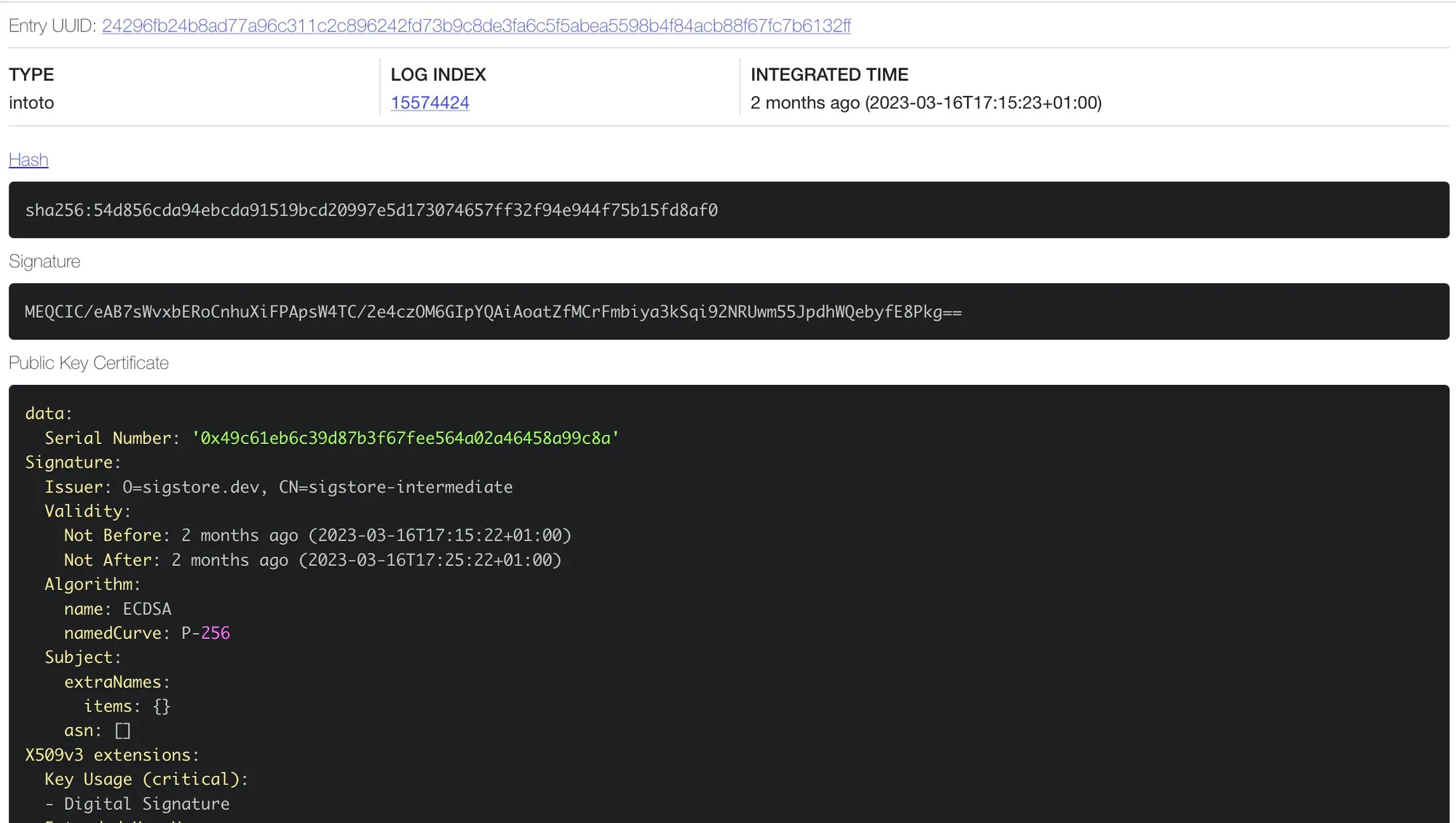
There you can scroll down to the Data section and see that all CI-related metadata is there:
Conclusion#
The provenance process is quite interesting in itself, and it’s an excellent way to protect the package chain that is essential for modern development, but it’s also one of the easiest ways for someone to be hacked.
Currently, only GitHub Actions has verification for provenance, but according to NPM, other CIs are being added.
Footnotes#
-
Take a look at the documentation too, there’s plenty of interesting stuff there ↩