What are errors and what does error.cause do in JavaScript?
Errors are probably the main construct of any programming language. They exist in all of them, we have several names for them: bugs, errors, exceptions, etc.
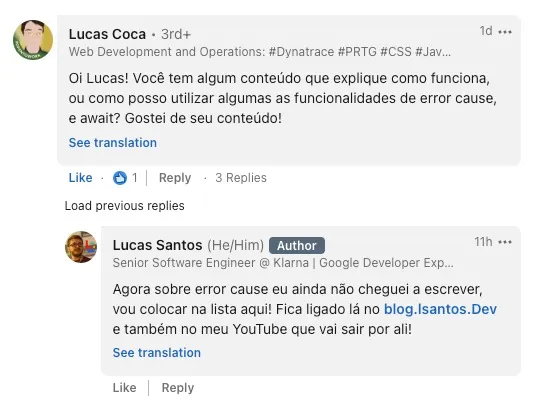
The idea of error handling is not new, in fact there are several guides, both new and old, that show us very well how we can handle most of what we call exceptions. The idea for this article came from a comment on a post on my LinkedIn:
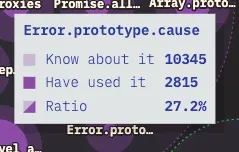
This only became even more real when I saw the results of the State of JS 2022 which showed that, of all the people who knew about the error.cause functionality, only 27% of them had actually used it at some point.
In other words, it’s time for us to learn much more not just about error.cause, but about errors in general. So without wasting any more time, let’s get into a quick and practical guide to what errors are in JavaScript and how you can improve your applications by using them well!
What errors REALLY are#
When we start programming, our greatest fears are directed at the famous bugs! Unexpected errors in the system. These errors are called exceptions in development, because they are a part of the code that was not programmed, therefore, they are an exception to the original programming.
Ideally, all code would be tested in such a way that there were no errors, but unfortunately that’s not possible. Not only because we are humans and don’t have the capacity to fully understand the scenario of any type of problem, but also because, with the arrival of more modern computers, the speed and modularity of applications have surpassed even the computer’s ability to predict errors that might happen. But it’s important to understand that there is a difference between error and exception.
An exception is an error that was raised by the running program through instructions like throw, that is, the error itself is the object that describes what happened, the exception is the mode of transport in which we deliver that error. In other words, the error contains something very important: the context, while the exception is a general description that may or may not contain that context.
Since we can’t get rid of errors, the best we can do is live with them, but it’s not enough to just tolerate errors, the most important thing is to know how to make good use of what is called exception handling, or error handling.
JavaScript is notorious for its mediocre way of handling errors. As a dynamic language that can accept virtually any type of value in its variables, it’s quite difficult to establish a specific error type, and that only gets worse when we add the Web on top of it, for example:
const obterValor = async (id) => { try { const result = await fetch(`https://url.com/${id}`) return result.json() } catch (error) { // ... }}
obterValor(1).then(console.log).catch(console.error)This is a simple example, but the error variable there can receive several types of errors. One of them could be a connection error with the website, another could be that the resource doesn’t exist (so it would be an HTTP error), we could have an error when getting the content and transforming it to JSON (which would be a parsing error), and so on.
But this has existed for years, so how do we deal with most of these errors?
Dealing with multiple errors#
There are several ways to deal with these errors. One of the most common (so common it’s in the MDN examples) is to treat the error message with a switch, like this:
function doWork() { try { doFailSomeWay(); } catch (err) { throw new Error("Failed in some way"); } try { doFailAnotherWay(); } catch (err) { throw new Error("Failed in another way"); }}
try { doWork();} catch (err) { switch (err.message) { case "Failed in some way": handleFailSomeWay(err); break; case "Failed in another way": handleFailAnotherWay(err); break; }}This is probably the worst possible way to deal with different errors. This is because a single wrong comma or some kind of spelling error will drastically change your code. But unfortunately the message field is one of the few fields we have to tell us something or differentiate one error from another. Or is it?
There is another way to deal with errors that is a bit more elegant (and much less dependent on what you write in the error message), which is to extend the Error class of JavaScript and add your own fields. This is my personally preferred approach.
Let’s go back to our previous example. Imagine that our API can return a user error, we can describe that error like this:
class UserNotFoundError extends Error { constructor (userId) { super(`The user was not found`) this.id = userId this.status = 404 this.statusMessage = 'Not Found' }}
throw new UserNotFoundError(45)And then we can verify that error like this:
const obterValor = async (id) => { try { const result = await fetch(`https://url.com/${id}`) return result.json() } catch (error) { if (error instanceof UserNotFoundError) { // return the error response with 404 } // if not, we return the error normally }}
obterValor(1).then(console.log).catch(console.error)But this is an HTTP call error, that is, we could have many more errors like these. We could go even deeper and create a base class for all errors that are related to HTTP. That would make sense because all HTTP errors will have the same properties like status and statusMessage, so why don’t we do it like this:
class HTTPError extends Error { constructor(message, status, statusMessage, context) { super(message) this.status = status this.statusMessage = statusMessage this.context = context }}
class UserNotFoundError extends HTTPError { constructor (userId) { super(`The user was not found`, 404, 'Not Found', {userId}) }}
throw new UserNotFoundError(45)This way we can create automatic handling for any HTTP error like this:
const obterValor = async (id) => { try { const result = await fetch(`https://url.com/${id}`) return result.json() } catch (error) { if (error instanceof HTTPError) { res.status = error.status res.json({ message: error.message, context: error.context }) return } // if not, we return the error normally }}
obterValor(1).then(console.log).catch(console.error)We can extrapolate this approach to create what we call errorMappers, which are essentially large switch statements that will give us the user response according to an input error. An example is this file I made for the cover generator here on the blog.
When we’re dealing with one error at a time, that’s all fine, but the problem comes when we have to chain these errors together. What do we do then?
Context and chaining#
A word I brought up at the beginning of the article was context, but we haven’t really talked much about it yet, and now is the time to say that the most important part of an error is its context.
It’s extremely difficult to debug any kind of error when you don’t have the context of what’s happening. Almost every developer has had to deal with someone saying “There’s an error here”, and then the first question is “What error? What is that?”. This is because most (if not all) errors are intimately linked with some kind of context of their own that facilitates their resolution 90% of the time.
Ideally, error messages should be fixed strings, not containing any kind of dynamic information, as we did in the errors above. If you notice, our HTTPError and our UserNotFoundError both have a message field. In the case of the child class UserNotFoundError, the message is not even editable.
We also have extra fields like statusCode, statusMessage and id where we set the information related to the context of that error. But how do we pass that forward? That’s where error.cause comes in.
Error.cause#
The error.cause is a relatively recent proposal from TC39 that proposes the standardization of the Error class by adding an extra optional field called cause. This field can be another instance of Error or any kind of structured object. Now, the error class would have the following signature:
interface ErrorOptions { cause?: Record<string, any> | Error}
class Error { constructor ( public readonly message: string, public readonly options: ErrorOptions ) {}
get cause () { return this.options.cause }}To understand why we need a new cause field in error classes, it’s easier to give an example. Let’s start simple. Imagine we have an API that can give us 3 types of errors: the error from the API itself, a specific error for one type of resource and another error that is specific to another type of resource. The traditional way would be to do something like this:
const apiFetch = async (objectName) => { await fetch(url + "/" + objectName);};
const main = async () => { try { await apiFetch(foo); } catch (error) { throw new Error("An error has occured while trying to fetch foo"); }
try { await apiFetch(bar); } catch (error) { throw new Error("An error has occured while trying to fetch bar"); }};This way we would have a message for each type of error, but we’re going to lose the context of both. So how do we add the context object without changing the message? With error.cause:
const apiFetch = async (objectName) => { await fetch(url + "/" + objectName);};
const main = async () => { try { await apiFetch(foo); } catch (error) { throw new Error("An error has occured while trying to fetch foo", { cause: error }); }
try { await apiFetch(bar); } catch (error) { throw new Error("An error has occured while trying to fetch bar", { cause: error }); }};Now we have, along with the error, a reason why this error happened, which can contain a stackTrace and other structured data we can pass. Our output will go from something like this:
Error: An error has occured while trying to fetch fooTo something like this:
Error: An error has occured while trying to fetch foo [cause]: Error: 401 - Unauthorized - Token ExpiredSee how much easier it is to understand what’s happening? In this case we’re passing the error instance itself in cause, but we can pass any kind of structured object, as you can see here.
But what if we have both errors at the same time? We’re going to have to run the API twice to find out, since we’re going to throw one error at a time. The idea here would be to chain the errors. And then once again cause can be useful, but we’re going to have to make a modification in our code:
const apiFetch = async (objectName) => { await fetch(url + "/" + objectName)}
const main = async () => { try { let errors = [] try { await apiFetch(foo) } catch (error) { errors.push(new Error("An error has occured while trying to fetch foo", { cause: error })) }
try { await apiFetch(bar) } catch (error) { errors.push(new Error("An error has occured while trying to fetch bar", { cause: error })) }
if (errors.length > 0) throw new Error("Error when fetching the API", { cause: errors }) } catch (err) { errors.push(err) throw new Error("Error when fetching the API", { cause: errors }) }}Or even more simplified:
const apiFetch = async (objectName) => { await fetch(url + '/' + objectName)}
const main = async () => { let errors = [] try { await apiFetch(foo) } catch (error) { errors.push(new Error('An error has occured while trying to fetch foo', { cause: error })) }
try { await apiFetch(bar) } catch (error) { errors.push(new Error('An error has occured while trying to fetch bar', { cause: error })) }
if (errors.length > 0) throw new Error('Error when fetching the API', { cause: errors })}Now, when we print our message like this:
main().catch(e => console.log(e, { cause: e.cause.map(e => ({ message: e.message, cause: e.cause}))}))We’re going to have the following output, in case we have an error in our APIs:
[Error: Error when fetching the API] { cause: [ { message: 'An error has occured while trying to fetch foo', cause: [ReferenceError: foo is not defined] }, { message: 'An error has occured while trying to fetch bar', cause: [ReferenceError: bar is not defined] } ]}See how much more context we have and much more understanding of what happened in all parts of the error, and not just what’s happening in the last errors. This is particularly useful when we’re using microservices, since we could have an error in any part of a call chain. Each of these errors should return a cause, so that we can chain all the errors that happened and understand exactly where the error occurred.
Conclusion#
Error handling in any language is not simple, and the hardest part is achieving the consistency needed to make all errors return in the same way. This is why standardized error libraries like Boom are so important.
I hope that with this article I’ve managed to clarify a bit more the ideas about the uses of error.cause and also about error handling using JavaScript! See you soon!