Temporal: the new way to work with dates in JavaScript
It’s no secret that JavaScript’s date API needs urgent changes. For a long time, many developers have complained that it’s not very intuitive and not very reliable. Moreover, the date API has some conventions that are, let’s say, unconventional, such as starting months at 0 instead of 1.
Let’s understand all the problems with Date and how the new Temporal API promises to solve them. We’ll also understand why we need a new API instead of modifying what already works.
The problems with Date#
As Maggie Pint points out on her blog, it’s common knowledge today that Brendan Eich had 10 days to write what would become known as JavaScript and include it in the now-defunct Netscape browser.
Date manipulation is an important part of any programming language. No language can be released (or even considered complete) without something to handle what’s most common in daily life: time. But implementing the entire domain of date manipulation is not trivial. If it’s not trivial for us, who just use it, imagine for those who implement it. So Eich based his work on the instruction “It should look like Java,” which was given to him to build the language, and copied the java.util.Date API, which was already flawed and was almost completely rewritten in Java 1.1, 24 years ago.
Based on this, Maggie, Matt, and Brian, the main contributors to our beloved Moment.js, compiled a list of things that JavaScript’s Date was lacking:
- The
Datedoesn’t support timezones beyond UTC and the user’s local time. There’s no native way to display dates in multiple timezones. What we can do is manually calculate an offset to add to UTC and then modify the date. - The date parser is quite confusing on its own.
- The
Dateobject is mutable, so some methods modify the original object’s reference, causing a global implementation to fail. - The implementation of DST (Daylight Saving Time) is something that remains somewhat esoteric in most languages, and JavaScript is no exception.
- Any arithmetic you need to do with dates will eventually make you cry inside. This is because the API lacks simple methods for adding days or calculating intervals. You need to convert everything to a unix timestamp and do the math manually.
- We forget that the world is a big place, and there’s not just one type of calendar. The Gregorian calendar is the most common in the west, but we need to support other calendars as well.
Further down in that same post, she comments on how some of these things are ‘fixable’ by adding extra methods or parameters. However, there’s another factor we need to consider when dealing with JavaScript that we probably don’t need to think about in other cases.
Compatibility.
Web Compatibility#
The web is a big place, and as a result, JavaScript became absurdly large. There’s a very famous saying that goes:
If it can be done with JavaScript, it will be done with JavaScript
And it’s very real, because everything that was possible and impossible has already been done at least once in JavaScript. This makes things much harder because one of the main principles of the web, which TC39 follows strictly, is “Don’t break the web”.
Today, in 2021, we have JavaScript code from legacy applications dating back to the 1990s being served across the web. While this may be commendable, it’s extremely concerning because any change must be carefully considered, and old APIs like Date can’t simply be deprecated.
And the biggest problem with the web today, and consequently with JavaScript, is mutability. If we think in terms of the DDD model, our objects can be defined as entities whose states change over time. But we also have value types, which are defined only by their properties, not by their states and IDs. From that perspective, Date is clearly a value type because even though we have the same Date object, the date 10/04/2021 is clearly different from 10/05/2021. And that’s a problem.
Today, JavaScript treats objects like Date by reference. So if we do something like this:
const d = new Date()d.toISOString() // 2021-09-23T21:31:45.820Zd.setMonth(11)d.toISOString() // 2021-12-23T21:31:45.820ZThis can give us many problems because if we have helpers like we always do, addDate, subtractDate, and so on, we normally take a Date parameter and the number of days, months, or years to add or subtract. If we don’t clone the object into a new object, we’ll mutate the original object instead of its value.
Another problem also mentioned in another article by Maggie is what we call a Web Reality issue: a problem whose solution wasn’t chosen because it made the most sense, but because the web already worked that way, and changing it would break the web.
This is the problem with parsing a date in ISO8601 format. I’ll simplify the idea here (you can read the full excerpt on the blog), but the idea is that the standard format for JS dates is ISO8601, or our famous YYYY-MM-DDTHH:mm:ss.sssZ. It has formats that are date-only, meaning they only understand the date part, like YYYY, YYYY-MM, and YYYY-MM-DD. And its time-only counterpart only understands variations that contain something related to time.
But there’s a quote that changed everything:
When the timezone offset is absent, date-only formats are interpreted as UTC, while full date-time formats are interpreted as the local time.
This means that new Date('2021-04-10') will give me a date in UTC that would be something like 2021-04-10T00:00:00.000Z, but new Date('2021-04-10T10:30') will give me an ISO8601 string in my local time. This problem was partially resolved since 2017, but there are still many discussions about how the parser works.
Temporal#
The Temporal proposal is one of TC39’s oldest open proposals and also one of the most important. At the time of publication, it’s at stage 3, which means most tests have passed and browsers are nearly ready to implement it.
The idea of the API is to have a global object as a namespace, similar to how Math works today. Moreover, all Temporal objects are completely immutable, and all values can be represented as local values but can be converted to the Gregorian calendar.
Other assumptions are that leap seconds are not counted and all times are shown on a traditional 24-hour clock.
You can test Temporal directly in the documentation using the polyfill already included in the console. Just press F12, go to the console tab, type Temporal, and you should see the result of the objects.

All Temporal methods will start with Temporal.. If you check your console, you’ll see we have five types of entities with temporal:
- Instant: An Instant is a fixed point in time, without considering a calendar or location. Therefore it has no knowledge of time values like days, hours, and months.
- Calendar: Represents a calendar system.
- PlainDate: Represents a date not associated with a specific timezone. We also have the
PlainTimevariation and local variations ofPlainMonthYear,PlainMonthDay, and so on. - PlainDateTime: Same as
PlainDate, but with hours. - Duration: Represents a length of time, for example five minutes, generally used for arithmetic operations or conversions between dates and to measure differences between
Temporalobjects themselves. - Now: It’s a modifier for all the types we have above. Setting the reference time as now.
- TimeZone: Represents a timezone object. Timezones are commonly used to convert between
Instantobjects andPlainDateTimeobjects.
The relationship between these objects is described as hierarchical, so we have the following:
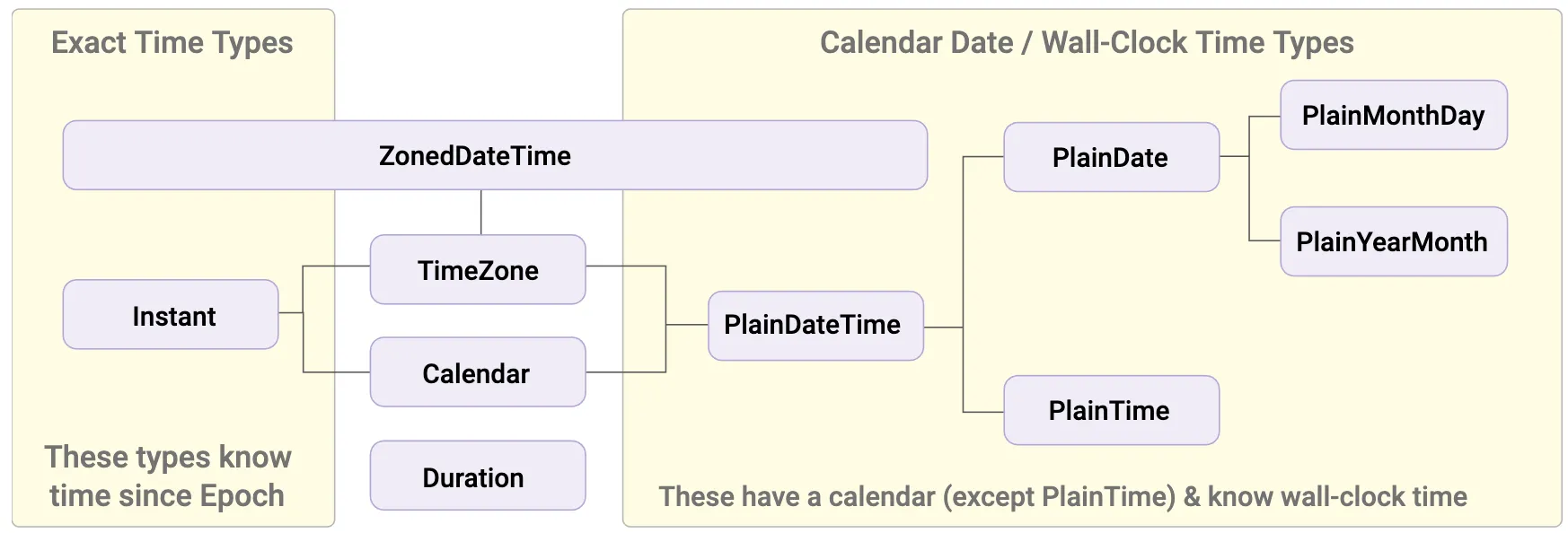
Notice that TimeZone implements all the object types below it, so it’s possible to get any object from it. For example, from a specific TimeZone, we can get all its objects on a specific date:
const tz = Temporal.TimeZone.from('America/Sao_Paulo')tz.getInstantFor('2001-01-01T00:00') // 2001-01-01T02:00:00Ztz.getPlainDateTimeFor('2001-01-01T00:00Z') // 2000-12-31T22:00:00Let’s go through the main methods and activities we can do with Temporal.
Getting the current date and time#
const now = Temporal.Now.plainDateTimeISO()now.toString() // Retorna no formato ISO, equivalente a Date.now.toISOString()If you only want the date, use plainDateISO().
Unix Timestamps#
const ts = Temporal.Now.instant()ts.epochMilliseconds // unix em msts.epochSeconds // unix em segundosInteroperability with Date#
const atual = new Date('2003-04-05T12:34:23Z')atual.toTemporalInstant() // 2003-04-05T12:34:23ZInteroperability with inputs#
We can set date type inputs using Temporal itself. Since these values accept dates in ISO format, any date set on them as value can be obtained with Temporal:
const datePicker = document.getElementById('input')const today = Temporal.Now.plainDateISO()datePicker.value = todayConverting between types#
const date = Temporal.PlainDate.from('2021-04-10')const timeOnDate = date.toPlainDateTime(Temporal.PlainTime.from({ hour: 23 }))Notice that we converted an object without a time to a PlainDateTime object by passing another PlainTime object as the hours.
Sorting DateTime#
All Temporal objects have a compare() method that can be used in Array.prototype.sort() as a comparison function. With that in mind, imagine a list of PlainDateTimes:
let a = Temporal.PlainDateTime.from({ year: 2020, day: 20, month: 2, hour: 8, minute: 45})let b = Temporal.PlainDateTime.from({ year: 2020, day: 21, month: 2, hour: 13, minute: 10})let c = Temporal.PlainDateTime.from({ year: 2020, day: 20, month: 2, hour: 15, minute: 30})Then we can create a comparison function to sort our array:
function sortedLocalDates (dateTimes) { return Array.from(dateTimes).sort(Temporal.PlainDateTime.compare)}And then:
const results = sortedLocalDates([a,b,c])// ['2020-02-20T08:45:00', '2020-02-20T15:30:00', '2020-02-21T13:10:00']Rounding types#
Temporal’s time types have a method called round that rounds objects to the next whole value according to the time type you’re looking for. For example, rounding to the next whole hour:
const time = Temporal.PlainTime.from('11:12:23.123432123')time.round({smallestUnit: 'hour', roundingMode: 'ceil'}) // 12:00:00Conclusion#
Temporal is the tip of a giant iceberg we call “temporal manipulation.” There are several key concepts like ambiguity that must be considered when working with hours and dates.
The Temporal API is our first chance to change how JavaScript handles dates and how we can improve our way of working with them. This was a sample of what’s possible and how it will be done in the future. Read the complete documentation to learn more.