Removing duplicate items in JavaScript ES6
I think everyone, like me, has had to remove duplicate items from an Array list at some point, but is the way we learned really the best?
In this article I’ll show my point of view, the way I found to remove duplicate items from a list with more than 1,000,000 items in my day-to-day work at @squidit, whether the array is of primitive types or not
The common way#
I believe the most common way we know is the one where we traverse an Array and check at each iteration whether that item is or is not in the new array.
/** * @desc Gera um array de tamanho N com números aleatórios, respeitando N * @param {number} length */function generateRandomArray(length) { return Array.from(Array(length), () => parseInt(Math.random() * length));}
const randomList = generateRandomArray(1000) // Um array com 1000 números aleatóriosconst uniqueList = [] // Lista de array único
for(const value of randomList) { // Caso o valor não esteja no uniqueList, adicionamos if (!uniqueList.includes(value)) uniqueList.push(value)}console.log(`uniqueList has ${uniqueList.length} itens`)Which generates the following output:

This might work for a small list of a few thousand items.
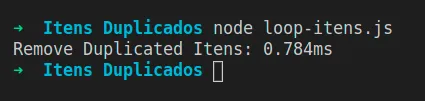
If we use console.time and console.timeEnd to check how long this operation takes, we’ll see it’s very fast.
// Resto do código
console.time('Remove duplicated items') // Adicionamosfor(const value of randomList) { // Verificação do código anterior...}console.timeEnd('Remove duplicated items')Generates the following output:
What would happen if we increased that dataset, for example, to a list with 100,000 items?
// Resto do código ...
// equivale a 10^5, que é o mesmo que 100.000const randomList = generateRandomArray(10 ** 5)const uniqueList = [] // Lista que conterá arrays únicos
console.time('Remove duplicated items')for(const value of randomList) { // Caso o valor não esteja no uniqueList, adicionamos if (!uniqueList.includes(value)) uniqueList.push(value)}console.timeEnd('Remove duplicated items')Generates the following output:

And if we increase it to 200,000, for example, the time increases drastically

The problem#
Using for or .reduce, the premise would still be the same, which is:
- Iterate through the array.
- Check if the value exists in the new array.
- Add to the array.
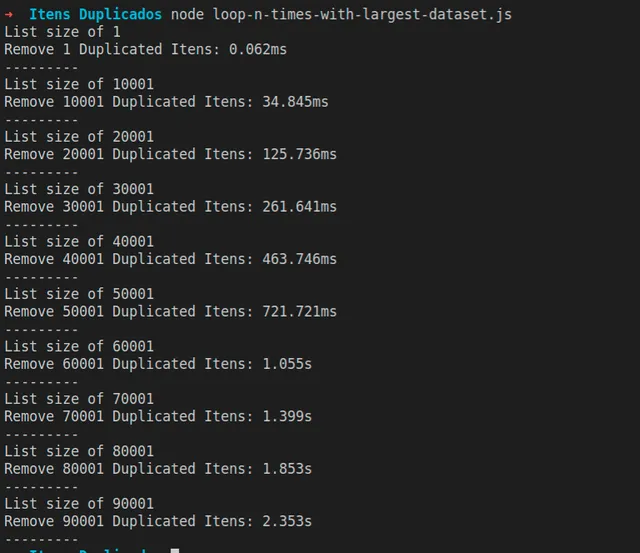
For each iteration it is necessary to do a second iteration in uniqueArray to check if the value exists there, this in programming is called O(n)², where n dictates the number of operations that will be executed in your application. Therefore the number of operations for this algorithm grows exponentially as the number of items increases.
Let’s illustrate with the following code:
// Resto do código
// Itera 10 vezes de 10k em 10k até chegar em 100kfor (let length = 1; length <= 100000; length += 10000) { // Para cada interação, gera um novo array. const randomList = generateRandomArray(length) const uniqueList = [] // Lista que contera arrays único
console.log(`List size of ${randomList.length}`) console.time(`Remove ${randomList.length} duplicated items`) for (const value of randomList) { // Caso o valor não esteja no uniqueList, adicionamos if (!uniqueList.includes(value)) uniqueList.push(value) } console.timeEnd(`Remove ${randomList.length} duplicated items`) console.log('---------')}It’s possible to see the time growing exponentially when we print how long it takes for the operation to finish according to the number of items
Using Set#
In JavaScript we have an object called Set, it guarantees that values are stored only once, that is, whenever we try to add a value that is in the structure, that value will not be added.
const set = new Set();
set.add(1) // [1]set.add(2) // [1,2]set.add(3) // [1,2,3]set.add(2) // [1,2,3]
console.log(set) // Set(3) { 1, 2, 3 }The set accepts objects as well, but it won’t remove the duplicates because objects, as we know, are passed by reference in JavaScript:
const set = new Set();
set.add({ a: 1, b: 2 }) // Objeto é adicionado [{}]set.add({ a: 10, b: 20}) // [{},{}]
// Por mais que os valores são iguais,// o objeto ainda assim é diferente,// pois ele está referenciado// em outro endereço de memoriaset.add({a: 1, b: 2}) // [{}, {}, {}]
console.log(set) // Set(3) { { a: 1, b: 2 }, { a: 10, b: 20 }, { a: 1, b: 2 } }Using Set to remove duplicates#
When we use the Set API to remove duplicate items from an array, we notice the time difference using Set compared to for.
/** * @desc Gera um array de tamanho N com números aleatórios, respeitando N * @param {number} length */function generateRandomArray(length) { return Array.from(Array(length), () => parseInt(Math.random() * length));}
// Itera 10 vezes de 10k em 10k até chegar em 100kfor (let length = 1; length <= 100000; length += 10000) { // Para cada iteração, gera um novo array. const randomList = generateRandomArray(length)
console.log(`List size of ${randomList.length}`) console.time(`Remove ${randomList.length} duplicated items using Set API`) const uniqList = Array.from(new Set(randomList)) console.timeEnd(`Remove ${randomList.length} duplicated items using Set API`) console.log('---------')}Generates the following output:
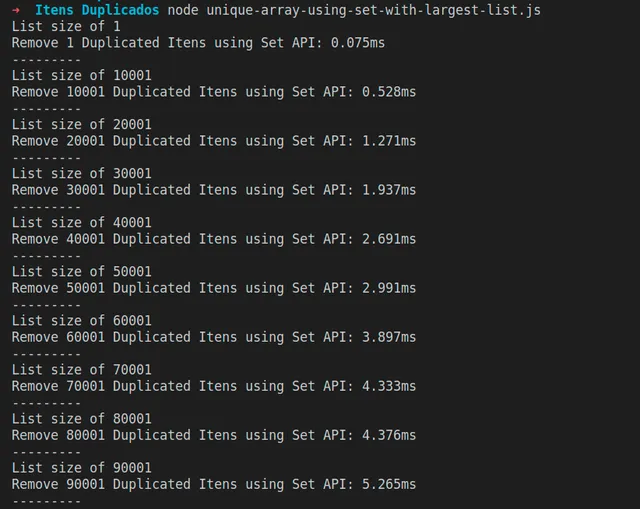
This happens because, unlike the loop, we need to iterate the array n times, and in each iteration the Set API guarantees that we are adding a single value, and because the Set object implements the iterable interface, we can transform it into an Array
Array.from(new Set([1,2,3,4,1,2,3,4])) // Gera [1,2,3,4]Duplicates in an object list#
In the real world we know that lists are not composed only of primitive type, so how would we do it for objects?
Instead of using Set, we use Map together with the .reduce method from the Array API, but for that I need to give an overview of what Map is
Maps#
The Map structure serves as a key-value data structure, or HashTable that, in short, is a list of key-value data, where for each item added there is a related id or key, making it possible to perform a quick search just by using the key, without the need to traverse the entire list to find the item
const map = new Map()
map.set(1, { a: 1, b: 2, b: 3 }) // Map(1) { 1 => { a: 1, b: 3 } }console.log(map)
map.set(2, { a: 10, b: 20, c: 30 }) // Map(2) { 1 => { a: 1, b: 3 }, 2 => { a: 10, b: 20, c: 30 } }console.log(map)
// Sobrescreve o objeto na chave 1.map.set(1, { a: 100 }) // Map(2) { 1 => { a: 100 }, 2 => { a: 10, b: 20, c: 30 } }
map.get(1) // { a: 100 }map.get(2) // { a: 10, b: 20, c: 30 }map.get(3) // undefined, pois na chave 3 não existe nadaAnd of course, the key value doesn’t necessarily have to be a numeric value, it can be any type of data:
const map = new Map()
map.set('samsung', ['S10', 'S20']) // Map(1) { 'samsung' => [ 'S10', 'S20' ] }
map.set('outro valor', [2, 3, 4, 5]) // Map(2) { 'samsung' => [ 'S10', 'S20' ], 'outro valor' => [ 2, 3, 4, 5 ] }Using Map to remove duplicate items#
Now that we have an idea of how to use Map we can take advantage of .reduce to generate a unique array from a list with duplicates.
First let’s create a function that generates a list with the same object, varying only the id of each item.
/** * @desc Gera uma lista com o mesmo objeto, * onde o id sera aleatório * @param {number} length */function generateRandomObjectList(length) { const defaultObject = { name: 'Guilherme', developer: true } return Array.from(Array(length), () => { const randomId = parseInt(Math.random() * length) return { ...defaultObject, id: randomId } });}Now let’s create a Map object from the generated array, where the id of the Map will be the id of the user, so we remove duplicate IDs from the list:
const listObjectWithRandomId = generateRandomObjectList(10 ** 5) // 100kconst objectMap = listObjectWithRandomId.reduce((map, object) => { map.set(object.id, object); return map}, new Map())Since Map is also an iterable object, we just need to use the Array.from function:
const uniqList = Array.from(objectMap, ([_, value]) => value)The complete code would look like this:
/** * @desc Gera uma lista com o mesmo objeto, * onde o id sera randômico * @param {number} length */function generateRandomObjectList(length) { const defaultObject = { name: 'Guilherme', developer: true } return Array.from(Array(length), () => { const randomId = parseInt(Math.random() * length) return { ...defaultObject, id: randomId } });}
const listObjectWithRandomId = generateRandomObjectList(10 ** 5) // 100k
console.time('uniq List usando Map') // Pra contabilizar o tempo da operaçãoconst objectMap = listObjectWithRandomId.reduce((map, object) => { map.set(object.id, object); return map}, new Map())
const uniqList = Array.from(objectMap, ([_, value]) => value)console.timeEnd('uniq List usando Map')console.log(`Lista duplicada: ${listObjectWithRandomId.length}`)console.log(`Lista duplicada: ${uniqList.length}`)
Conclusion#
Even though libraries like lodash have functions to remove duplicate items, importing an entire lib to solve a problem that can be solved in a few lines of code natively ends up being unnecessary.