Elevating microservices with service meshes
Since Docker was released, and even before that, developers have been concerned with how to decouple their applications from their configurations and infrastructure, so they can be easily migrated and can easily communicate with each other.
The advent of Kubernetes greatly facilitated the implementation of better service layers, especially when we talk about distributed services using microservices architecture.
The main problem is that, even with all these conveniences, we still face many difficulties when it comes to migrating an application or even making it more independent. Mainly because of the communication model we use.
The microservices problem#
When we study microservices, we see that the ideal is to have individual applications that communicate with their own databases and are independent enough that they don’t need any other external application to function.
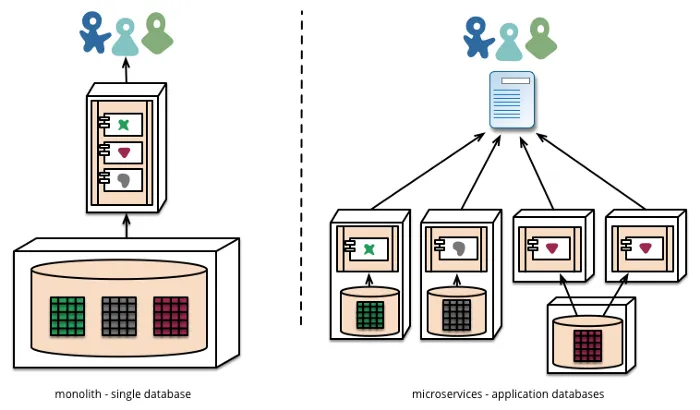
Besides that, we’re always hearing phrases like this:
A microservice is an independent application that is self-contained and can use its own database so it doesn’t depend on any other part of the system.
The main problem is that we can’t always create an application in this model, this can be related to various more blocking issues:
- Significant increase in complexity
- Cost to maintain all databases
- Data dispersion
- Data duplication
- Security
And another major problem that many companies face when using microservices are the classic problems of observability (which we’ll discuss in another article) and Service Discovery. Although the latter has been largely solved by the use of orchestration tools like Kubernetes.
So we enter a very interesting topic, Service Mesh.
Service Mesh#
In very simple terms, a service mesh can be considered a new “layer” that abstracts network problems when we’re talking about communication between services.
However, when we talk about abstractions, we’re not just talking about something passive. A service mesh layer also provides a series of benefits, the main ones being:
- Telemetry
- Canary Deployments
- A/B Testing
- Traffic routing
- Network discovery (Service Discovery)
- Monitoring
- Tracing
These points are the main problems we have in distributed architectures, questions like “how can I monitor all my services completely?”, “how can I know the number of requests I’m receiving?” generally require the existence of a shared resource, the API Gateway, which is a very common resource in distributed architectures as an entry point and control for the entire service mesh behind it.
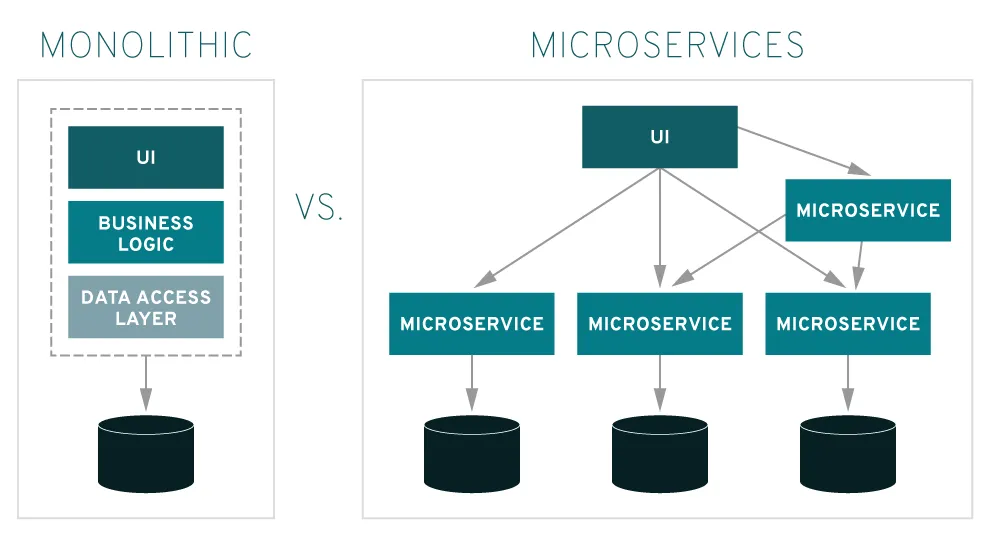
In general, calling Service Mesh a layer is somewhat wrong, because it’s not a layer on top of other services, but rather a network embedded directly in the structure of applications.
One of the main advantages of using a mesh model is, for example, not having this shared resource, as we would with an API Gateway if we have to route our requests through a single entry point, because the routing implementation is already within the application itself.
Furthermore, the use of Service Mesh allows the implementation of a pattern called Circuit Breaker, which isolates broken instances of an application until gradually bringing them back to life.
The most famous implementations of Service Mesh today are Istio and Linkerd.
Definitions#
Because it’s a new pattern that permeates all of the services ecosystem, some terminology is necessary.
Instances and services#
By default, all applications within a service mesh are called services, each one of them is an instance of a service.
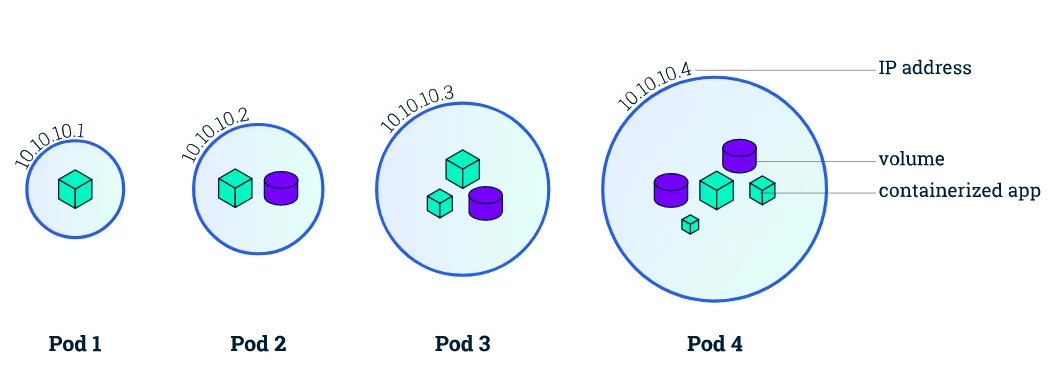
Basically, every service is a running copy of some microservice, sometimes that instance is a single container, other times it can be an application composed of more than one container, which is the concept of Pod that we have in Kubernetes.
Sidecar#
The great advantage of Service mesh is the use of sidecars. Sidecars are proxy containers that live alongside the services they’re supporting. When we’re talking about a Pod in Kubernetes, a sidecar is another container that lives within the same pod.
The sidecar is responsible for receiving network traffic and routing this traffic to its sibling application. The sidecar communicates with other sidecars in other microservices and they are managed by the container orchestrator in use. Furthermore, the sidecar is one of the major components responsible for obtaining network usage metrics of the application.
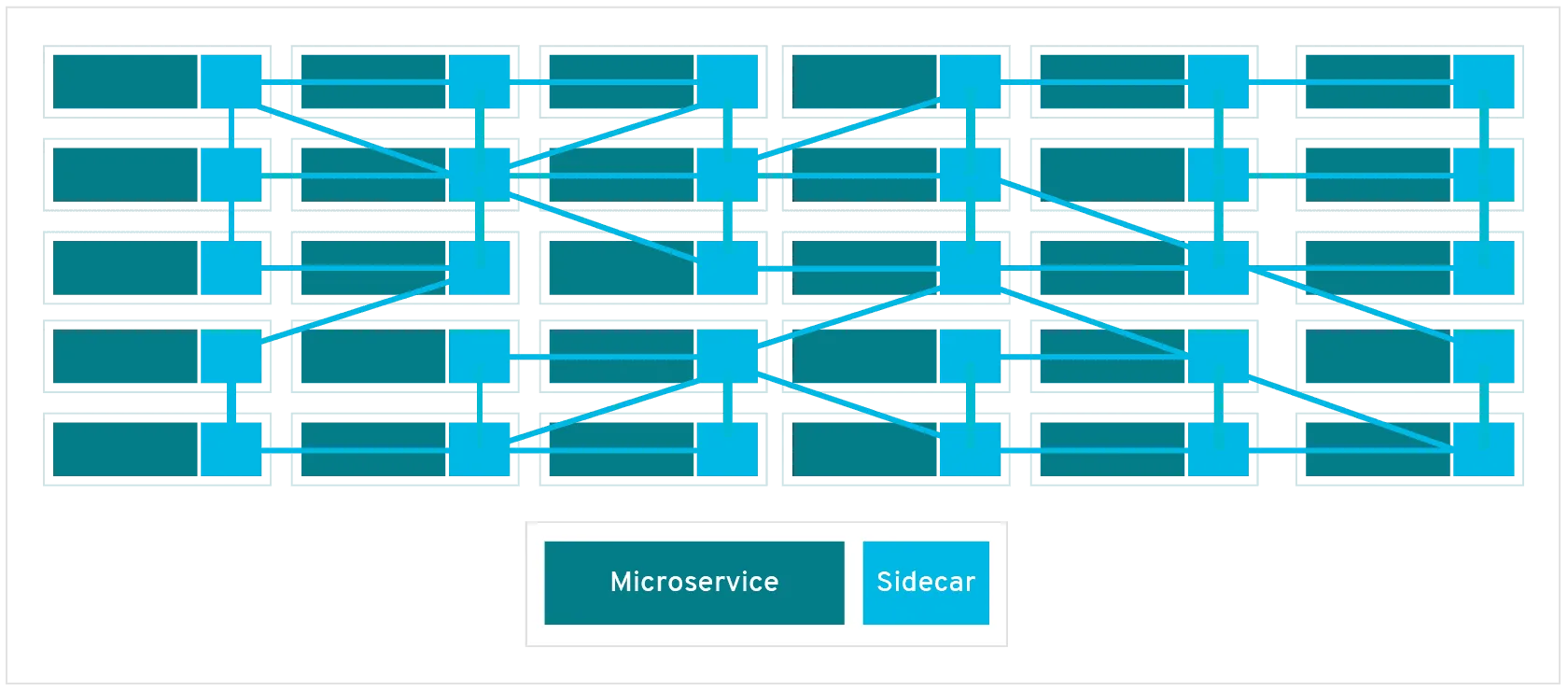
This is the advantage because a sidecar is basically a distributed implementation of an API Gateway. Instead of having a single communication point, we have multiple points that allow the network to know how to get from service A to service B.
Data Plane#
The Data Plane is responsible for network traffic between instances, this is called “East-West Traffic”, as we can see in the previous image, this type of traffic is the one that is moving horizontally within the same network. In other words, the data plane is the sidecar itself.
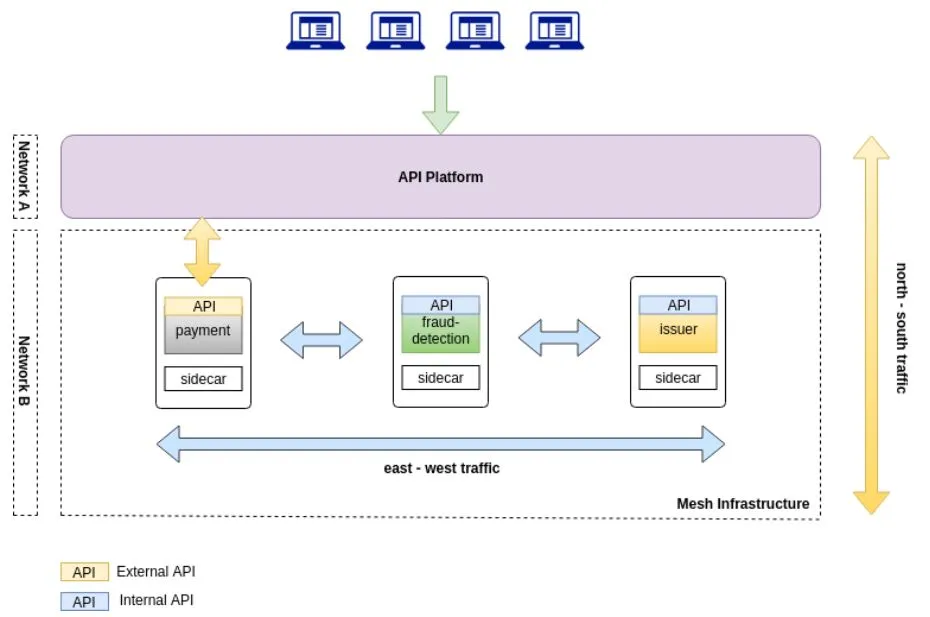
North-South traffic, as shown in the image above, is the communication between different networks, in other words, communication from an internal network to an external network is a type of N-S traffic, while one service communicating with another within the same cluster is an example of E-W traffic.
Control Plane#
The control plane, or Control Plane, is only used by people operating the service mesh, in other words, it’s the plane that contains the control tools for the service mesh.
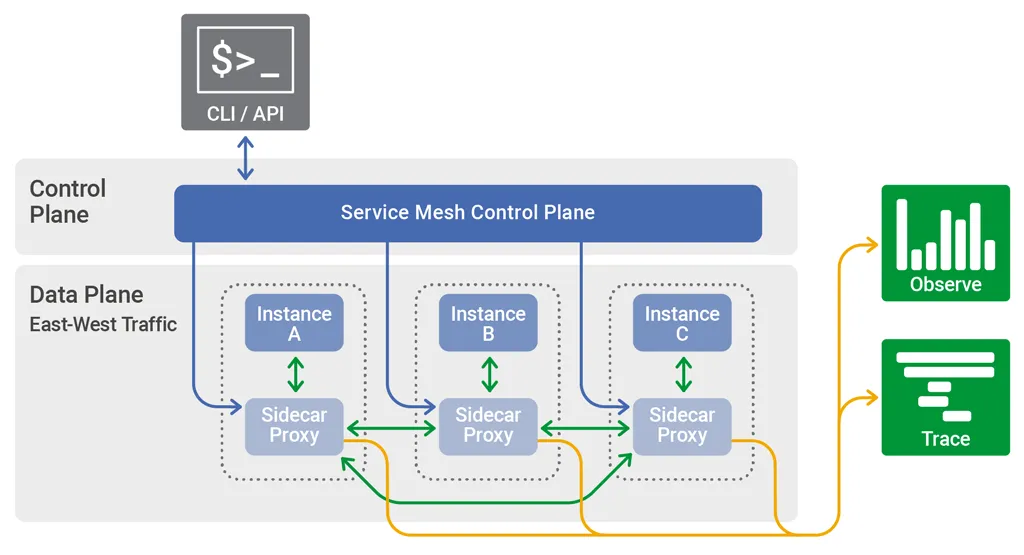
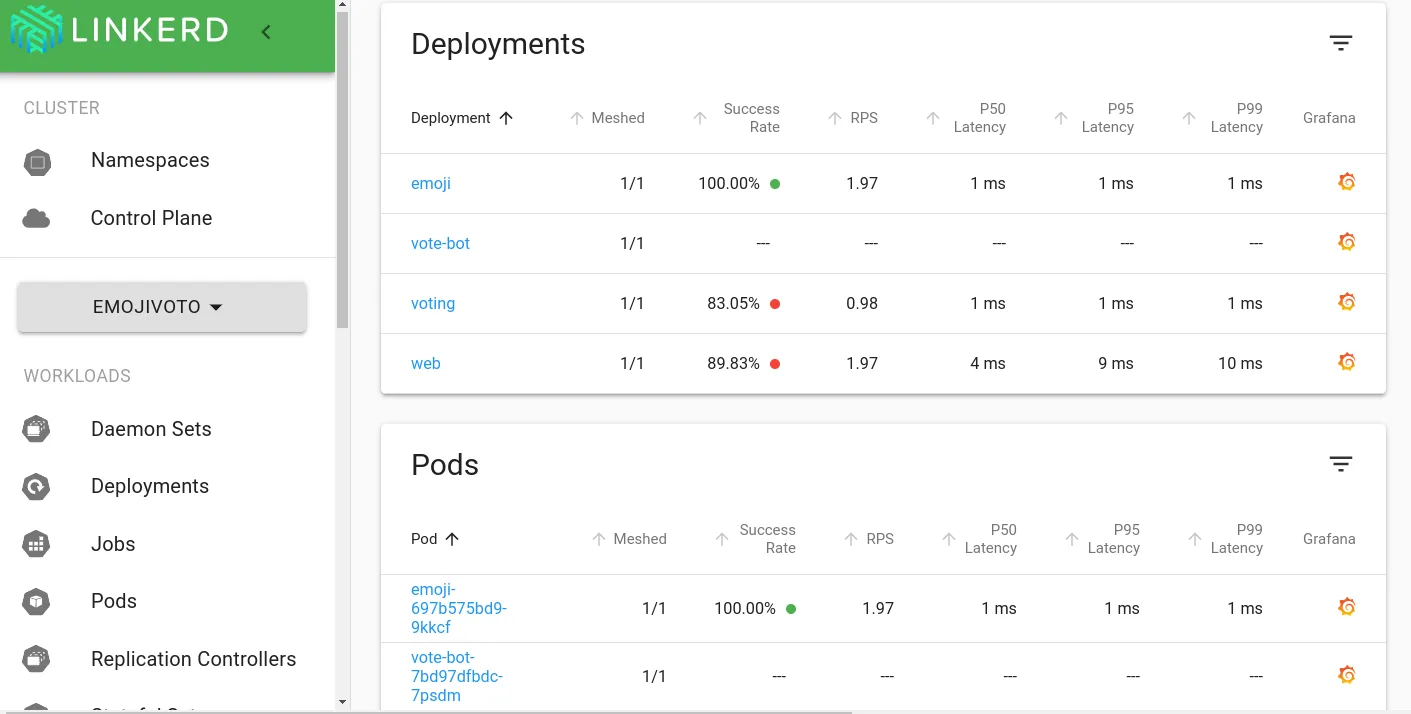
This layer includes, in most cases, a communication API with the Service Mesh and can also include a CLI and/or a visual interface for application control, as we can see in the image below.
How a service mesh can improve service communication#
It’s hard to understand how a simple service mesh can improve the communication of an entire network. Well, let’s see a practical situation where we can take advantage of the metrics and visibility of the service mesh to improve our applications.
Imagine you have a service that fails constantly, this is already known but there’s no known solution, so your application implements a retry system that retries the call every 5, 8, 10 and 15 seconds respectively with each attempt. However, this is causing a bottleneck of requests since, during peak hours, your application is holding the user up for up to 15 seconds.
Because of the inherently transparent nature of the service mesh metrics, all communication is documented, including traffic metrics between services. With these metrics in hand, we can see the average time that our service is failing, or even if it’s this service that’s failing and not another one, and adjust our retry time to be equivalent.
Let’s say the average failure time is 6 seconds, so our retry is not being effective because we have to make two attempts before we can have a third one that is valid. We can set our retry time to 6 seconds then, avoiding an unnecessary load of service requests.
Conclusion#
In the next articles we’ll explore further how we can create and manipulate service meshes and also their concepts! So subscribe to the newsletter to receive weekly news from all articles and also other news from the technology world!
See you later!